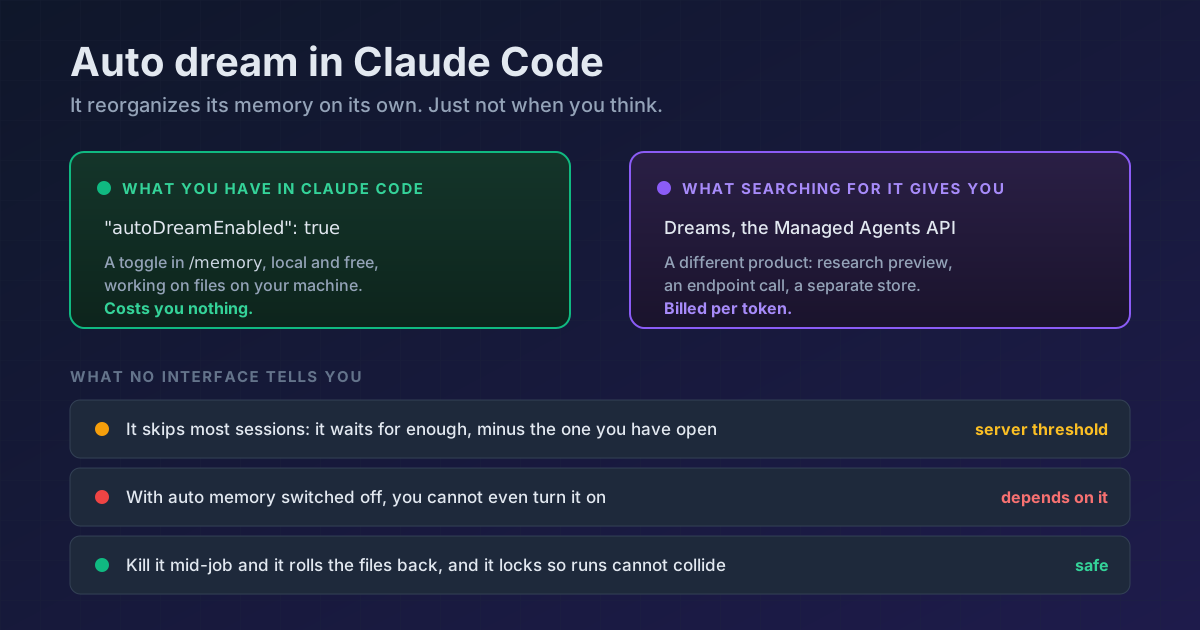
TL;DR Claude Code can reorganize its own memory files in the background. It is called auto dream, you turn it on and off from
/memory, and it leaves an"autoDreamEnabled"setting in yoursettings.json. What almost nobody knows is when it runs: not every session, but once enough sessions have piled up since the last consolidation, against a threshold the server sets and you do not control. And there is no/dreamcommand, however often you have read otherwise.
Open your ~/.claude/settings.json and see whether this is in there:
{
  "autoDreamEnabled": true
}
If it is, Claude Code has been tidying its own memories for a while now, quietly, while you were not looking. Mine was on and I have no memory of turning it on.
First, do not let the name fool you
Search for this and you will land on the Dreams page in the Managed Agents documentation, and that is a different thing. It is an API feature in research preview: you call an endpoint, hand it a memory store plus session transcripts, and it returns a new store. It bills at API token rates and the input store is never touched.
What you have in Claude Code is something else: a local toggle, free, working on ~/.claude/projects/<project>/memory/ on your own machine. Same idea and same name, but neither the same place nor the same bill.
Why it exists
Auto memory writes notes on its own: build commands, decisions, corrections you made, preferences it picked up. The catch is that it writes incrementally and never deletes, so across sessions you accumulate duplicates, contradictions, and relative dates that no longer mean anything.
And there is a real ceiling: only the first 200 lines or 25 KB of MEMORY.md, the index, get loaded, whichever comes first. Anything past that simply does not enter the session. Auto dream is what makes sure the part that fits is the part that matters.
When it actually runs
Here is what the interface does not tell you. It does not consolidate at the end of every session. Before starting, it counts how many sessions have touched the project since the last consolidation, discounts the one you have open right now, and if that does not clear the minimum it leaves without doing anything:
[autoDream] skip — 2 sessions since last consolidation, need 5
That minimum is not in your settings: the server sets it. The setting itself says as much, describing autoDreamEnabled as something that "overrides the server-side default". You decide whether it runs, not how often.
So if you just switched it on and nothing is happening, nothing is broken. It is short on sessions.
What it does once it finally runs
It starts as a background task (you will see it as dream with status running) and works through four phases:
- Orient. Reads
MEMORY.mdand the topic files to know what is there before touching anything. - Gather signal. Searches recent transcripts for high-value patterns: your corrections, explicit save requests, themes that keep coming back.
- Consolidate. Folds in what is new, merges duplicates, drops what has been contradicted, and turns relative dates into absolute ones ("yesterday" becomes a date).
- Prune and index. Gets
MEMORY.mdback under the load limit and pushes the detail out into topic files.
When it finishes it returns a summary of what it consolidated, updated, or pruned. And when there was nothing to do, it says so instead of inventing work.
Turning it on, off, and pausing it
/memory
You will see Auto-dream: on or off, and next to it when it last ran. One thing that catches people out: with auto memory switched off, auto dream shows as off and you cannot turn it on. It depends on auto memory, and the panel says so with Auto-dream: off while auto-memory is off.
If you prefer the file, it is "autoDreamEnabled": true (or false) in ~/.claude/settings.json.
To pause memory entirely for one session, without touching settings, there is /pause-memory. The same command pauses and resumes it, and while it is paused Claude can neither read nor write memory.
If you cut it off mid-job
Two things that are well thought out and visible nowhere:
- It takes a lock before starting, so two of your sessions will not consolidate the same files at once. If another one holds it, the second backs off.
- If you kill it while it works, it rolls the files back to the state they were in before it started. You are not left with a half-reorganized memory.
Do not go looking for the command
There is no /dream. I checked by enumerating the slash commands the v2.1.220 binary declares: 99 of them, including /advisor, /chrome and /memory, and it is not among them. If you want it right now, ask for it in plain language ("consolidate my memory files") and Claude does it in the session.
Reference
| Piece | What it is |
|---|---|
autoDreamEnabled |
User setting. Overrides the server-side default |
/memory |
Where you turn it on and off and see when it last ran |
/pause-memory |
Pauses and resumes all auto memory for the session |
| Session threshold | Set by the server. Discounts the current session from the count |
| Dependency | With auto memory off, auto dream does not run |
| Index limit | 200 lines or 25 KB of MEMORY.md, whichever comes first |
If what you want is the opposite, deciding yourself what gets remembered rather than letting Claude decide, that lives in CLAUDE.md, which is the other memory system and works the other way around.
Official docs: How Claude remembers your project · Dreams (Managed Agents API, a different thing)
Requirements: verified on Claude Code v2.1.220. The exact session threshold depends on server-side configuration, so the number in your log may not be the number in mine.