TL;DR The
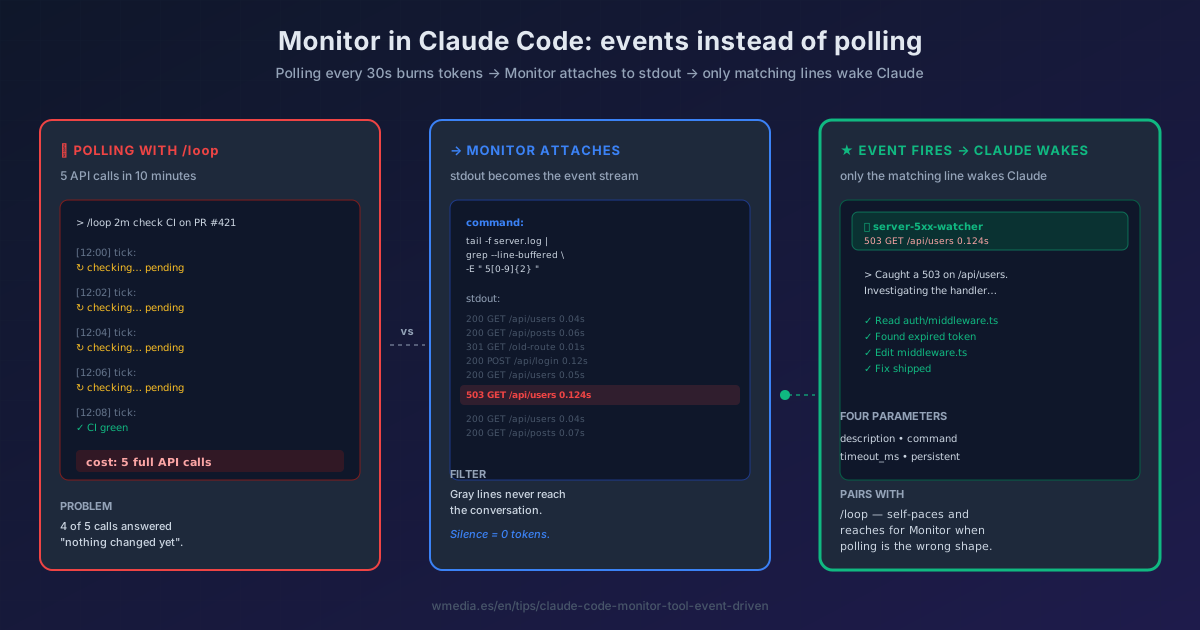
Monitortool spawns a background script and turns every stdout line into a notification. Claude only reacts when something matches — a log error, a failing test, a PR approval. No polling, no tokens spent asking "is it ready yet?".
You have a dev server booting, a test suite running, or a PR waiting on CI. With /loop every 2 minutes for 10 minutes you pay 5 full API calls asking the same question: "is it done?". Monitor inverts that. Claude attaches to a command's stdout — tail -f, a CI checker, a while true — and only wakes up when a line that matters comes through.
Anthropic shipped it in v2.1.98 (Week 15, April 2026). The /loop you already use now reaches for Monitor whenever it can skip polling for you.
How it works internally
Monitor takes 4 parameters:
| Parameter | Detail |
|---|---|
description |
Label you'll see on every notification |
command |
The script whose stdout becomes the event stream |
timeout_ms |
Max runtime (default 5 min, max 1 hr) |
persistent |
Whether it lives the full session (true) or self-destructs at timeout |
Every stdout line is a notification that wakes the main session. Lines arriving within 200 ms batch into a single notification — handy for multiline output from one event. Stderr is not streamed; it goes to the output file.
If your script starts firehosing hundreds of lines per second, Claude stops it automatically. Filter selection is your responsibility.
Result preview
> Tail server.log and tell me the moment a 5xx shows up

⏺ Monitor started
   command: tail -f server.log | grep --line-buffered -E " 5[0-9]{2} "
   description: server-5xx-watcher

[12:14:03] 192.168.1.4 - "GET /api/users" 503 0.124s
⏺ Caught a 503 on /api/users. Investigating the handler...
Claude asked nothing for 12 minutes. It reacted only when there was something to react to.
How to use it
1. Stream filter — watch logs forever
> Monitor app.log and ping me when an ERROR or Traceback appears

# Internally equivalent to:
tail -f app.log | grep --line-buffered -E "ERROR|Traceback|FAILED"
grep --line-buffered is mandatory in every pipe. Without it, pipe buffering delays events by minutes.
2. Poll-and-if — watch CI or a PR
> Every 30 seconds check CI on PR #421 and ping me when it goes green or red
For remote sources use intervals of 30 s or more; local checks at 0.5–1 s are fine. Handle transient failures with || true so a one-off timeout doesn't kill the monitor.
3. Wait-once — wait for the dev server to come up
> Wait until the dev server prints "Ready in" then run the E2E suite
The classic pattern: until grep -q "Ready in" dev.log; do sleep 0.5; done. Bash with run_in_background works for this too, but Monitor gives you the proper notification in the transcript.
Essential coverage
"If this process crashed right now, would my filter emit anything?"
A filter that only matches elapsed_steps= fails silently if the script blows up. Always match terminal states (success AND failure): elapsed_steps=|Traceback|Error|FAILED.
/loop vs Monitor
| Scenario | Use | Why |
|---|---|---|
| "Tell me when test #23 fails" | Monitor | Silence = 0 tokens; only the failure line hits the session |
| "Every 5 min give me a full status check" | /loop |
Each tick needs reasoning, not just one line |
| "Tail logs looking for 5xx" | Monitor | Low-frequency asynchronous events |
| "Periodic summary comparing iterations" | /loop |
Needs memory of the prior tick |
Reference
| Aspect | Detail |
|---|---|
| Minimum version | Claude Code v2.1.98 |
| Type | Built-in tool (no setup) |
| Stream | stdout — each line is a notification |
| Batching | Lines within 200 ms group together |
| Stderr | Goes to output file, not streamed |
| Auto-stop | On excessive event volume |
| Pairs with | /loop (which reaches for it when polling is the wrong shape) |
Official docs: Monitor tool reference