Preliminary note
Throughout this article you will see that I refer mainly to Claude and Claude Code (if you don't know it, frontend automation with Claude Code) as examples of MCP clients. But what I describe here is valid for any large language model (LLM) that can be integrated into real workflows: be it ChatGPT, Gemini, Mistral, or any other.
The concept treated here and its architecture do not depend on the model, but on the MCP protocol and its implementation.
What is the Model Context Protocol (MCP)?
There is a clear limitation in “standard” interaction with any LLM: it can read your code, but cannot interact directly with the rest of your tools.
For example, reading specifications in Notion, managing tasks in Linear, doing deployments in Vercel… but Claude remains confined in a chat window.
The result?: copy, paste, repeat.
**MCP** (Model Context Protocol) solves that bottleneck.
MCP is not a new tool. It is the protocol that allows an LLM (like Claude) to stop being a passive spectator and become an active part of your workflow.
It is a standard protocol that allows AI applications to connect with external tools in a structured, secure, and modular way.
Simplified Architecture
graph LR
  Client[MCP Client]
  Server[MCP Server]
  Tool[External Tool]

  Client --> Server --> Tool
Components
- MCP Client: the application that wishes to access data or execute external functions (Claude Desktop, Claude Code, Cursor, etc.).
- MCP Server: the intermediary that translates client requests to concrete actions on a tool.
Types of capabilities
- Resources: allow reading information (files, documents, API responses).
- Tools: allow executing actions (create issues, send emails, query databases).
- Prompts: predefined instructions converted into reusable commands.
Of course there is much more to learn about MCP, so I recommend reviewing its essential concepts.
MCP vs Traditional APIs: What's the difference?
This is the most common confusion and a doubt I myself have had. To be clear: MCP is not an API. It is a protocol that standardizes how an LLM interacts with multiple APIs without learning them one by one.
Let me give you an example so you see the differences.
Without MCP (The Chaos)
flowchart LR
    Claude[LLM]
    Linear[Linear API Token + own JSON]
    GitHub[GitHub API Token + pagination]
    Notion[Notion API OAuth + nested structures]

    Claude --> Linear
    Claude --> GitHub
    Claude --> Notion

    subgraph Result
      direction TB
      Error[Chaos of specific integrations]
    end

    Linear --> Error
    GitHub --> Error
    Notion --> Error
Each API has its own authentication, format, and structure, so the LLM is forced to know implementation details in each case. This potentially implies a different context every time you interact with services:
- Linear → token + own JSON.
- GitHub → token + pagination.
- Notion → OAuth + nested structures.
Result: specific integrations that are complicated to maintain and can end in chaos.
With MCP (The Solution)
flowchart LR
    Claude[LLM]
    MCPServer[MCP Server as adapter]
    API1[Linear API]
    API2[Jira API]
    API3[Notion API]

    Claude --> MCPServer
    MCPServer --> API1
    MCPServer --> API2
    MCPServer --> API3

    subgraph Result
      direction TB
      Uniformity[Same protocol Reusable integration]
    end

    API1 --> Uniformity
    API2 --> Uniformity
    API3 --> Uniformity
- The LLM talks to MCP.
- The MCP server translates between MCP and concrete API.
- Switch from Linear to Jira → same protocol, different server.
Result: MCP acts as a universal adapter.
MCP Server Directories (Where to start)
Awesome MCP (https://mcpservers.org/)
- This is a more or less global directory of MCP servers of all types and colors.
- Each server gives you access to a repository where all options are to integrate server in any MCP client like Claude, Cline, ChatGPT, Cursor, Windsurf, etc.
Claude MCP (https://www.claudemcp.com/)
- A directory of servers (for any MCP client, not just Claude) created by community.
- Databases: PostgreSQL, MongoDB, SQLite.
- Development: GitHub, Git, Docker.
- Productivity: Notion, Obsidian, Gmail.
- Automation: Puppeteer, web browsers.
- Installation instructions are all very similar.
- For example, to use GitHub MCP server with Claude Code:
claude mcp add github /path/to/server -e GITHUB_TOKEN=your_token
claude mcp add postgres /path/to/server -e DATABASE_URL=your_connection
VSCode MCP (https://code.visualstudio.com/mcp)
- Direct installation from VS Code interface.
- Once installed, they are accessible from agent window.
- You have all information about its use on this page.
Real Case: Creating an MCP Server for FrontendLeap
There is nothing comparable to practice to ensure you have understood a concept. With something as apparently abstract as MPC protocol, it is almost an obligation.
On the other hand, I totally believe in the “scratch your own itch” theory when solving problems, that is, solve yours first.
The problem
As a trainer of Frontend developers, I usually face this:
- Student: "I don't understand
Array.reduce" —it's an example. - Result: search examples (almost always generic) that do not connect with their context.
So I started rambling until the idea presented itself.
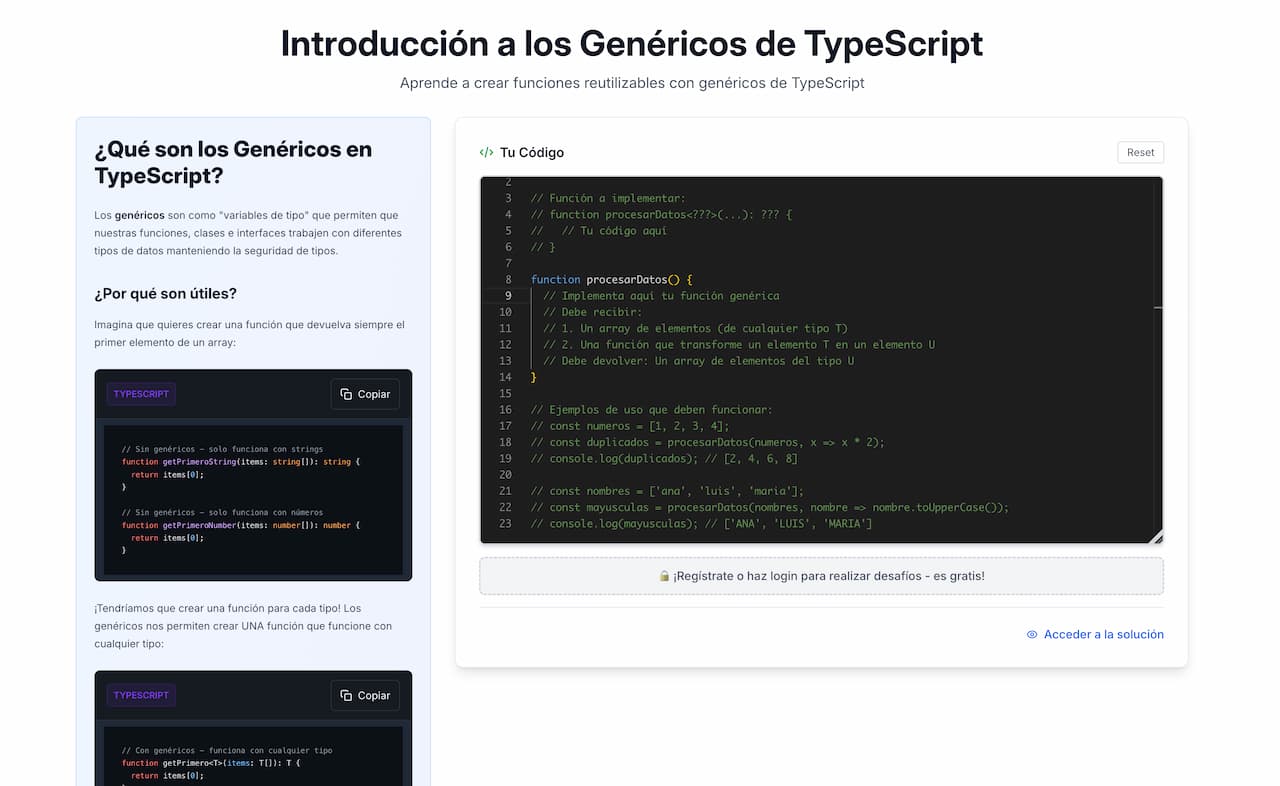
What if Claude could generate personalized exercises based on user's specific context?.
To test it I needed:
- Connection with FrontendLeap challenges API.
- Content generation adapted to user (via an LLM).
- Return a URL with created challenge, ready to solve.
The solution
A —very simple— MCP server with an exposed command: create_challenge, created with TypeScript SDK:
const server = new McpServer({ name: "frontendleap-challenges", version: "1.0.0" });

server.addTool({
  name: "create_challenge",
  description: "Creates a personalized FrontendLeap challenge",
  handler: async (params) => {
    const challenge = await createCustomChallenge(params);
    return `Challenge created: ${challenge.url}`;
  }
});
This is the morphology of challenge entity:
tools: [
  {
    name: "create_challenge",
    description:
      "Create a complete coding challenge with all content generated by Claude and save it to FrontendLeap",
    inputSchema: {
      type: "object",
      properties: {
        title: {
          type: "string",
          description:
            "The challenge title (e.g., 'Advanced CSS Flexbox Centering Challenge')",
        },
        description: {
          type: "string",
          description: "Brief description of what the challenge teaches",
        },
        explanation: {
          type: "string",
          description:
            "Detailed markdown explanation of the concept, including examples and learning objectives",
        },
        starter_code: {
          type: "string",
          description:
            "The initial code template that users start with - should be relevant to the challenge",
        },
        test_code: {
          type: "string",
          description:
            "JavaScript test code (using Jasmine) that validates the user's solution",
        },
        solution: {
          type: "string",
          description:
            "Optional markdown explanation of the solution approach and key concepts",
        },
        language: {
          type: "string",
          enum: ["javascript", "html", "css", "typescript"],
          description: "Programming language for the challenge",
        },
        difficulty: {
          type: "string",
          enum: ["beginner", "intermediate", "advanced"],
          description: "Challenge difficulty level",
        },
      },
      required: [
        "title",
        "description",
        "explanation",
        "starter_code",
        "test_code",
        "language",
        "difficulty",
      ],
    },
  },
];
If you want to take a look at the code, here is the repo.
What this MCP server does
- Receives user context conversationally (no more static exercises).
- With context, generates code, unit tests, explanations, and solution.
- Queries
challengesAPI in FrontendLeap. - Publishes challenge and returns URL to user.
Result in Production
I am a Junior Frontend dev and I struggle to understand TypeScript generics. Can you generate a challenge for that?.
Claude interprets context, calls MCP server, and returns something like:
https://fl.test/desafios/custom-hooks-uselocalstorage-hook-challenge (as you see it is a local URL since this feature is not in production).
When to create your own MCP server
Not all automations require an MCP server. But when the model needs to interact with external systems in a structured way, the difference, as you can verify, is radical.
When it is yes worth it
- When you need to manage secure authentication (tokens, OAuth, permissions per user).
- When there is non-trivial logic: multiple steps, conditions, transformations, calculations.
- When it is required to write or modify external resources (create files, upload content, update records).
- When flow demands responses adapted to user or current context.
When probably not
- If it is enough to read local files or consult static JSON.
- If task is so simple that it is solved with a custom command, as we saw with Claude Code.
- If logic is so specific that it will not be reused in other contexts.
The decisive test
Does your model need to leave the local environment to act in an external system with its own criteria?.
If the answer is yes, then you need MCP.
Conclusion
MCP is the glue that was missing
Transforms a passive model into an operative agent within your stack — see the Claude Code subagents guide for multi-agent patterns. Without repetitive integrations or manual hacks.
The ecosystem is already mature
Before building from scratch, explore. There are MCP servers for most common cases.
It is not always necessary to build
Key is discerning: does what you are going to do justify implementation and maintenance effort?.
MCP does not replace APIs, abstracts them
It is the bridge between your LLM and any service, without forcing model to learn every API in detail.
If you want to see a practical example of all this, don't miss tutorial on Automated Code Review with MCP. For a quick reference on server types and setup commands, check the MCP quick tip.