TL;DR You just solved something non-trivial. The context is fresh. Instead of waiting for auto-memory to decide what to save, tell Claude: "extract what we just did as a skill." In 30 seconds you have a reusable workflow in
.claude/skills/. So that skill then actually gets invoked and doesn't sit unused, follow Anthropic's 5 rules for creating skills — especially rule 2 ("pushy" description) and rule 5 (iterate with evals).
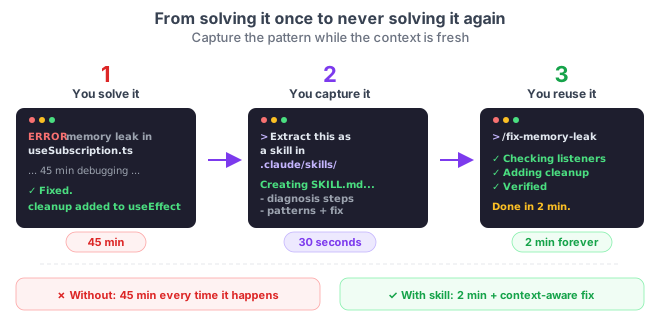
Auto-memory saves what Claude considers relevant. But it doesn't capture complete workflows — the steps, the decisions, the gotchas you discovered along the way. That's lost when you close the session.
The trick is simple: right after solving something hard, ask Claude to turn it into a reusable skill. You don't need a special command. Claude already knows how to create skills. You just need the habit of asking at the right moment.
Result:
You: extract what we just did to fix the memory leak
     into a reusable skill in .claude/skills/

Claude: creates ~/.claude/skills/fix-memory-leak/SKILL.md with:
  - The diagnostic steps we followed
  - The patterns we searched for (event listeners without cleanup)
  - The standard fix
  - The verification command

You: /fix-memory-leak
# Next time, the entire workflow is one command away.
How to do it
1. Spot the moment
You just solved something that:
- Took more than 10 minutes
- Involved non-obvious steps
- Could happen again in the future
2. Ask on the spot
Extract what we just did as a skill in .claude/skills/<name>/SKILL.md.
Include the steps, the patterns we searched for, and how to verify it works.
Claude has all the conversation context — the files it read, the errors it found, the final solution. This is the best moment to capture it.
3. Refine the result
Claude generates a SKILL.md with frontmatter and steps. Review it: trim what's unnecessary, add what's missing. The skill is yours — a markdown file you can edit. If you want it reliably invocable afterwards, Anthropic's 5 rules for skill creation cover each decision (frontmatter, <500 lines, evals, etc.).
4. Use it next time
/fix-memory-leak
Or let Claude invoke it automatically when it detects a similar problem (if the frontmatter description is good enough).
When to capture
| Signal | Example |
|---|---|
| Non-trivial debugging | Memory leaks, race conditions, auth edge cases |
| Complex setup | Configuring an MCP server, deploying to a new environment |
| Repeating pattern | Migrating a component, updating dependencies |
| Multi-step workflow | Deploy + verification + rollback |
Reference
| Aspect | Detail |
|---|---|
| What to ask | "Extract this as a skill in .claude/skills/" |
| When | Right after solving something non-trivial — context is fresh |
| Result | A SKILL.md with frontmatter, steps, and verification |
| Invocation | /skill-name or automatic if the description is good |
| Location | ~/.claude/skills/<name>/SKILL.md (personal) or .claude/skills/ (project) |
Official docs: Skills — Create your first skill