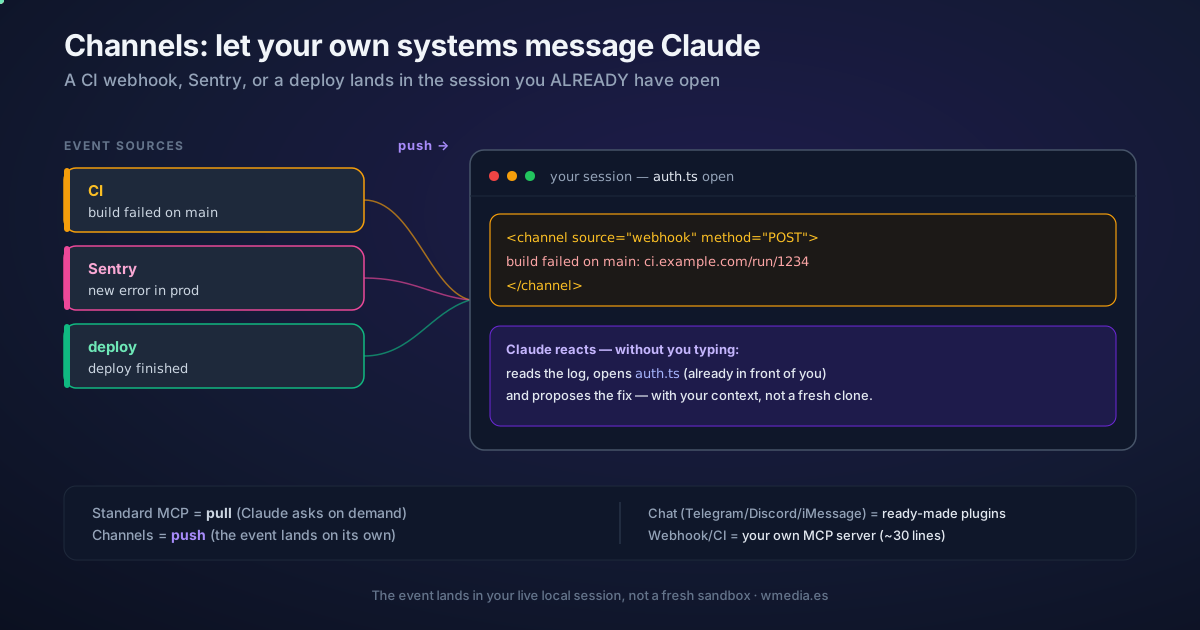
TL;DR The best-known use of channels is chat: you text from Telegram and Claude replies. But a channel is really an event receiver: any system — your CI, Sentry, a deploy, a
curl— can push an event into the session you already have open, with your files loaded and the context of whatever you were debugging. The chat plugins ship ready-made; the webhook receiver is a ~30-line MCP server you build yourself.
If you've read how to control Claude Code from Telegram or Discord, you know the chat-bridge side: you ask, Claude answers. This tip is the other side of the same engine: a machine fires the message and Claude reacts without you typing anything.
From pull to push
The difference is who starts the conversation:
- Chat-bridge (the known one): you pull. You text "any failing tests?" and Claude looks.
- Event receiver (this one): the world pushes. Your CI fails → a webhook lands in your session → Claude, which already had the file open, reads the log and proposes the fix.
A channel can be one-way (forwards alerts or webhooks for Claude to act on, no reply) or two-way (also exposes a reply tool, like chat). For CI or monitoring events, one-way is enough.
What an event receiver looks like
The chat plugins (Telegram, Discord, iMessage) ship ready-made. For webhooks there's no one-click plugin: you build your own channel, which is just a tiny MCP server. This is the whole receiver — it listens on a local HTTP port and pushes every POST to Claude:
#!/usr/bin/env bun
import { Server } from '@modelcontextprotocol/sdk/server/index.js'
import { StdioServerTransport } from '@modelcontextprotocol/sdk/server/stdio.js'

const mcp = new Server(
  { name: 'webhook', version: '0.0.1' },
  {
    // this key is what makes it a channel
    capabilities: { experimental: { 'claude/channel': {} } },
    instructions: 'Events arrive as <channel source="webhook" ...>. They are one-way: read them and act.',
  },
)
await mcp.connect(new StdioServerTransport())

Bun.serve({
  port: 8788,
  hostname: '127.0.0.1', // localhost-only: nothing outside can POST
  async fetch(req) {
    const body = await req.text()
    await mcp.notification({
      method: 'notifications/claude/channel',
      params: { content: body, meta: { path: new URL(req.url).pathname, method: req.method } },
    })
    return new Response('ok')
  },
})
Register it in .mcp.json and start with the development flag (custom channels aren't on the research-preview allowlist yet):
claude --dangerously-load-development-channels server:webhook
Now anything that can POST lands in your session. Simulate a CI failure:
curl -X POST localhost:8788 -d "build failed on main: https://ci.example.com/run/1234"
And Claude receives this, mid-session, with your files already open:
<channel source="webhook" path="/" method="POST">build failed on main: https://ci.example.com/run/1234</channel>
The source comes from the server's name; each meta key becomes an attribute on the tag.
Why it matters: it lands in the session you ALREADY have open
Claude Code has several ways to connect to the world outside the terminal. Channels is the only one that pushes an event into your live local session:
| Feature | What it does | Why it's not the same |
|---|---|---|
| Claude Code on the web | Runs the task in a fresh cloud sandbox | New session, none of your local context |
| Claude in Slack | Spawns a web session from an @Claude |
Another new session, not your open one |
| Standard MCP | Claude queries the system on demand | It's pull: nothing is pushed to the session |
| Remote Control | You drive your local session from your phone | Manual; you act, it doesn't react to an event |
| Channels | Pushes an external event into your open session | Claude reacts with your context and your files |
That's the value: the CI webhook doesn't open a fresh clone of the repo — it lands where Claude already remembers what you were debugging.
Bonus: approve permissions from your phone
If you react to events while you're away, what happens when Claude needs to approve a Bash or a Write? A two-way channel can declare the claude/channel/permission capability and relay the permission prompt to you (requires v2.1.81+). You get "Claude wants to run Bash: … reply yes/no" with a short ID; you answer from chat and Claude applies the verdict. The local dialog stays open in parallel — whichever answer arrives first wins. Only enable it if you gate the sender: anyone who can reply can approve commands in your session.
Watch out for
- The session has to be open. Channels isn't a persistent service; if Claude Code isn't running (or your org blocks it), the event is dropped silently, with no error.
- Gate the sender. An ungated endpoint is a prompt injection vector: anyone who reaches it puts text in front of Claude. Check the sender's identity (not the room or group) before pushing anything.
- Events queue. If several arrive while Claude is busy, they're delivered together on the next turn. For independent streams in parallel, use separate sessions.
Reference
| Aspect | Detail |
|---|---|
| Types | One-way (alerts/webhooks) · Two-way (chat, with a reply tool) |
| Ready-made plugins | Telegram, Discord, iMessage, fakechat (all chat) |
| Webhook/CI | Build-your-own: MCP server with capabilities.experimental['claude/channel'] |
| Inbound event | <channel source="..." …>body</channel> (method notifications/claude/channel) |
| Permission relay | claude/channel/permission capability (v2.1.81+) — approve remotely |
| Test your own | claude --dangerously-load-development-channels server:<name> |
| Runtime | @modelcontextprotocol/sdk + Bun, Node, or Deno |
| Security | Gate on sender identity; otherwise, prompt injection |
Official docs: Channels · Channels reference — build a webhook receiver
Related: Control Claude Code from Telegram or Discord · the map of autonomous primitives