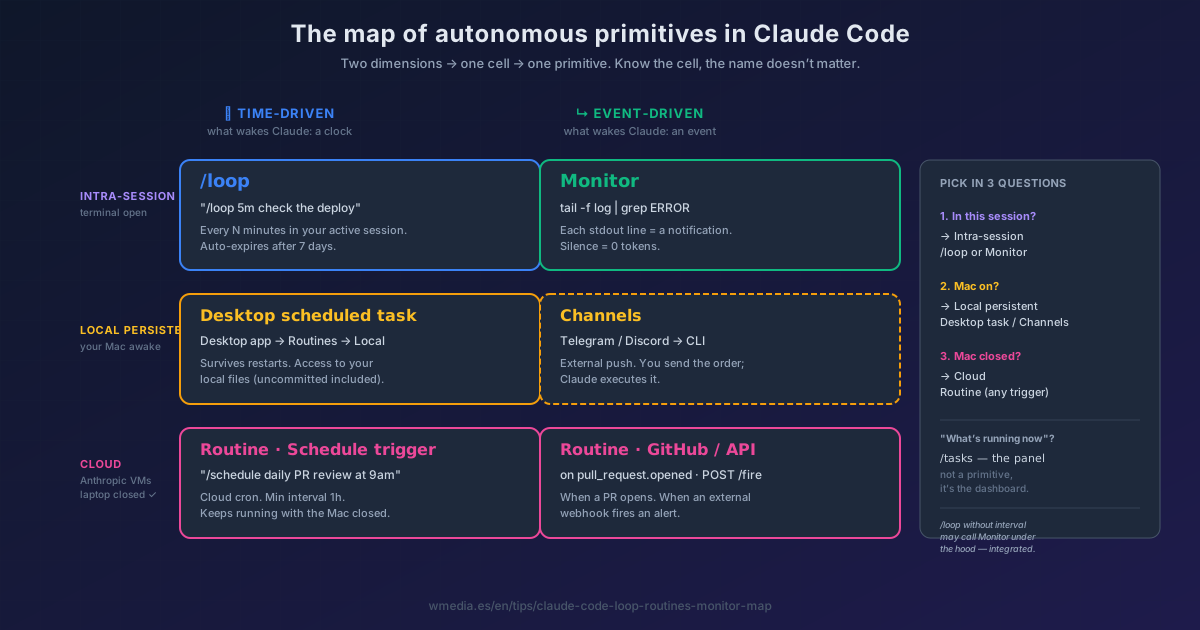
TL;DR Every Claude Code primitive for "let the agent work when I'm not there" fits inside a 2×3 matrix. Horizontal axis: what wakes it — a clock (cron) or an event (a line, a PR, a webhook). Vertical axis: where it runs — your active session, your persistent Mac, or Anthropic's cloud. One cell, one primitive. If you know the cell, the name doesn't matter.
Anthropic has stacked six different primitives in under a year: /loop, Monitor, Desktop scheduled tasks, Routines, Channels, and the old cron + claude -p (headless mode). Each one is named differently in CLI, Web, and Desktop app. And picking the wrong one costs you tokens, lost sessions, or an agent that dies the moment you close the lid.
There's a map.
The two dimensions that explain everything
Dimension 1 — what wakes Claude:
- Time-driven: a clock. "Every 5 minutes", "every day at 9 am". Useful for periodic checks where the moment matters.
- Event-driven: something happens. A line in a log, a PR opening, a webhook landing. Useful when silence costs zero and you only want to react to that.
Dimension 2 — where Claude runs:
- Intra-session: your open terminal right now. Close it and it's gone. Has access to local files and the conversation context.
- Local persistent: your Mac, managed by the Desktop app. Survives restarts, but needs the machine awake.
- Cloud: Anthropic-managed VMs. Keeps working with the laptop closed. Starts from a fresh clone of the repo.
The 2×3 matrix (every primitive in one cell)
| Time-driven (clock) | Event-driven (event) | |
|---|---|---|
| Intra-session | /loop |
Monitor |
| Local persistent | Desktop scheduled task | Channels (external push) |
| Cloud (Anthropic) | Routine with Schedule trigger | Routine with GitHub or API trigger |
Each cell answers two questions: what wakes Claude and where it runs. That's it.
How to pick in 3 questions
- Do I need this while I'm working right now, in this session? → row Intra-session. If the trigger is time,
/loop. If it's an event (a log line, a stdout signal), Monitor. - Do I need it recurring, but only while my Mac is on? → row Local persistent. Scheduled task → Desktop scheduled task. External push notification (Telegram, Discord) → Channels.
- Does it have to run reliably even when I close the laptop? → row Cloud. Schedule, GitHub event, or API webhook — it all lands inside a Routine.
If your question is "what's running right now?" — that's the /tasks panel. It's the dashboard, not a primitive. If the question is a different one — "how many sessions do I have on the table?" — the dashboard is Agent View: a level above /tasks, it shows the sessions, not the tasks running inside one of them.
And a cousin that doesn't fit the grid: if your trigger is neither a clock nor an event but a done condition (tests pass, lint clean, queue drained), that's /goal — an evaluator runs after every turn until it holds.
The naming jungle (the same thing shows up under different names)
| Concept | CLI | Web (claude.ai/code) | Desktop app |
|---|---|---|---|
| Cloud agent | /schedule (alias /routines) |
Routines | sidebar Routines → New routine → Remote |
| Local scheduled task | (no CLI equivalent) | (none) | sidebar Routines → New routine → Local |
| Intra-session loop | /loop (alias /proactive) |
(none — needs live CLI) | (none) |
| Stop polling, watch events | Monitor tool (built-in) | (none) | (none) |
The most expensive confusion: /schedule in the CLI does NOT create a Desktop scheduled task on your Mac — it creates a Routine in the cloud. If you want a local Desktop task, open the Desktop app and pick Local.
The detail few people know
/loop and Monitor are integrated on purpose. If you fire /loop check whether CI passed with no interval, Claude self-paces — and may decide to drop down to Monitor under the hood if polling is the wrong shape. The official docs say it verbatim:
"When you ask for a dynamic
/loopschedule, Claude may use the Monitor tool directly. Monitor [...] avoids polling altogether and is often more token-efficient."
You ask "watch this"; Claude picks the mechanism.
Quick reference
| Primitive | Persistence | Min interval | Best for |
|---|---|---|---|
/loop |
Active session only (auto-expires 7d) | 1 min | Watching while you work |
| Monitor | Active session only | Async events | Log tails, waiting on signals |
| Desktop scheduled task | Mac awake | 1 min | Tasks with local file access |
| Channels | While your CLI is listening | External push | Receiving orders from Telegram/Discord |
| Routine schedule | Cloud, always | 1 hour | Unattended cron without your Mac |
| Routine event | Cloud, always | Webhook / GitHub event | Auto PR review, alert triage |
Official docs: Scheduled tasks · Desktop scheduled tasks · Routines · Monitor tool reference