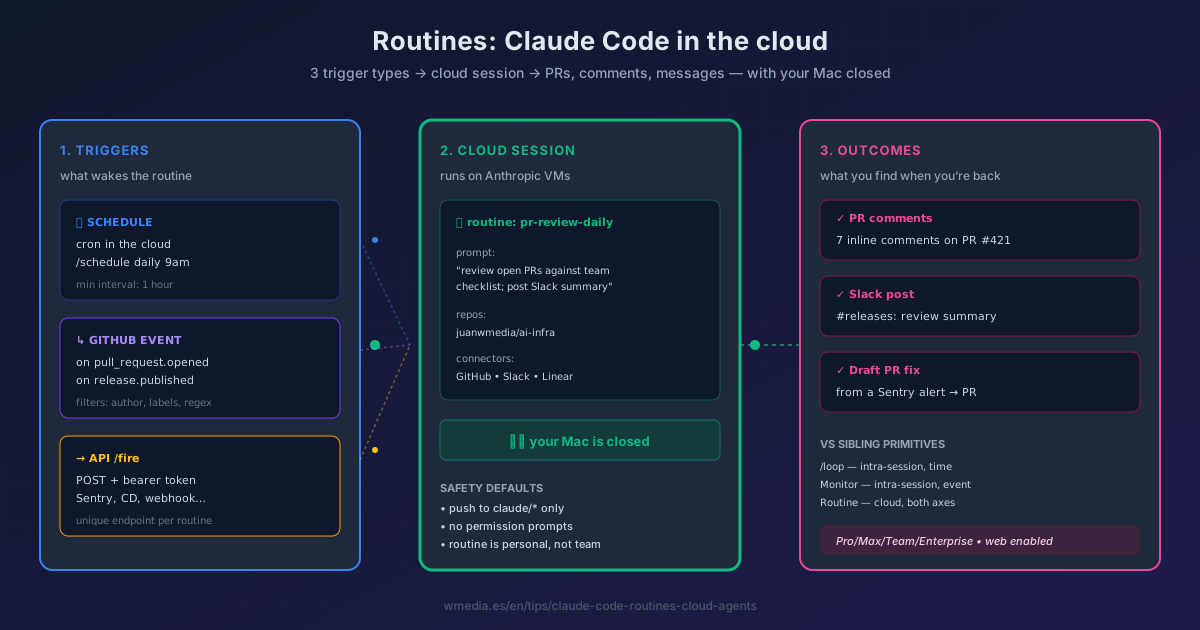
TL;DR A Routine is a saved Claude Code config (prompt + repos + MCP connectors) with one or more triggers: cron, GitHub event, or an HTTP endpoint any system can hit. Anthropic runs it in its cloud, so it keeps working with your Mac closed. Available on Pro / Max / Team / Enterprise plans with Claude Code on the web enabled. It's one of the four ways to send Claude Code to background — alongside Agent View, headless, and
/loop— and the only one that survives turning off the machine; the full map lays out all four in a decision table.
/loop makes Claude watch something inside your active session, but it dies when you close the terminal. Monitor reacts to stdout events, but it also lives and dies with the session. Routines is the next floor up: it takes the same "Claude works for me" pattern to Anthropic's cloud, where it doesn't depend on your laptop being on or your terminal being open. To see where Routines fits next to /loop, Monitor and Channels, there's a map that puts it all in a 2×3 matrix.
Anthropic shipped it in v2.1.105+ (Week 16, April 2026) and it's still in research preview — the API endpoint ships under beta header experimental-cc-routine-2026-04-01.
What a Routine actually is
Three pieces + one or more triggers:
- Prompt: instructions Claude runs every time the routine fires (autonomously — no permission prompts mid-run)
- Repos: one or more GitHub repositories Claude clones on each run; by default it can only push to
claude/-prefixed branches - Connectors: your connected MCPs (Slack, Linear, Sentry, etc.) — Claude can use any tool from included connectors without asking
- Triggers: when the routine fires. A single routine can combine multiple.
Each fire creates a full Claude Code session on Anthropic-managed VMs. It shows up in your session list (web, Desktop, CLI) like any other. You can open it after the fact, review what it did, see diffs, open a PR.
The 3 trigger types
1. Schedule trigger — cron in the cloud
# From the CLI:
> /schedule daily PR review at 9am

# Or from web/Desktop: presets (hourly, daily, weekdays, weekly)
# or custom cron expression (minimum: every 1 hour)
Times are interpreted in your local timezone. There's an automatic stagger of a few minutes to avoid hammering the API. One-off runs ("remind me in 2 weeks") DO NOT count against your daily cap.
2. GitHub event trigger — react to PRs and releases
Configured from the web only. Supported events: pull_request.* and release.*. Available filters: author, base/head branch, labels, title, regex.
# Example: only ready-for-review PRs touching the auth module
event: pull_request.opened
filter: is_draft = false AND head_branch contains "auth-"
Requires installing the Claude GitHub App on the repo (/web-setup alone isn't enough — that only grants clone permissions).
3. API trigger — unique webhook per routine
Every routine has its own /fire endpoint with a unique bearer token. Any external system can fire it:
curl -X POST https://api.anthropic.com/v1/claude_code/routines/trig_01ABC.../fire \
  -H "Authorization: Bearer sk-ant-oat01-xxxxx" \
  -H "anthropic-beta: experimental-cc-routine-2026-04-01" \
  -H "anthropic-version: 2023-06-01" \
  -H "Content-Type: application/json" \
  -d '{"text": "Sentry alert SEN-4521 fired in prod. Stack trace attached."}'
The optional text reaches the routine as literal run-specific context. The response returns the claude_code_session_id and URL to follow the run in real time in the browser.
The 6 templates Anthropic ships in docs
| Use case | Trigger | What it does |
|---|---|---|
| Backlog maintenance | Schedule (weeknights) | Reads new issues, labels, assigns owners, posts a Slack summary |
| Alert triage | API | Sentry/Datadog hits with a stack trace → Claude correlates with recent commits and opens a draft PR with a proposed fix |
| Bespoke code review | GitHub pull_request.opened |
Applies your team's checklist, leaves inline comments for security/perf/style |
| Deploy verification | API (from your CD) | Smoke checks after each deploy, scans logs, posts go/no-go to release channel |
| Docs drift | Weekly schedule | Scans merged PRs, flags docs referencing changed APIs, opens update PRs |
| Library port | GitHub pull_request.closed (merged) |
When a change merges in SDK-A, ports it to SDK-B and opens a matching PR |
Result preview
> /schedule daily PR review at 9am

⏺ Routine created: pr-review-daily
  Trigger: schedule, daily 09:00 (local)
  Repo: juanwmedia/ai-infra
  Connectors: GitHub, Slack
  Permissions: push to claude/* only

[The next day, with your Mac off]

⏺ Routine running in cloud session_01HJK...
  ✓ Cloned juanwmedia/ai-infra
  ✓ Analyzed 4 open PRs
  ✓ Left 7 inline comments on PR #421
  ✓ Posted summary to Slack #releases

Done in 4m 22s.
Caveats you must know first
- Research preview: the
/fireendpoint and shapes may change; two versions of the beta header coexist to give callers time to migrate - Routines are personal, not team-shared: anything they do appears as you (commits, comments, Slack messages)
- Daily run cap per account; check current usage at claude.ai/code/routines
- GitHub triggers have hourly caps per-routine and per-account during preview
- Branch safety by default:
claude/*only. To push elsewhere, enable "Allow unrestricted branch pushes" per repo - The
/firebody is opaque text: if you POST JSON, it reaches the prompt as a literal string - Min recurring interval: 1 hour. Faster cron expressions are rejected
- Pro / Max / Team / Enterprise plans only, with Claude Code on the web enabled
Reference
| Aspect | Detail |
|---|---|
| Minimum version | Claude Code v2.1.105 |
| Create from | claude.ai/code/routines, Desktop app, or /schedule in CLI |
| Triggers | Schedule (cron), GitHub event, API HTTP |
| Beta header | experimental-cc-routine-2026-04-01 (only for /fire) |
| Min interval | 1 hour (recurring); unlimited for one-off |
| Branch safety | claude/* only by default |
| Connectors | Your connected MCPs, per-routine config |
| Pricing | Counts against your normal subscription usage |
| Pairs with | /loop (the intra-session cousin), Monitor (events inside the session). 6-primitives map: autonomous map. 4-mechanisms background map (incl. Agent View + headless): background agents map |
Official docs: Routines guide