TL;DR
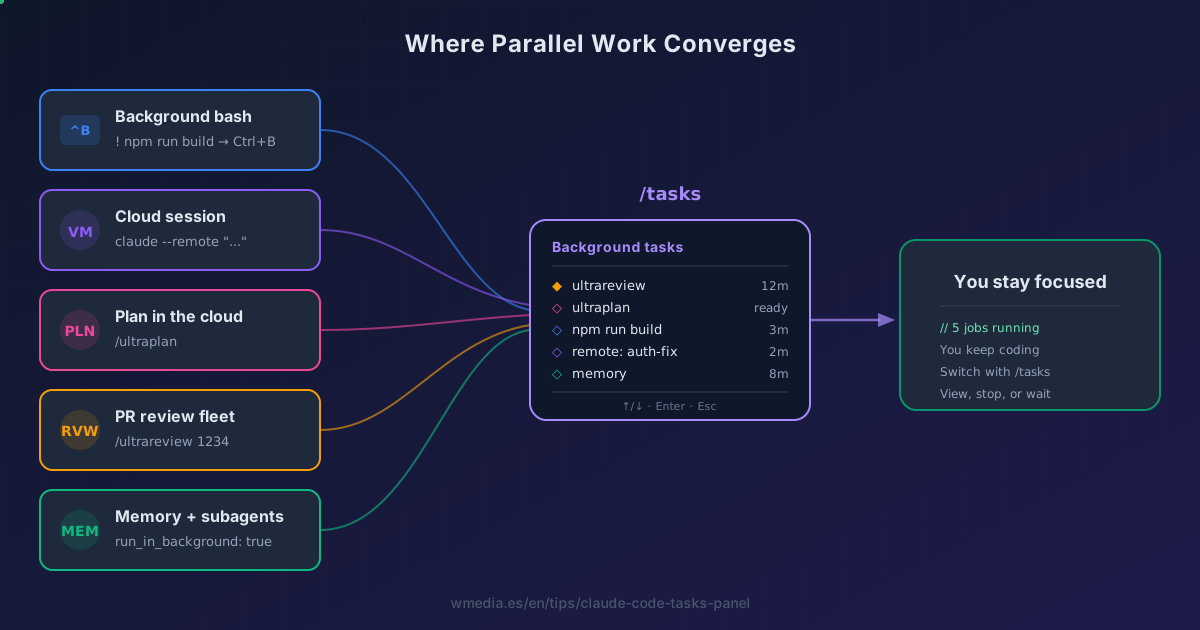
/tasks(alias/bashes) opens the panel where every parallel job in Claude Code converges: background bashes fromCtrl+B, cloud sessions from--remote, reviews from/ultrareview, memory consolidation, subagents, long MCP calls, and bash commands that run out their timeout. If you've never opened it, it's probably because you haven't sent anything in yet.
Why nobody knows it exists
You probably opened /tasks once, saw "No tasks currently running" and closed it. So did I. The panel isn't interesting on its own. It gets interesting once you realize it's the shared dashboard of a whole set of Claude Code features you're probably already using separately.
Each of those features delegates work somewhere (your shell, a cloud VM, a subagent, Claude's subconscious) and reports back to the same panel. /tasks is where they reunite.
What populates your /tasks
1. Local background bashes (Ctrl+B)
While running a command with ! (bash mode), press Ctrl+B to send it to the background. It shows up in /tasks with its PID and live output. Perfect for long builds, heavy tests, or dev servers.
2. Cloud sessions with --remote
Every claude --remote "task" you launch creates a parallel cloud session. You can fire 3 or 4 at once and see them all listed here, each linking to claude.ai/code for the diff.
3. /ultrareview in parallel
/ultrareview launches a fleet of reviewer agents in the cloud and takes 10 to 20 minutes. While they run, you keep coding. /tasks reports the progress of each one.
4. Memory consolidation and subagents
When Claude runs memory consolidation or spawns a subagent with run_in_background: true, those land here too. Watch those subagents: running in the background trims their built-in tools even when you declared them, and that cut has a list of its own. Each subagent's row also carries the model it runs on, plus the effort level when its definition pins one, so this panel is where you check which model and which level your agents are working at.
5. What shows up unasked
Since v2.1.212, an MCP call that runs past two minutes becomes a background task and lands here, in its own MCP tasks section. Same for a bash command that runs out its timeout, with one exception worth knowing, because git never gets rescued.
There used to be one more source, /ultraplan, which sent its cloud plans here. It was removed in v2.1.224 and no longer appears in the panel; what happened and what to use now.
How to navigate it
↑/↓     Move between tasks in the list
Enter   Open a task: see output, session link, Stop option
←/Esc   Close the panel and return to the conversation
Once inside a task you can read its full output or stop it if it's going off the rails.
How work gets in there
| Path | Who triggers it | When it appears |
|---|---|---|
Ctrl+B during a ! |
You, manually | The instant you press it |
claude --remote "..." |
You, from the CLI | When the cloud session is created |
/ultrareview |
You, command or /ultrareview <PR> |
After confirming the launch |
Subagent with run_in_background |
Claude, autonomously | At spawn |
| Memory consolidation | Claude, during /auto-dream |
While running |
| MCP call over 2 minutes | On its own | When the timeout is passed |
| Bash that runs out its timeout | On its own | When the timeout is passed |
The mental shift
/tasks doesn't fill up because you open it. It fills up when you start to delegate. The right question isn't "what does /tasks do?" but "what long-running work am I running serially that could be running in parallel?"
And if the question is "which autonomous primitive sends what into the panel?", there's a map that places each primitive (loop, Monitor, Routines, Desktop tasks, Channels) in its cell. /tasks is the dashboard where they all converge, not a primitive itself.
And if what you want is to see EVERY Claude Code session you have (not just the tasks running inside this one), that's a level above: Agent View (claude agents). To grasp the full family of background mechanisms (Agent View, headless, /loop, Routines) and pick the right one each time, there's the map of the four ways.
Don't confuse it with Claude's task checklist (Ctrl+T): that's the step list of the current task, not this panel of parallel jobs. And that checklist has a twist of its own, because the steps can be chained with dependencies, at which point it reads as a graph rather than a list.
Official docs: Interactive mode — Background bash commands · Commands reference