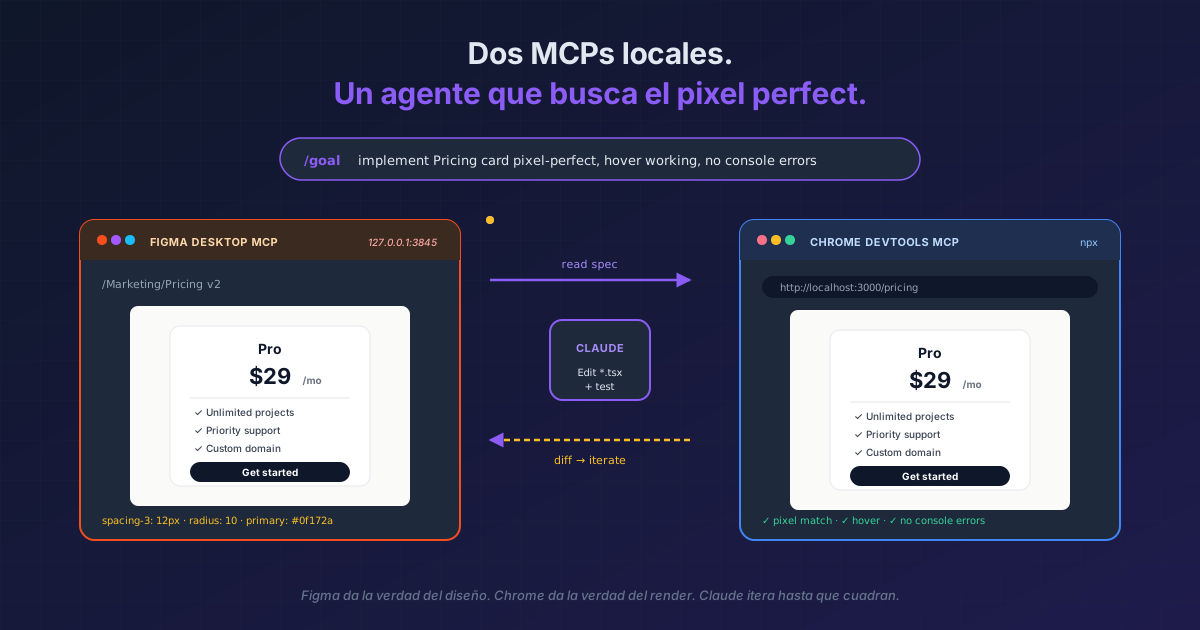
TL;DR Two local MCPs —
figma-desktop(athttp://127.0.0.1:3845/mcp) andchrome-devtools-mcp— plus/goalas the stop condition close the loop: Claude reads specs and captures screenshots from Figma, writes the code, opens real Chrome, verifies visual and functional, and iterates until pixel perfect. Drop the/goalinside/loopand you have an E2E pipeline that runs itself. I use it more and more — the memory overhead of running both MCPs locally is well worth it.
For months we've heard that the feedback loop between design and implementation is the bottleneck of AI-assisted frontend. Claude Code closes it when you give it two local things: eyes in Figma (so it reads the actual spec, not your description of it) and eyes in Chrome (so it verifies what it wrote, not assumes it). Both servers run on your machine, which matters for two reasons — localhost latency vs HTTPS-with-OAuth roundtrips, and writes to Figma are exempt from rate limits (reads inherit your Figma plan's tier-1).
The MCPs that move the needle aren't always the remote ones with 200-tool catalogs. Sometimes the two that close the loop live on your own local port.
Result:
> claude mcp list

  ● figma-desktop    (http,  connected) → 127.0.0.1:3845
  ● chrome-devtools  (stdio, connected) → npx chrome-devtools-mcp

> /goal Implement the Pricing card component from frame
  "/Marketing/Pricing v2" exactly as in Figma — pixel
  perfect, hover animation included — and verify at
  http://localhost:3000/pricing

[Autonomous loop]
  ✓ figma_get_frame "/Marketing/Pricing v2"
  ✓ figma_export_screenshot → saved
  ✓ Edit src/components/PricingCard.tsx
  ✓ chrome_navigate http://localhost:3000/pricing
  ✓ chrome_screenshot → compare
  ⚠ Visual diff: spacing-3 ≠ Figma (8px vs 12px)
  ✓ Edit src/components/PricingCard.tsx
  ✓ chrome_screenshot → match
  ✓ chrome_click [data-test="pricing-card"] → hover state OK
  ✓ Goal reached
Install (two commands)
# 1. Figma Desktop MCP — open Figma Desktop first,
#    enable "MCP Server" in Dev Mode (right sidebar)
claude mcp add --transport http figma-desktop http://127.0.0.1:3845/mcp

# 2. Chrome DevTools MCP — official from the Chrome team
claude mcp add chrome-devtools --scope user -- npx chrome-devtools-mcp@latest

# Verify
claude mcp list
Requirements: Figma Desktop open with the project file, Chrome installed, Figma plan with Dev or Full seat (Starter is capped at 6 calls/month — effectively blocking for this flow).
Why the loop works so well
The pattern is an Evaluator-Optimizer (five Agentic AI patterns) built with two real sensors. Figma is ground truth for design. Chrome is ground truth for render. Claude iterates between them until they match.
The trick to keep it from spinning forever on subtleties: give it a /goal with the exact stop condition — "pixel perfect against frame X, working hover state, no console errors". Without a clear goal, the agent keeps polishing. With a goal, it knows when to stop.
For recurring routines — nightly review of a set of components, visual regression before each release — wrap the /goal in /loop:
/loop 1h /goal Verify components in /design-system/*
  still match the latest Figma export pixel-perfect, and
  ping me if any diverged.
The memory overhead
Two local MCPs add ~150-300 MB of RAM (Figma Desktop is already open if you actually use it; chrome-devtools-mcp spins up a headless Chrome only when invoked). On my machine it's well worth it — the time saved on the manual "capture, paste, does it look the same?" ping-pong pays for it on day one.
When NOT to use it
- When you don't use Figma. Obvious, but worth saying — the Figma MCP only earns its slot if you actually open the file regularly. If what you want is the same loop with no reference design, judged against the claim you made in the prompt, that's Playwright MCP. And if the real problem is that there is no design to implement yet,
/designdraws you one inside the terminal on an editable canvas. And if your designs live in Claude Design rather than Figma, there is an MCP for that. For other options, see the five MCPs that earn the slot. - When you're in a backend-only repo. Drop Chrome DevTools MCP from
--scope userand keep it at--scope projectonly where it pays off. - When the site requires your authenticated session. Chrome MCP launches a clean Chrome with no cookies. For that case, use
--chrome(the Claude in Chrome extension), which reuses your active session — different mechanisms, not competitors. Full comparison of the two here.
Reference
| MCP | Local at | Rate limit | Best for |
|---|---|---|---|
| Figma Desktop | 127.0.0.1:3845/mcp |
Writes exempt · reads tier-1 Figma | Read specs, export frames, tokens, components |
| Chrome DevTools | stdio (npx) | None (it's your Chrome) | Real render, eval JS, console, screenshots, E2E click flows |
| Command | What it does |
|---|---|
claude mcp add --transport http figma-desktop http://127.0.0.1:3845/mcp |
Connects the local Figma Desktop MCP |
claude mcp add chrome-devtools --scope user -- npx chrome-devtools-mcp@latest |
Installs the official Chrome DevTools MCP |
claude mcp list |
Verify both show connected |
claude mcp remove <name> |
Uninstall when not needed in a specific project |
If you are wondering why the browser Desktop ships with won't do for this: it doesn't measure. The three browsers compared.
Official docs: Figma MCP server guide · Chrome DevTools MCP · Connect Claude Code to tools via MCP