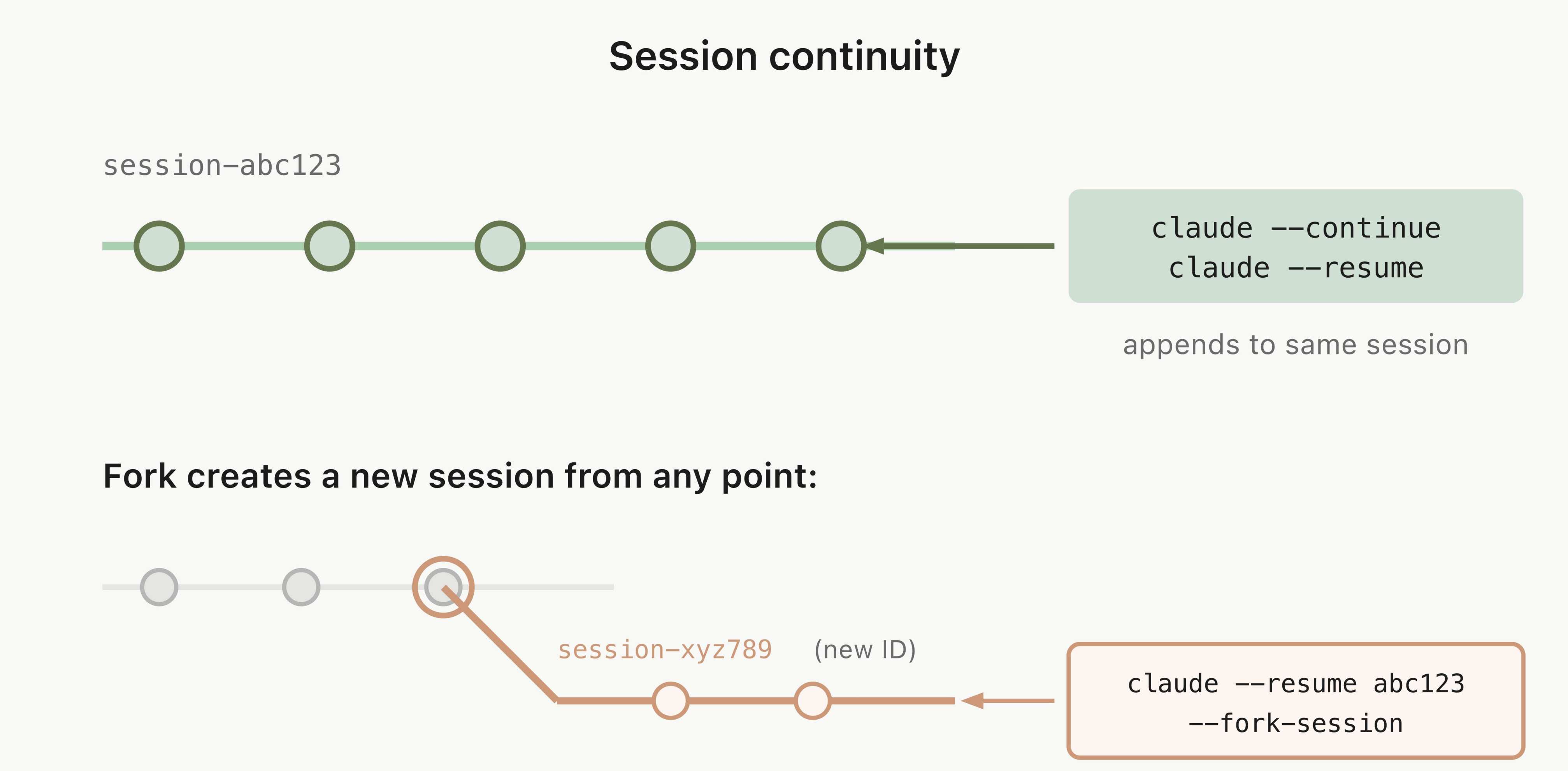
You probably know that claude --continue picks up your last session. That's common knowledge. What you probably don't know is that you can fork it. Fork creates a new session with its own ID, but starts with the full history of the original session intact. The original session stays untouched. Think of it as git checkout -b for your conversation with Claude.
Why is this so powerful? Because it lets you explore multiple approaches to the same problem without losing previous work. You're debugging a bug, Claude suggests a fix, you want to try a different route without risking what you already have — fork, try, and if it doesn't work out, the original session is still there, exactly where you left it.
Result:
> claude --continue --fork-session

Resuming session abc123 (forked → new session def456)

> [you continue from where you left off, but in an
  independent session — the original stays unchanged]
How to use it
1. Resume the last session (no fork)
claude --continue
This appends messages to the same session. Useful when you simply want to pick up where you left off.
2. Choose a specific session
claude --resume
Shows a list of recent sessions to choose from. You can search by name or date. Rename and color-code your sessions to make that list easier to navigate.
3. Fork a session
claude --continue --fork-session
Creates a new session with its own ID. The full history is copied, but from here on they're independent.
4. Fork a specific session
claude --resume --fork-session
Select the session first, then fork it.
Reference
| Command | What it does |
|---|---|
claude --continue |
Resume the last session (same ID) |
claude --resume |
Choose a session from the list and resume it |
--fork-session |
Combine with --continue or --resume to fork |
/resume |
From within a session, switch to another |
| Concept | Detail |
|---|---|
| Resume | Same session ID, messages append to existing history |
| Fork | New session ID, copies history up to that point, independent from there |
| Permissions | Session-scoped permissions are not inherited — must be re-approved |
| Multiple terminals | Without fork, messages interleave. With fork, each terminal gets a clean session |
Looking for every way to resume a session (not fork): the picker, by name, or even from a PR with --from-pr? They're in resume sessions in Claude Code.
Official docs: Resume or fork sessions
Related: this is forking into an independent session you drive yourself. The other half, the
/forkcommand that delegates to a subagent without moving you, is in /fork vs /branch.
Don't want a new branch, just to reclaim context without losing recent work? Summarize up to here compresses in the same session.