You need to configure something new in your project: stop Claude from touching the dist/ folder, always use Opus, give the whole team the same Notion server. Where do you write it? CLAUDE.md, settings.json, .mcp.json, settings.local.json... and half the time you're not sure which. It's genuinely confusing to keep track of what each file is for, and it's worth pausing five minutes to learn it, because putting a rule in the wrong file has one concrete consequence: it doesn't apply.
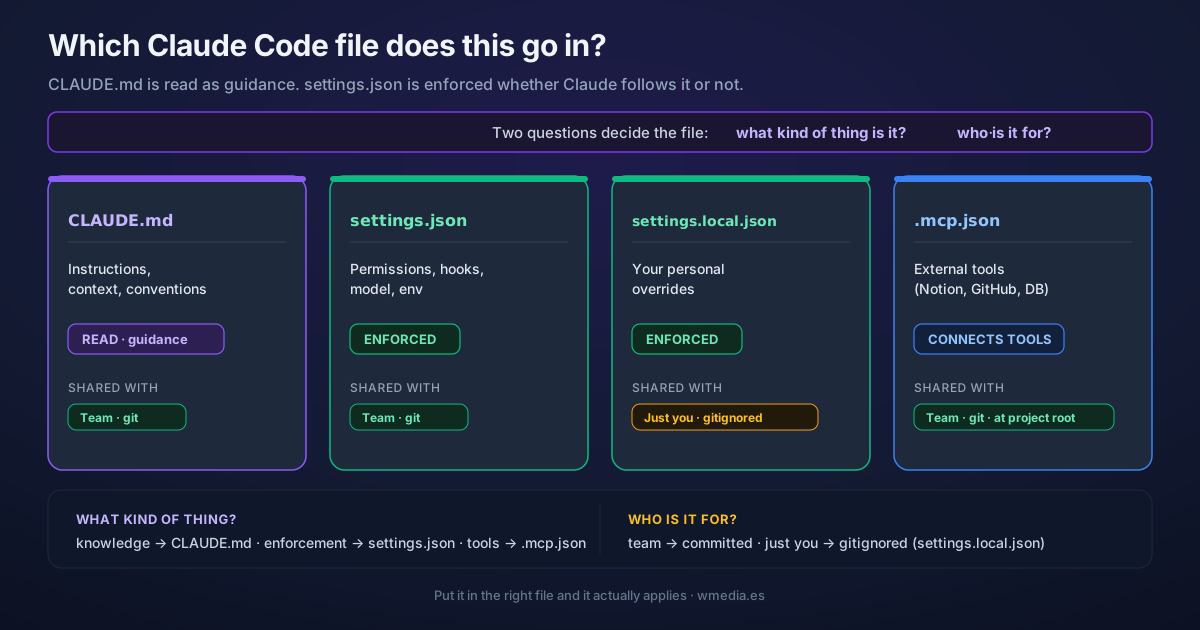
One distinction sorts almost everything. CLAUDE.md is instructions Claude reads as guidance. settings.json is rules that are enforced whether Claude follows them or not. One is context Claude can follow or ignore (it's a model, after all). The other is a fence that Claude Code's engine enforces for you. If you need something to be impossible, it doesn't belong in CLAUDE.md.
TL;DR Two questions pick the file. What kind of thing is it? Knowledge Claude should keep in mind goes in
CLAUDE.md(read as guidance). A rule that must hold no matter what (permissions, hooks, model) goes insettings.json(enforced). An external tool goes in.mcp.json. Who is it for? If it's for the team, commit it (settings.json,.mcp.json). If it's just for you, put it in a gitignored file (settings.local.json).
Result:
I need to configure something new. Which file?

  Knowledge or conventions Claude should read?
    → CLAUDE.md            read as guidance, not enforced

  A rule that must ALWAYS hold?
    → settings.json        permissions, hooks, model, env

  An external tool (Notion, GitHub, a database)?
    → .mcp.json            at the project root, not inside .claude/

  Just for you, not committed?
    → settings.local.json  personal override, gitignored
Guidance vs. fence
CLAUDE.md loads at the start of the session and sits in context as instructions. Claude reads them and does its best to follow, but it's a model: it can misread them, forget them 50,000 tokens later, or decide they don't apply this time. Write "never drop the database" in CLAUDE.md and it's a very strong suggestion. It is not a guarantee.
settings.json is a different animal. Claude doesn't "read" it: Claude Code's engine enforces it. Put dist/** in permissions.deny and Claude cannot touch dist/, whatever it decides. Hooks are scripts that run on every event, like it or not. model pins the model. None of it depends on Claude cooperating.
The official docs sum it up in one sentence worth remembering: unlike CLAUDE.md, which Claude reads as guidance, settings are enforced whether Claude follows them or not.
A concrete example of this: stripping the Co-Authored-By: Claude line from your commits needs both at once, a CLAUDE.md rule and the attribution setting in settings.json, precisely because the instruction alone isn't always enforced.
Team or just you
The second question is whose configuration it is.
settings.json and .mcp.json get committed. They go into git, and everyone who clones the repo inherits them: same permissions, same hooks, same MCP servers. That's the project's configuration, not yours.
settings.local.json is yours alone. Claude Code makes sure git ignores it automatically, so it never lands in a commit by accident. This is where the stuff you don't want to impose on the team lives: your preferred model, an API key, permissions only you need. It has the highest precedence you can hand-edit, which also makes it the place to override a project setting for yourself without touching the shared file.
One level up, ~/.claude/settings.json is your global settings: applied across all your projects at once.
The table, at a glance
| File | For | How it acts | Shared |
|---|---|---|---|
CLAUDE.md |
Instructions, context, conventions | READ (guidance) | Team (git) |
settings.json |
Permissions, hooks, model, env vars | ENFORCED | Team (git) |
settings.local.json |
Your personal overrides | ENFORCED | Just you (gitignored) |
.mcp.json |
Project MCP servers | Connects tools | Team (git) |
One detail that trips everyone up: .mcp.json goes at the project root, not inside .claude/. It's the only file on this list that lives outside that folder.
Two questions this tip does NOT answer
"What if I define the same thing in two files?" That's no longer about where to put something new, it's about which one wins when two definitions collide. Different problem, with rules that don't always point where you'd guess, and it has its own tip.
"OK, it goes in CLAUDE.md, but what do I write?" Most CLAUDE.md files are stuffed with things Claude can already infer on its own. What to keep and what to delete is in your CLAUDE.md is full of junk.
And two more files, for specific cases
.claude/rules/*.md: modular pieces of CLAUDE.md. Handy once your CLAUDE.md nears 200 lines, because you can scope each rule to load only for the paths you point it at..worktreeinclude: lists gitignored files (your.env, say) you want copied automatically into every new worktree.
And one MCP heads-up to close the loop: .mcp.json is the project's MCP, for the team. Your personal MCP doesn't go in a .mcp.json of your own, it lives in ~/.claude.json (added by claude mcp add --scope user). They're different files. And that block is the only part of ~/.claude.json worth taking along when you move Claude Code to a new machine.
To see where these rules fit among the other levers that cut permission prompts, read the permissions guide.
Official docs: The .claude directory