TL;DR You have a
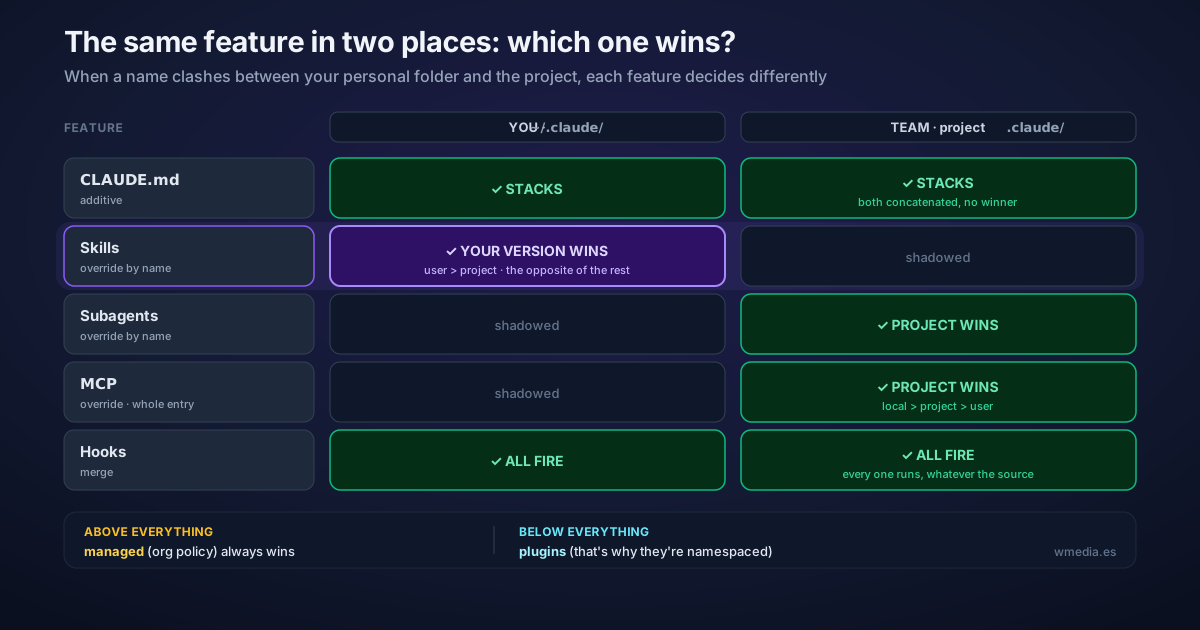
/deployskill in~/.claude/skills/and another with the same name in the project's.claude/skills/. Which one runs? Your personal one: for skills, the user level beats the project level. But create a subagent or an MCP server with that same name and it flips: the project wins. Four extension types, three different conflict rules.
When you define the same feature in two places — your personal ~/.claude/ folder, the project repo, a plugin, or a company policy — Claude Code has to decide what to do with the clash. The intuitive guess is "the most specific one always wins," meaning the project. It doesn't work that way. Each extension type resolves the conflict differently, and for skills the direction is inverted compared to subagents and MCP. Knowing this saves you the "but I configured this in the project — why isn't it applying?" detour.
This is the companion to when each feature loads into context: that one covers the when and the cost; this one covers who wins when two definitions collide. And if your question is more basic, which file to put something in before who wins, see which Claude Code file each thing goes in.
Result:
Same /deploy skill at two levels:

  ~/.claude/skills/deploy/      (user)      ─┐
  .claude/skills/deploy/        (project)   ─┤  same name → collision
                                             │
  Skill      → USER wins  ──────────────────┘   (managed > user > project)
  Subagent   → PROJECT wins                      (managed > --agents > project > user)
  MCP        → PROJECT wins                       (local > project > user)
  CLAUDE.md  → both STACK                          (additive, no winner)
  Hooks      → ALL fire                            (merge, no winner)
How Claude Code resolves it
There's no single rule. There are three behaviors:
1. CLAUDE.md: stacks. Every level (managed, user, project, CLAUDE.local.md) is concatenated into context — nothing gets overwritten. Files are ordered from the filesystem root down toward your working directory, so the instruction closest to your cwd is read last. If two conflict, Claude reconciles with judgment and tends to favor the more specific one. There's no hard winner: everything goes in.
2. Skills: override by name, and the user level wins. When the same skill exists at multiple levels, one replaces the rest with this priority: managed > user > project. Here's the trap: your personal skill in ~/.claude/skills/ shadows the project skill of the same name. Plugin skills are namespaced (plugin:skill), so they never clash with yours. And a skill living in a subfolder of the repo sits outside this contest altogether: it shadows nothing and nothing shadows it, because it is listed with its path in front, and only once you work in there.
3. Subagents: override by name, but the project wins. Same idea, opposite direction: managed > --agents flag > project > user > plugin. Here the project does beat your personal definition.
4. MCP: override by name, whole entry. Priority is local > project > user > plugin > claude.ai connectors. Important: fields are not merged. If the same server exists in two scopes, Claude uses the entire entry from the higher-priority source, not a blend of the two.
5. Hooks: merge. Every registered hook fires on its event, no matter where it came from. Nothing gets replaced.
Quick reference
| Feature | On collision | Same name → who wins |
|---|---|---|
| CLAUDE.md | Stack (additive) | No one; all load, the one closest to cwd is read last |
| Skills | Override by name | managed > user > project (plugins namespaced) |
| Subagents | Override by name | managed > --agents > project > user > plugin |
| MCP | Override by name (whole entry) | local > project > user > plugin > claude.ai |
| Hooks | Merge | All fire, regardless of source |
Why it matters
- A project skill isn't firing and you can't tell why. Look for one with the same name in
~/.claude/skills/— it's shadowing it. Open/skillsto see the source of each. - Your model resets on startup. A
modelin project or managed settings overrides your choice on every launch, same as any other config: why your model sticks or resets. - An environment variable can beat even managed settings. That is what happens with the auto-compact window: four places can set it and
CLAUDE_CODE_AUTO_COMPACT_WINDOWbeats the other three without a word, here is how to see which one won. - Rules that MUST always hold belong at the
managedlevel (it beats everything), and if it's a hard prohibition, make it a hook — because CLAUDE.md is context, not a guarantee. The same goes for subagent limits written into a prompt. - Plugins always sit last for skills, subagents, and MCP: the lowest priority. That's why plugin skills are namespaced and never compete with yours. If you're unsure which feature to reach for, see skills vs hooks vs MCP vs plugins.
Official docs: Extend Claude Code — Understand how features layer