TL;DR
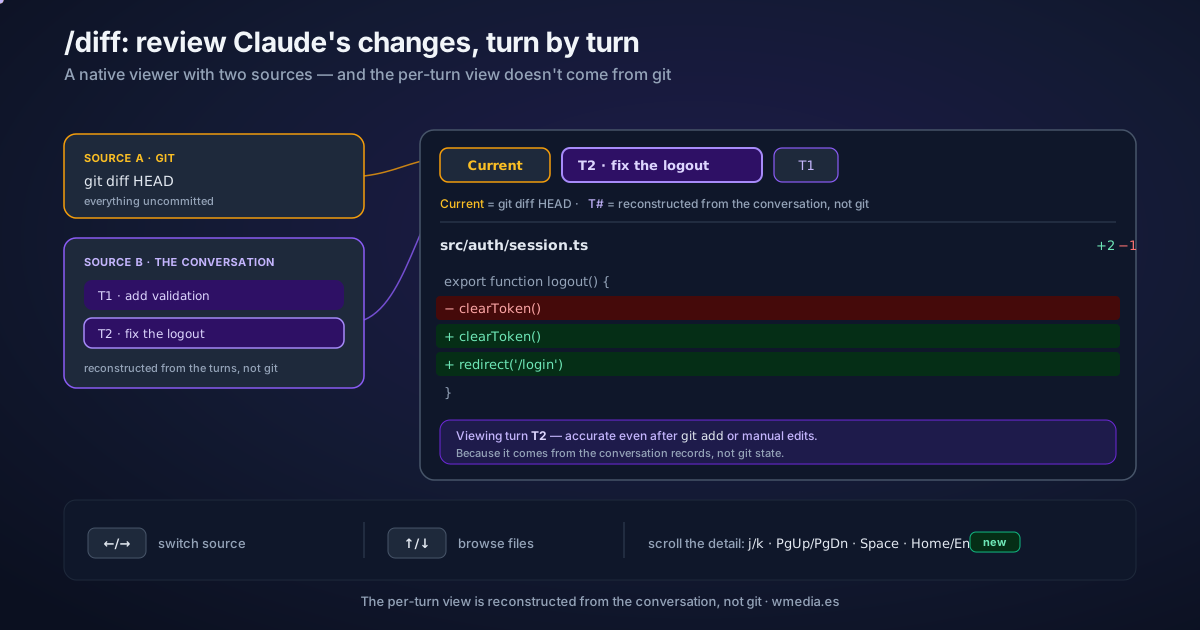
/diffopens an interactive diff viewer in the terminal. Use ←/→ to switch between Current (git diff HEAD, everything uncommitted) and the turns (T1, T2…): what Claude changed on each turn. The good part: the per-turn view is reconstructed from the conversation, not from git — so it survives your manual edits andgit add. Use ↑/↓ to browse files, and the detail view now scrolls with the keyboard.
Update (v2.1.260): in fullscreen, inside a git repo, with 110 columns or more, /diff now opens a panel that stays beside the conversation. The viewer this tip covers, per-turn tabs and all, is what you still get everywhere else.
I come from lazygit and only just started using /diff. It still feels a bit clunky — it just shipped — but having a native change viewer right inside Claude Code, where you see what it touched on each turn, is genuinely great. And it's not "just another peek" at git diff: the per-turn tab looks at something else entirely.
How it works
/diff has two sources, and that's the whole trick:
- Current =
git diff HEAD: every uncommitted change in your working tree. The usual thing, minus the second tab. - Per turn (T1, T2, T3…) = what Claude edited on that specific turn. It doesn't come from git: Claude reconstructs it from the
FileEdit/FileWriterecords in the conversation. That's why it stays accurate even if you touched files by hand or rangit addin between — and each turn carries a snippet of your prompt so you remember what it was about.
Result:
> /diff

 Current   T2   T1            ← ←/→ switches source · ↑/↓ browses files
 ─────────────────────────────
 src/auth/login.ts     +12 −3
 src/auth/session.ts    +4 −1

 ▸ Current  = git diff HEAD (everything uncommitted)
 ▸ T2       = "fix the logout" → what Claude touched on THAT turn
How to use it
1. Open it. Type /diff (no arguments). The viewer opens instantly.
2. Switch source with ←/→. Jump between Current (git) and each of Claude's turns (T1, T2…, most recent first).
3. Browse files with ↑/↓. Move through the files touched in the selected source.
4. Scroll the detail with the keyboard. In the detail view of a long diff: arrows, j/k, PgUp/PgDn, Space, Home/End. (This is the part that just landed.)
Quick reference
| Key / source | What it does |
|---|---|
/diff |
Open the interactive change viewer |
Current |
git diff HEAD: everything uncommitted in the working tree |
T1, T2, … |
What Claude changed on each turn (from the conversation, not git) |
← / → |
Switch between Current and the turns |
↑ / ↓ |
Browse between files |
arrows · j/k · PgUp/PgDn · Space · Home/End |
Scroll the detail |
Why it matters
- "Which turn broke this?" The per-turn view ties each change to its prompt, so you find the culprit without bisecting by hand.
- It survives git. Because the per-turn view doesn't depend on git state, you still see what Claude touched even after you've run
git addor edited by hand. - Look first, then audit.
/diffonly shows (read-only). Once you've eyeballed it and want AI to hunt for bugs, run it through/code-reviewor the cloud review. A whole turn you don't like? That's rewinding with checkpoints.
Official docs: Commands — /diff