TL;DR Most people know
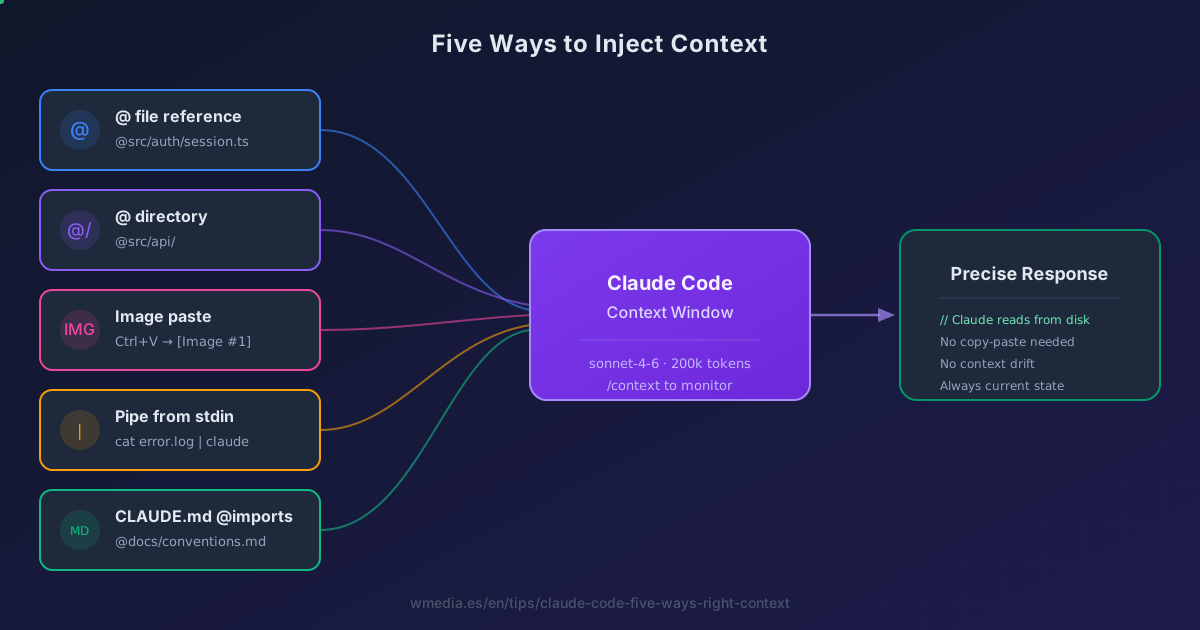
@filename. But there are five distinct ways to inject context into Claude Code — files, directories, images, piped data, and CLAUDE.md imports. The last one is the one almost nobody uses, and it changes how you architect your entire config.
The @ reference is one of those features that's so basic you stop thinking about it. You type @, pick a file, done. But precisely because it feels simple, most developers never explore the full syntax — and there's more here than pointing at a file.
Claude Code has five distinct input methods for providing context. Each one serves a different purpose. Knowing when to use which is the difference between Claude guessing and Claude understanding.
Result:
> @src/auth/session.ts explain the token refresh logic around line 47

Claude reads session.ts from disk, focuses on line 47,
and explains the exact expiry flow — no guessing, no drift.
The five methods
1. @ file reference
The basic move. Type @ followed by a path and Claude reads the file from disk before responding. All of it, and again on every turn where you type the @ afresh: that is what this syntax actually costs, measured.
> @src/api/payments.ts what does this module expose?
Tab completion activates after @ — the index pre-warms on startup with session-based caching, so suggestions appear fast. You don't need to type full paths.
Two details people miss:
- Case-sensitive on Linux and macOS.
@Auth.tsand@auth.tsare different files. - Fuzzy matching: typing
@Buttonmay surface bothButton.tsxandButton.test.tsx, letting you pick from a filtered list.
Combine it with natural language line references for surgical precision:
# Focus on a specific area
> @src/auth/session.ts explain the logic around line 47

# Compare across files
> @src/models/user.ts line 23 vs @src/models/admin.ts line 18 — what's different?
2. @ directory reference
Point to a directory instead of a file:
> @src/api/ what endpoints do we have?
Claude gets a directory listing — file names, not full contents. Useful for orientation before diving into specific files. Saves context compared to reading every file individually, and that saving isn't a one-off: whatever enters the context gets re-sent on every turn the session has left.
3. Image paste
Press Ctrl+V (or Cmd+V in iTerm2) with an image in your clipboard:
[Image #1] fix the spacing issue visible in this screenshot
Claude receives the image as visual input. The [Image #N] chip inserts at your cursor position, so you can reference it by number in your prompt. You can also drag and drop image files directly into the terminal window.
Works with screenshots of UI bugs, design mockups, error dialogs, or terminal output that's hard to copy as text.
The full gesture (the right key for your terminal and why paste sometimes fails with no error) is in Paste screenshots with Ctrl+V.
4. Pipe data from stdin
cat error.log | claude "what's causing this?"
npm test 2>&1 | claude "which tests are failing and why?"
git diff HEAD~3 | claude "summarize what changed"
Piped data enters context the same way a file reference does. The difference: it works with any command output, not just files on disk. Useful for logs, build output, API responses, or diffs you don't want to save first.
5. CLAUDE.md @imports (the advanced pattern)
This is the one most people don't know about. Inside any CLAUDE.md file, @path/to/file imports that file's content into context at session start:
# CLAUDE.md
See @README.md for project overview and @package.json for scripts.

# Workflow
- Git conventions: @docs/git-instructions.md
- Personal overrides: @~/.claude/my-project-instructions.md
This turns @ from a prompt feature into a config architecture tool:
- Recursive imports: imported files can import other files, up to 5 levels deep
- Relative paths: resolve from the importing file, not the working directory
- Approval dialog: the first time Claude encounters external imports in a project, it asks for confirmation
- Safe in code blocks:
@some-packageinside a fenced code block or inline code span won't trigger an import — you can document package names without side effects
The practical pattern: keep your main CLAUDE.md under 200 lines (the official recommendation), and @import everything else. Project architecture in one file, testing conventions in another, API standards in a third. Each loads at startup, but they're modular enough to maintain separately.
Reference
| Method | Syntax | What Claude receives |
|---|---|---|
| File reference | @path/to/file.ts |
Full file content read from disk |
| Line focus | @file.ts + "line 47" |
Full file, focused on that area |
| Directory reference | @path/to/dir/ |
Directory listing (names only) |
| Image paste | Ctrl+V or drag-and-drop |
Visual input as [Image #N] chip |
| Piped input | cat file | claude "..." |
Command stdout as context |
| CLAUDE.md @import | @path inside CLAUDE.md |
File content at session start |
Injecting the right context is only half. The other half is structuring the prompt around it. The five rules Anthropic actually follows when writing a Claude Code prompt cover that side.
Official docs: Best Practices — Provide rich content | CLAUDE.md imports