If your AI-assisted writing keeps getting flagged as AI (or you can just feel it sounds like ChatGPT), the problem isn't your topic — it's the statistical fingerprints LLMs leave behind. Em-dashes used for emphasis. "Let's dive into." "Not just X, but Y." Triadic lists everywhere. The humanizer skill hunts these patterns down and rewrites them. It's also a solid community example of a well-built skill — it follows the 5 Anthropic-grounded rules for creating skills: a description packed with concrete triggers, a body under 500 lines, the 29 patterns documented with reasoning (not in caps).
How it works internally
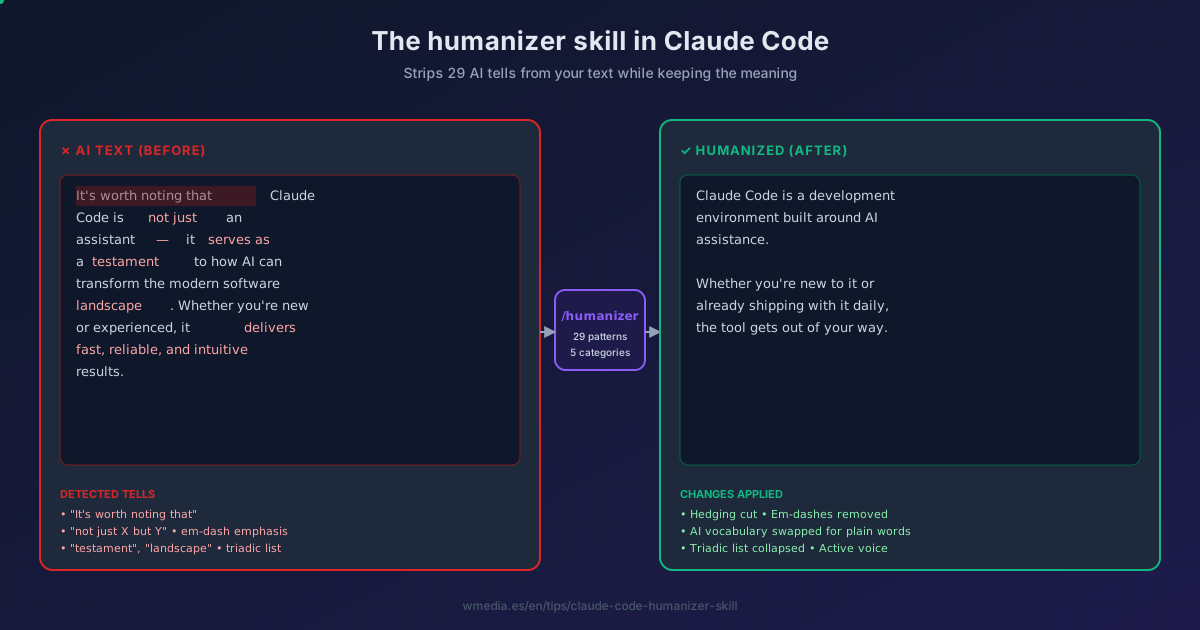
The skill lives at ~/.claude/skills/humanizer/SKILL.md. When you invoke it (or Claude auto-routes to it via the description field), it runs your text through a checklist of 29 patterns grouped into 5 categories. It rewrites problematic passages, then does a second-pass audit to catch what slipped through.
What it detects:
| Category | Sample patterns |
|---|---|
| Content issues | Significance inflation, notability name-dropping, vague attributions, formulaic challenges |
| Language markers | AI vocabulary (testament, landscape, delve), "serves as" copula, rule-of-three constructions, false ranges, passive voice |
| Stylistic red flags | Em-dash overuse, excessive boldface, inline headers, hyphenated word pairs, signposting |
| Communication artifacts | "I hope this helps," cutoff disclaimers, sycophantic tone |
| Filler & hedging | "In order to," excessive qualifiers, generic conclusions |
Result preview
Before:
It's worth noting that Claude Code is not just a coding assistant —
it's a complete development environment that serves as a testament
to how AI can transform the modern software landscape. Whether
you're a beginner or a seasoned developer, this powerful tool
delivers fast, reliable, and intuitive results.
After:
Claude Code is a development environment built around AI assistance.
Whether you're new to it or already shipping with it daily, the
tool gets out of your way.
Setup
1. Install the skill
git clone https://github.com/blader/humanizer.git ~/.claude/skills/humanizer
Done. Claude Code auto-discovers skills in ~/.claude/skills/ at session start.
2. Verify
claude
Inside the session:
> /humanizer paste your AI-flavored paragraph here
Or trigger it implicitly: paste a paragraph and ask "clean this up, sounds like AI." Claude routes to the skill via its description field.
3. Calibrate to your voice (optional)
The skill supports voice calibration — you can edit SKILL.md to add your own tone preferences (e.g., contraction usage, sentence-length variance, idiom set). This is the same mechanism any custom skill uses.
When it works (and when it doesn't)
- Works well: marketing copy, blog drafts, LinkedIn posts, documentation prose, anything where AI tells are statistical patterns.
- Doesn't help: code (it leaves code blocks alone), short reactive replies (the patterns need volume to detect), text that's already terse and human.
If the output still feels off, run it twice — the skill's second-pass audit is good but not perfect.
Source: blader/humanizer on GitHub Build your own variant: Claude Code skills — custom slash commands