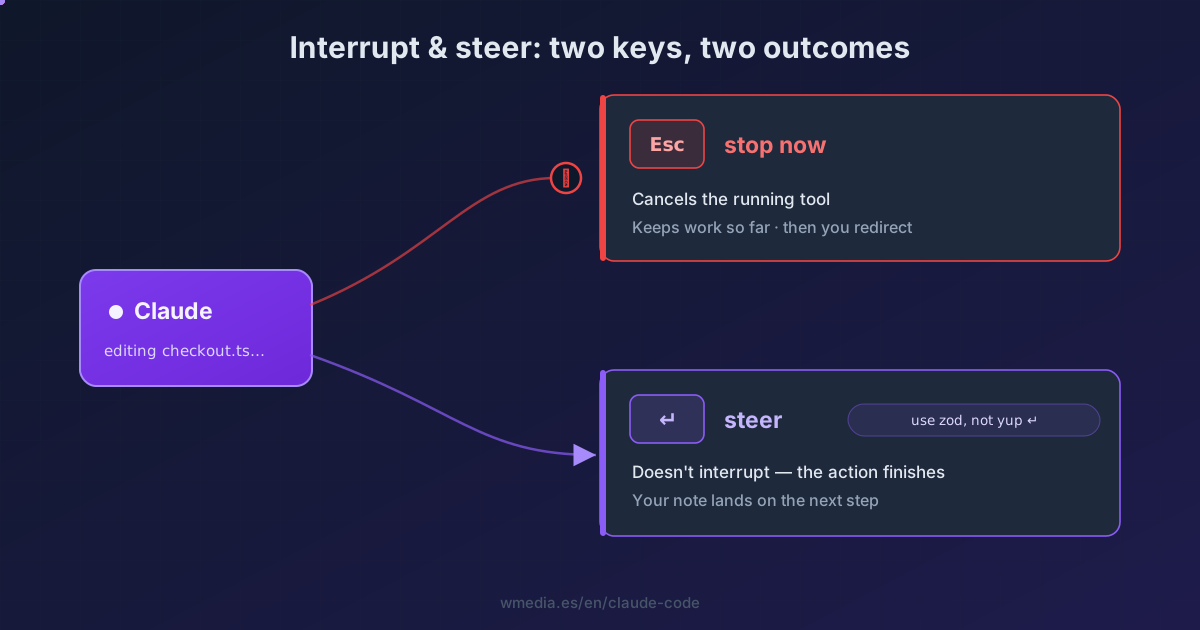
TL;DR Two keys, two intentions.
Escstops the running tool cold: you keep the work done so far and redirect with a fresh prompt, but you lose whatever action was in flight. Typing a correction and pressingEnterinterrupts nothing: the current tool finishes and Claude picks up your note on its next step. HitEscwhen it's on the wrong track; type andEnterwhen you just want to nudge the direction.
Claude Code works in a loop: it gathers context, acts with tools, and verifies, chaining decisions together until the task is done. You're part of that loop, and you can step in without restarting the session or losing context. There are two ways to do it, and the difference between them comes down to one thing: what happens to the action running right now.
Result:
> Refactor the payments module           (Claude is editing files…)

⏺ Edit  src/payments/checkout.ts
  ↳ Running…               [you press Esc]

⎿  Interrupted · Claude keeps what it did and waits for you
The brake and the steering wheel
1. Esc — the emergency brake
Press Esc once to stop the response or tool call mid-turn. Claude cancels the in-flight action, keeps everything it had already done, and waits for your next instruction. From there you redirect with a fresh prompt.
Reach for it when Claude is clearly on the wrong track: editing the wrong file, building a solution you don't want, or spinning out a long explanation you never asked for. You cut it off, keep the earlier work, and point it somewhere else.
2. Type and Enter — the steering wheel
If instead of Esc you type a correction and press Enter, nothing gets interrupted. The running tool finishes its work and your message lands at the next decision point: Claude reads it and adjusts its next step before moving on.
Use it when things are going fine but you want to course-correct on the fly — "use zod instead of yup", "don't touch the tests yet" — without throwing away the action already running.
3. The decision: is the current action worth keeping?
That's the whole rule:
- If the in-flight action is not worth keeping (it's about to break something, it's headed the wrong way) →
Esc. Stop cold and redirect. - If the in-flight action is worth keeping and you only want to shape what comes next → type and
Enter. Let it finish, then hand it the new direction.
On Fable 5 you get that warning in writing: the (summarized) line tells you what it is about to do right before it does it, so you make the call above by reading rather than guessing.
Two things so nothing catches you out
Typing and Enter queues, it doesn't abort. Don't expect your message to halt the current tool: it applies on the next step, not this one. When you need an immediate cut, that's Esc. And that queue does more than it looks: you can stack several instructions and edit or delete them with ↑.
Esc doesn't always cut instantly. Deep in a long chain of tool calls, or when you're driving Claude over Remote Control, it can lag or miss the first press — keep at it. And mind the double tap: with text in the prompt, Esc Esc clears your draft, and when that draft matters the key is a different one, because Ctrl+S parks it instead of throwing it away; with an empty prompt, Esc Esc opens the rewind menu to undo changes, which is a different job. And if what you want to undo is just the last thing you typed, without dropping the whole draft, that key is Ctrl+_.
Just want to ask something without touching the task? That's what /btw is for: it answers in an overlay and Claude keeps working, none the wiser.
And if what you keep cutting is the explanation rather than the action, Esc is a per-turn patch: the Concise output style takes the narration out up front.
Interrupting is not quitting: when what you want is to close the session, the keys are different and they don't all do the same thing.
Reference
| Action | What it does | What happens to the work | When |
|---|---|---|---|
Esc |
Stops the running tool or response | Keeps work done so far; the in-flight action is canceled | It's on the wrong track and you want to redirect |
Type + Enter |
Sends a correction without interrupting | The current action finishes; your note lands on the next step | It's going fine and you only want to nudge |
Esc Esc (empty prompt) |
Opens the rewind menu | Undoes edits to an earlier checkpoint | You want to undo, not redirect |
/btw <question> |
Side question in an overlay | Doesn't touch the task; Claude keeps going | You just want to ask something |
Official docs: How Claude Code works — Interrupt and steer