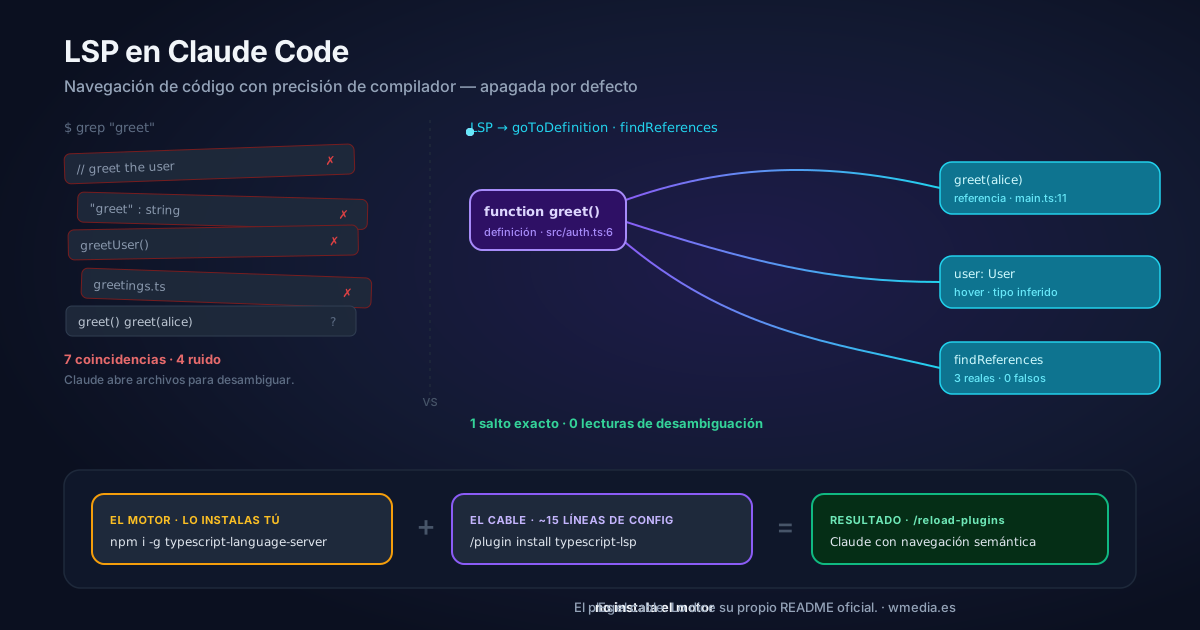
TL;DR If you installed the TypeScript plugin and Claude Code hands you
Executable not found in $PATHin the Errors tab of/plugin, nothing is broken: the plugin is only the adapter and it never installs the language server. Its own README says so. You are two commands short:npm install -g typescript-language-server typescript(the engine), then/reload-plugins. From there Claude navigates your code with compiler precision (goToDefinition,findReferences, and type diagnostics after every edit), which is the built-inLSPtool you had switched off without knowing it.
I'm a heavy Claude Code user and I discovered this literally an hour ago. When I tried the LSP tool on a .ts file it returned No LSP server available for file type: .ts: IDE-precision navigation was right there, built in, but switched off. We turned it on for TypeScript in three steps — and there are official plugins for Rust, Python, Go and eight more.
The misunderstanding that will bite you
The plugin does not install the language server. Its official README makes it clear — its installation section is literally npm install -g typescript-language-server typescript. There are two separate pieces:
| Piece | What it is | Who installs it |
|---|---|---|
The binary (typescript-language-server) |
The engine that understands types | You, via npm install -g |
The plugin (typescript-lsp) |
The adapter: ~15 lines saying "for .ts, launch this binary" |
/plugin install |
If you install only the plugin, you'll see Executable not found in $PATH in the Errors tab of /plugin. The plugin is the cable, not the device.
Turning it on (TypeScript, 3 steps)
# 1. The engine (you install it — prerequisite)
npm install -g typescript-language-server typescript

# 2. The adapter (official Anthropic plugin)
/plugin install typescript-lsp@claude-plugins-official

# 3. Activate in the current session
/reload-plugins
From there, open any .ts/.tsx/.js/.jsx and Claude navigates with compiler precision and sees type errors instantly. Press Ctrl+O when the "diagnostics found" indicator appears to view them inline.
The underlying reason is that Claude Code does not index your codebase: there are no resolved symbols waiting anywhere, only text search.
Without LSP, when you ask Claude "where is greet defined and who calls it?", the answer comes from grep: it returns every textual match — comments, strings, greeting, greetUser, the definition and the calls, all mixed together. Claude has to open several files to disambiguate, loading context it doesn't need. With LSP, goToDefinition returns one exact location, semantically resolved. Zero false positives, zero disambiguation reads.
What Claude gains
| Capability | What it does |
|---|---|
goToDefinition |
Jumps to a symbol's exact definition (not the first text match) |
findReferences |
Lists the real references, scope-resolved — not grep |
hover |
Type signature and info on the fly: function greet(user: User): string |
| Automatic diagnostics | After every edit, the server reports type errors in the same turn |
The most underrated benefit is automatic diagnostics. Without LSP, the loop to validate a change is: edit → run tsc (which dumps a lot of output into context) → read errors → re-edit. With LSP, if I introduce a broken import or a wrong type, Claude sees it and fixes it in the same turn, without the compiler dump. That report has its own rules about which files it checks and which it doesn't.
Languages with an official plugin
Each needs its binary installed separately:
| Language | Plugin | Binary |
|---|---|---|
| TypeScript | typescript-lsp |
typescript-language-server |
| Python | pyright-lsp |
pyright-langserver |
| Rust | rust-analyzer-lsp |
rust-analyzer |
| Go | gopls-lsp |
gopls |
| C/C++ | clangd-lsp |
clangd |
| C# | csharp-lsp |
csharp-ls |
| Java | jdtls-lsp |
jdtls |
| PHP | php-lsp |
intelephense |
| Lua, Kotlin, Swift | lua-lsp, kotlin-lsp, swift-lsp |
(see docs) |
The "semi-automatic" nuance
If Claude Code detects that you already have the binary in your PATH when you open a project, it offers to install the matching plugin. It doesn't install silently — you approve. But the binary is still your prerequisite: Claude Code never installs it for you.
Honest caveat: language servers consume memory (rust-analyzer and pyright notably on large monorepos). If it causes issues, /plugin disable <plugin> and Claude falls back to its search tools. The savings are in tokens and precision, not RAM.
Pair this with /run-skill-generator to close the loop: semantic navigation + actually running the app.
Official docs: Code intelligence — Claude Code Docs · Catalog: claude.com/plugins