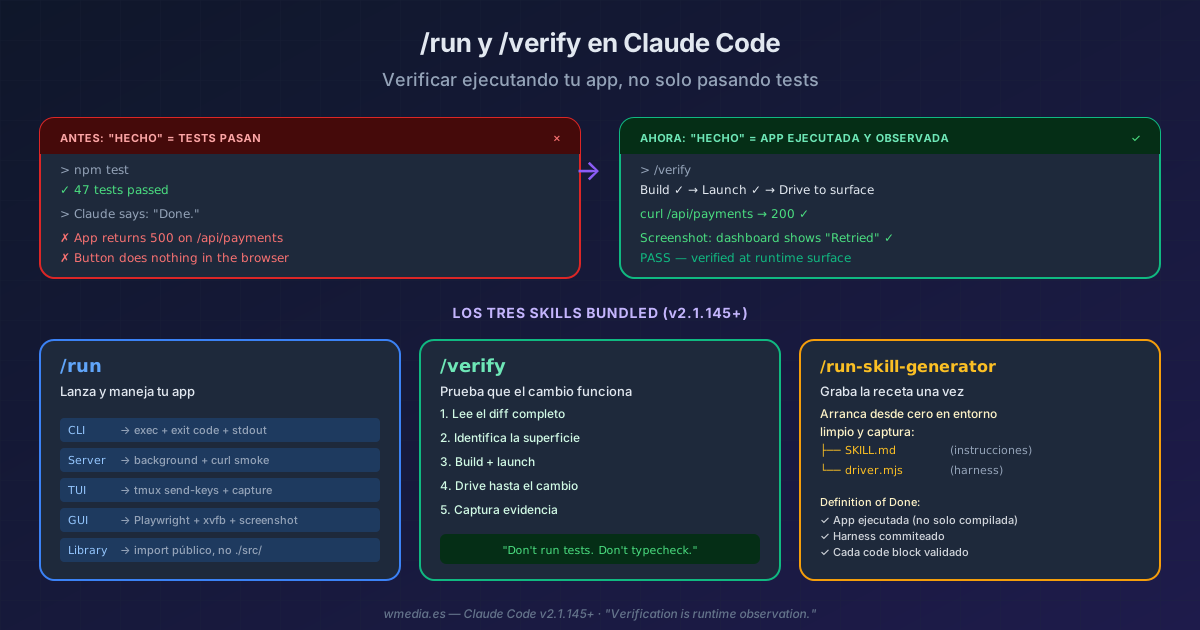
TL;DR Claude Code v2.1.145 ships three bundled skills that change how Claude says "done":
/runlaunches your app and drives it like a user would,/verifybuilds, runs, and observes whether the change shows up in the real app (not in tests), and/run-skill-generatorrecords your project's build+launch recipe so/runand/verifynever have to guess again. The doctrine behind them: "Verification is runtime observation. Don't run tests. Don't typecheck." — verbatim from the/verifyskill's own instructions.
The problem: you tell Claude "verify this works" and Claude runs npm test. Tests pass. Claude says "done." But the app doesn't start, or the button does nothing, or the route returns 500 in the browser. Tests verify that the code does what the code says, not that the app works as the user expects.
Anthropic decided to break that inertia. The bundled /verify skill's own instructions are explicit:
"Don't run tests. Don't typecheck. Running them here proves you can run CI — not that the change works."
Result:
> /verify

Finding change scope...
  git diff origin/HEAD... --stat → 3 files changed

Building and launching...
  npm run build ✓
  npm run dev → localhost:3000

Driving to the surface...
  curl localhost:3000/api/payments/retry -d '{"id":"pay_123"}'
  → 200 {"status":"retried","next_attempt":"2026-05-26T13:00:00Z"}

Capturing evidence...
  Response matches expected retry behavior ✓
  Screenshot: payment dashboard shows "Retry scheduled" ✓

PASS — change verified at runtime surface
The three skills
1. /run — launch and drive your app
/run
Detects the project type (CLI, server, TUI, Electron, browser, library) and launches it. Not just node index.js and done — it interacts until a point where a user would see something:
| Project type | What /run does |
|---|---|
| CLI | Runs a representative command, checks exit code and stdout |
| Server / API | Launches in background + curl to the touched endpoint |
| TUI | tmux send-keys + capture-pane of the result |
| Desktop GUI (Electron) | Playwright _electron REPL under xvfb + screenshot |
| Browser | Dev server + chromium-cli script |
| Library / SDK | Import from the public package boundary, not from ./src/ |
If your repo has a project skill at .claude/skills/run-<name>/, /run follows it verbatim instead of guessing. If none exists, it applies the pattern by type.
2. /verify — proof the change works
/verify
/verify goes beyond /run: it first reads the diff (git diff origin/HEAD...), identifies what changed, then runs the app to the surface where that change manifests. The surface is the point where a user — human or programmatic — encounters the change.
Rules the skill follows:
- Internal function that isn't a surface → follows the call chain to the CLI, socket, or window
- Test-only changes →
SKIP — no runtime surface, doesn't try to fill the gap by running tests - Mixed PR (src + tests) → verifies the src, ignores the tests (CI runs those)
- No runtime surface (docs, type declarations) →
SKIP — no runtime surface: (reason)
3. /run-skill-generator — record the recipe once
/run-skill-generator
/run and /verify infer how to launch your project from README, package.json, or Makefile. That works for standard projects. But if you need a database, an .env file, specific environment variables, or a multi-step build, inference breaks down.
/run-skill-generator starts your project from scratch in a clean environment, captures everything that worked (the exact apt-get install lines, env vars, patches, the driver script), and commits it as a project skill:
my-project/.claude/skills/run-my-project/
├── SKILL.md          # short instructions + driver reference
└── driver.mjs        # programmatic harness for app interaction
From that point, /run, /verify, and any other agent in the repo follow the recorded recipe instead of rediscovering it. Run it once per project, and again if the build or launch process changes.
What the generator requires before it's done (its own "Definition of Done"):
- The app actually ran — compiling isn't enough
- The interaction harness is committed — a driver (JS, Python, shell) or smoke test lives alongside the SKILL.md
- The SKILL.md documents the harness — the agent path describes the driver first, not generic setup commands
- Every code block was executed and validated — all commands in the skill were run in the session
When to use each one
| Situation | Skill |
|---|---|
| "I want to see if the app works after my change" | /verify |
| "Launch the app so I can test it" | /run |
| "Teach Claude how to build and launch this project" | /run-skill-generator |
| "Tests pass but the app doesn't work" | /verify (that's exactly its use case) |
All three are verification on demand: you ask for them once the work is done. If what you want instead is Claude checking as it goes and correcting itself unprompted, that means handing over the instrument before it starts.
Requirements
- Claude Code v2.1.145+ (all three skills were introduced in this version)
- For GUI:
xvfbavailable (the skill auto-detects it) - For complex projects: run
/run-skill-generatoronce before relying on/runand/verify
All three are bundled skills — they live inside Claude Code, nothing to install. If you already have project skills covering build/launch (created with /run-skill-generator or manually following Anthropic's 5 rules for creating skills), /run and /verify prefer them over automatic inference. To understand the difference between skills, hooks, MCP, and plugins, see the full comparison.
Official docs: Run and verify your app — Claude Code Docs · Commands reference