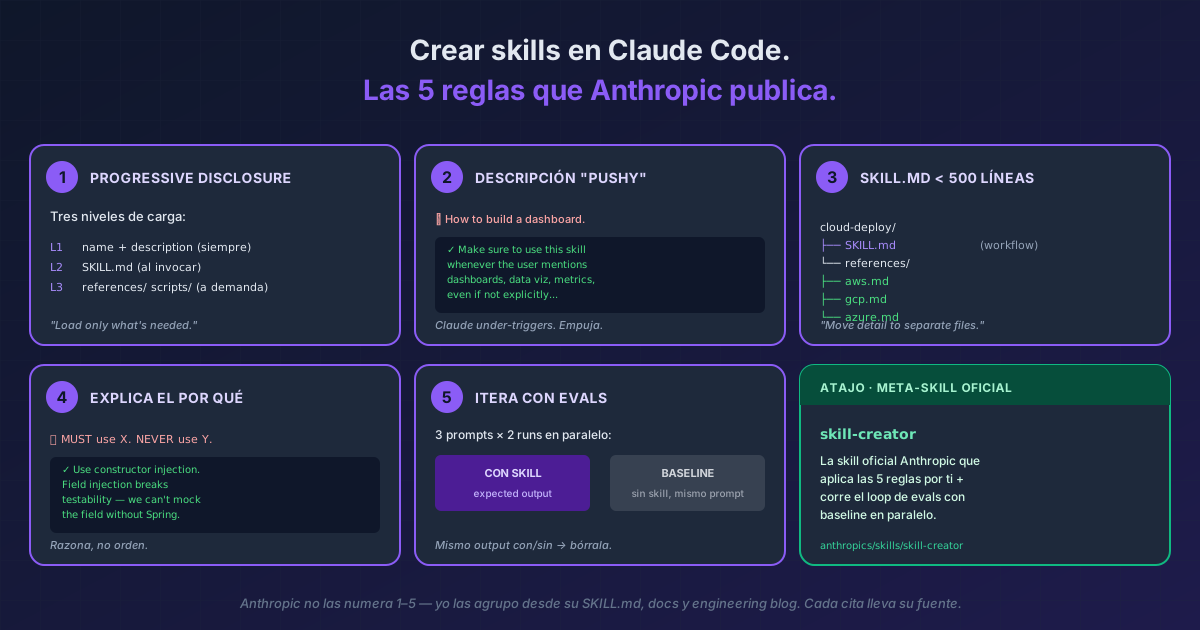
TL;DR The 5 rules Anthropic publishes for a Claude Code skill to actually get invoked instead of collecting dust: (1) progressive disclosure in 3 levels, (2) a slightly "pushy" description because Claude under-triggers, (3)
SKILL.mdunder 500 lines with detail in supporting files, (4) explain the why instead of writingALWAYS/NEVERin caps, and (5) iterate with evals in parallel against a no-skill baseline. The shortcut if you create skills often: install the officialskill-creatorskill — the skill that applies these 5 rules for you.
Anthropic doesn't number them "1–5" anywhere — that grouping is mine, distilled from skill-creator's SKILL.md, the official docs, and the engineering blog. Each quote carries its exact source.
The problem starts with the description. Anthropic admits it literally: "Claude has a tendency to 'undertrigger' skills — to not use them when they'd be useful" [skill-creator SKILL.md]. If your skill doesn't get invoked, 80% of the time it's the description. And a useful number: the combined description + when_to_use field is truncated at 1,536 characters in the skill listing [official docs] — the critical use case goes first or it doesn't show.
The 5 rules
1. Progressive disclosure — three loading levels
Anthropic, verbatim [engineering blog]:
"Like a well-organized manual that starts with a table of contents, then specific chapters, and finally a detailed appendix, skills let Claude load information only as needed."
| Level | What loads | When | Cost |
|---|---|---|---|
| L1 | name + description |
Always, in the system prompt | ~100 words |
| L2 | SKILL.md body |
When the skill is invoked | <500 lines ideal |
| L3 | scripts/, references/, assets/ |
Only when SKILL.md references them | Unlimited |
Real example (literal from skill-creator): a cloud-deploy skill supporting AWS, GCP, and Azure doesn't stuff all three docs into SKILL.md. It splits them out:
cloud-deploy/
├── SKILL.md            # workflow + which reference to load per provider
└── references/
    ├── aws.md
    ├── gcp.md
    └── azure.md
"Claude reads only the relevant reference file."
[skill-creator SKILL.md]
2. "Pushy" description
Verbatim [skill-creator SKILL.md]:
"Make the skill descriptions a little bit 'pushy'."
Real example (Anthropic verbatim):
# ❌ Shy description — Claude won't invoke
description: How to build a simple fast dashboard to display internal Anthropic data.

# ✅ Pushy description — Anthropic verbatim
description: How to build a simple fast dashboard to display internal Anthropic
  data. Make sure to use this skill whenever the user mentions dashboards,
  data visualization, internal metrics, or wants to display any kind of
  company data, even if they don't explicitly ask for a "dashboard."
The pattern: explain what it does, then list the triggers ("whenever the user mentions X, Y, Z, even if they don't explicitly ask"). Same pattern applied to a TypeScript review skill:
# ✅
description: Reviews TypeScript code for type errors and edge cases. Use this
  skill whenever the user asks to review, audit, or check a .ts file — even
  casually ("does this look right?", "any issues?") — or when they paste
  TypeScript without specifying what they want.
3. SKILL.md under 500 lines
Dual citation [official docs] and [skill-creator SKILL.md]:
"Keep
SKILL.mdunder 500 lines. Move detailed reference material to separate files."
Real example: skill-creator does it to itself. Its SKILL.md delegates to agents/grader.md (how to evaluate assertions), agents/comparator.md (A/B blind comparison), agents/analyzer.md (why one version wins), and references/schemas.md (JSON schemas).
Applied to your case: a commit-with-context skill. SKILL.md has the 10-step workflow. commit-message-templates.md and examples/sample-commits.md only load when Claude actually needs a template or example.
4. Explain the why, don't write ALWAYS/NEVER in caps
Verbatim [skill-creator SKILL.md]:
"If you find yourself writing ALWAYS or NEVER in all caps, or using super rigid structures, that's a yellow flag — if possible, reframe and explain the reasoning so that the model understands why the thing you're asking for is important."
Real example:
# ❌ Rigid — Claude doesn't generalize to unanticipated cases
MUST use constructor injection. NEVER use field injection.

# ✅ With reasoning — Claude understands and generalizes
Use constructor injection. Field injection breaks testability because
we cannot mock the field without Spring context.
Anthropic's reasoning: "Today's LLMs are smart. They have good theory of mind and when given a good harness can go beyond rote instructions." [skill-creator]
5. Iterate with evals (and a baseline)
The literal workflow Anthropic publishes [skill-creator SKILL.md]:
"Decide what you want the skill to do → Write a draft → Create a few test prompts and run claude-with-access-to-the-skill on them → Help the user evaluate the results both qualitatively and quantitatively → Rewrite the skill based on feedback → Repeat until you're satisfied"
Real example with the exact JSON Anthropic recommends. A commit-message skill:
// evals/evals.json
{
  "skill_name": "commit-message",
  "evals": [
    {
      "id": 1,
      "prompt": "I just refactored the auth module to use JWT instead of sessions",
      "expected_output": "feat(auth): switch from session-based to JWT auth",
      "files": []
    },
    {
      "id": 2,
      "prompt": "Fixed typo in README",
      "expected_output": "docs: fix typo in README",
      "files": []
    },
    {
      "id": 3,
      "prompt": "I'm not sure what to commit, look at git diff and decide",
      "expected_output": "Skill reads git diff, generates correct Conventional Commit",
      "files": []
    }
  ]
}
The critical part (Anthropic verbatim): each prompt runs twice — with your skill and without it as a baseline.
"Don't spawn the with-skill runs first and then come back for baselines later. Launch everything at once so it all finishes around the same time."
[skill-creator]
How to read results: if all 3 prompts produce the same output with/without the skill, the skill adds nothing — delete it. If only the with-skill version produces the correct output, your triggers + instructions work. That by-hand experiment now has a command behind it: claude plugin eval runs both arms for you and reports the difference, with a case format separate from the evals.json here.
If one eval fails, don't rewrite the whole skill. Anthropic says: "Generalize from the feedback... Keep the prompt lean... Explain the why." [skill-creator]
The shortcut: skill-creator
Anthropic publishes skill-creator as an open-source skill — the meta-skill that applies these 5 rules for you. Its description, verbatim [skill-creator SKILL.md]:
"Create new skills, modify and improve existing skills, and measure skill performance. Use when users want to create a skill from scratch, edit, or optimize an existing skill, run evals to test a skill, benchmark skill performance with variance analysis, or optimize a skill's description for better triggering accuracy."
If you create skills often, installing it is the first step. It ships with its own description optimization loop that runs 5 automatic iterations against a 60/40 train/holdout test set — rule 5 industrialized.
Bonus VERIFIED (also from Anthropic docs)
when_to_use— frontmatter field for extra trigger phrases without bloatingdescription. Counts toward the combined 1,536-char cap[official docs].- Live change detection — editing
~/.claude/skills/<skill>/SKILL.mdapplies in the current session without restarting[official docs]. disable-model-invocation: true— for skills with side effects (deploy, commit) that only YOU should invoke. Claude won't auto-invoke them[official docs].allowed-tools— pre-approves tools while the skill is active. Earns its own deep-dive./run-skill-generator— the bundled skill that applies these rules automatically for your project's build+launch recipe. Generates a committedSKILL.md+ driver.
When NOT to create a skill
Three cases where the pattern fits a different mechanism better:
- You need reactive capture — "extract what we just solved as a skill" → see capture the pattern on the spot.
- You need to automate a lifecycle event (after-edit, pre-tool) → hook, not skill. Comparison: skills vs hooks vs MCP vs plugins.
- Real Anthropic-grounded skill examples we've already covered: Frontend Design Skill (official Anthropic, real pushy description) and Humanizer Skill (community following the pattern).
And a fourth check before you rewrite anything: look at whether the skill has been invoked at all. /skill-doctor reports how many times each one ran and what its description costs you every turn. A zero there is the symptom rule 2 fixes, and it is also the sign that the skill may simply be surplus.
Quick reference — minimum viable frontmatter
---
name: my-skill                    # optional, defaults to directory name
description: ...                  # CRITICAL — pushy + use case first
when_to_use: ...                  # optional, extra trigger phrases
disable-model-invocation: false   # default; true for side effects
allowed-tools: Read Grep          # optional, pre-approve tools
---
Were your skills written for an older model?
/claude-api prompt-auditreviews them and proposes the patch.
Official docs: Skills — Claude Code Docs · Equipping agents with Agent Skills (engineering blog) ·
skill-creatorSKILL.md (GitHub)