TL;DR Anthropic shipped an official skill (
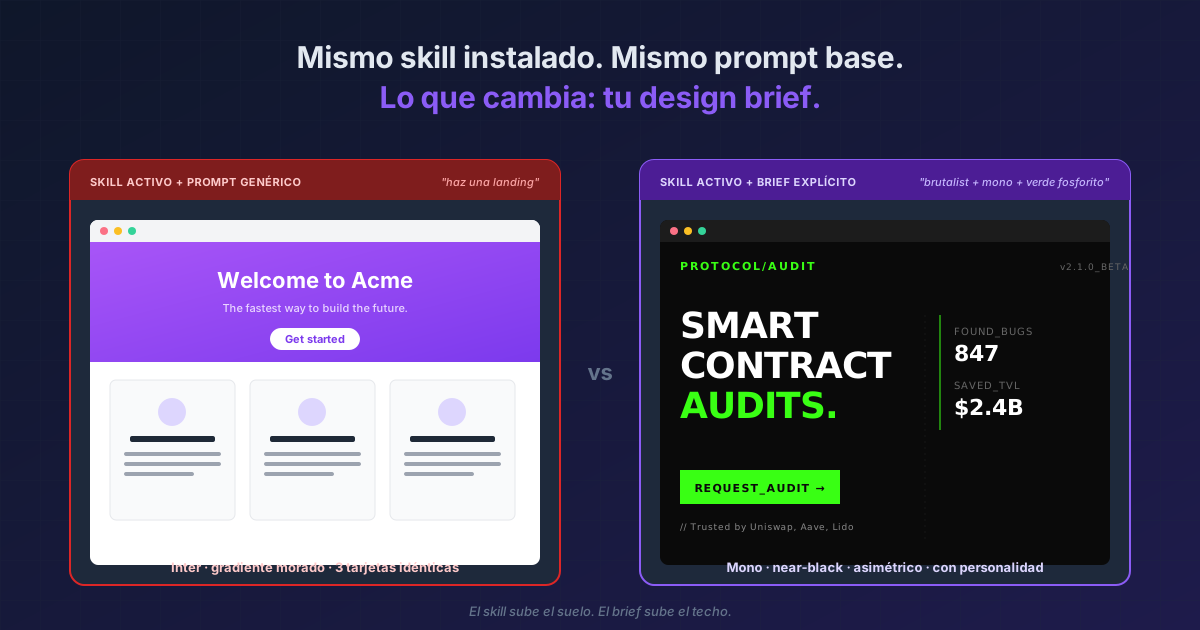
frontend-design, inside the plugin of the same name) that loads ~400 tokens of guidance about typography, color, motion, and composition the moment you ask for a UI. Two commands to install, then it activates automatically. But installing it isn't enough: the skill itself says "it is critical that you think outside the box!", because even with the guidance loaded Claude still converges to the statistical center. The difference between "made by AI" UI and UI that passes for human-made isn't the skill — it's the skill plus an explicit design brief.
If the screens you build with Claude Code keep coming out with Inter, a purple gradient on white, and a layout of three identical cards, it isn't Claude — it's distributional convergence. The model predicts tokens by sampling the statistical center of its training data, and the statistical center of web design is exactly that: the "safe" stuff. Anthropic acknowledges this openly in their skill announcement.
Their solution is an official skill packaged inside a plugin. When you ask "design me a landing page", the skill loads automatically and injects ~400 tokens of guidance: palette, typography, motion, composition. It's also a real-world example of the 5 Anthropic-grounded rules for creating skills — its description is markedly "pushy", it splits detail into supporting files (progressive disclosure), and keeps the main body under 500 lines.
Result of installing it:
> /plugin marketplace add anthropics/claude-code
✓ Added marketplace: anthropics/claude-code

> /plugin install frontend-design@claude-code-plugins
✓ Installed frontend-design (1 skill: frontend-design)

> Design a landing page for a smart contract audit startup
[frontend-design skill activated automatically]

⠋ Choosing aesthetic direction...
⠋ Applying non-Inter typography...
⠋ Building orchestrated motion...
The 4 dimensions the skill loads into context
| Dimension | What it pushes you to use | What it pushes you to avoid |
|---|---|---|
| Typography | Distinctive display + body pairs (Playfair Display, Bricolage Grotesque, IBM Plex Mono…) | Inter, Roboto, Arial |
| Color & theme | CSS variables, dominant + sharp accents, IDE themes or cultural references | Purple gradients on white, "AI-blue" palettes |
| Motion | CSS animations, staggered reveals, orchestrated load sequences | Scattered, purposeless micro-interactions |
| Composition / backgrounds | Asymmetry, layered gradients, textures, atmospheric depth | Predictable card layouts, flat backgrounds |
Install
# Add the official Anthropic marketplace
/plugin marketplace add anthropics/claude-code

# Install the frontend-design plugin
/plugin install frontend-design@claude-code-plugins

# Verify
/plugin list
From here, the skill activates automatically whenever you ask for frontend. No manual command.
Why installing isn't enough
The SKILL.md itself includes a revealing line: "it is critical that you think outside the box!" Anthropic knows that even after you load 400 tokens of guidance, Claude still converges. What the skill does is raise the floor of aesthetic quality — not guarantee distinctive output.
The community confirms it: there's a recurring Reddit thread, "Anyone else struggling with the official frontend-design skill?", where devs report UIs that are now "better typographed" but still feel AI-generated. The pattern is consistent: skill installed, prompt generic, output mid — better than before, but not memorable.
The skill works like a co-author with good taste — not a substitute for the brief. If you don't give it audience + extreme aesthetic direction + constraints, it gives you the improved average.
The prompt that actually works
Pair the skill with an explicit design brief in every request:
> Design a landing page for a smart contract audit startup.
> Audience: founders and CTOs of DeFi protocols.
> Tone: brutalist, dominant mono typography, near-black background
>   with phosphorescent green accents.
> AVOID: purple gradients, Inter, card layouts, micro-interactions.
> Constraint: single HTML page, vanilla CSS, no heavy JS.
Without a brief, the skill gives you a generic brief — and generic is exactly what you wanted to avoid.
When NOT to use it
- When you already have a design system. The skill pushes toward "distinctive"; if your product lives in Material UI, Tailwind UI, or a corporate system, the skill gets in the way — you want consistency, not breakage. Uninstall it or scope it out of that repo. And if that design system is React, the opposite road is
/design-sync: instead of improving the agent's taste, you hand it your parts. - When you're only changing a detail. For "change the button color to green" you don't want to reopen the aesthetic debate. Pair with Plan Mode and skill off, so Claude doesn't rewrite your system.
- When you have visual regression tests (Storybook snapshots, Chromatic). The skill wants to rewrite; your snapshots want stability. You'll break more tests than you fix.
Reference
| Command | What it does |
|---|---|
/plugin marketplace add anthropics/claude-code |
Adds Anthropic's official marketplace |
/plugin install frontend-design@claude-code-plugins |
Installs the plugin (loads the frontend-design skill) |
/plugin list |
Verifies installation |
| (no command) | Claude invokes the skill automatically when you ask for UI work |
/plugin uninstall frontend-design@claude-code-plugins |
Uninstall when it gets in the way of a specific repo |
Official docs: Frontend Design plugin · Source on GitHub · Improving frontend design through Skills (Anthropic blog)
Related: the same design instinct lives in the
artifact-designskill Claude loads when publishing an artifact in Claude Code. How I put it to work: sculpting the artifact until I understand what I delegate. And for the drawings there's a third skill,artifact-diagramming: Claude Code diagrams. And when you'd rather settle the screen before any code gets written,/designhands you an editable canvas instead of a finished UI.