TL;DR
Shift+Tabcycles to plan, or/plan <prompt>runs a single turn in plan. Claude explores, proposes a step-by-step plan, doesn't touch a single file. I combine it with/evaluatebefore implementing — and sometimes after too, to check what Claude did against the original plan. Plan mode doesn't give Claude superpowers; it forces you to actually understand what's about to change.
Plan Mode is one of the first steps toward working with an AI agent with any structure at all. The myth is that activating Plan Mode flips on superpowers — that Claude becomes smarter, more careful, more "himself." The reality is more mundane and more useful: what Plan Mode does is force Claude to break the task into the smallest possible atomic actions. And by forcing it to do that, it forces you to understand it. That's why it feels magical when it isn't. It's just the power of planning before acting — the same one humans get from it.
Technically, Plan Mode is a read-only permission mode: Claude reads files, runs read-only shell commands (grep, ls, find, cat), and writes a plan. It can't touch a single file until you explicitly approve the plan.
Result:
> /plan add rate limiting to the auth endpoints

⠋ Exploring codebase...
⠋ Reading src/auth/*.ts
⠋ Reading src/middleware/*.ts

Here's my plan for adding rate limiting:

1. Install express-rate-limit
2. Create src/middleware/rateLimit.ts with two tiers:
   - Strict: /login, /register, /reset-password (5 req/15min)
   - Standard: /me, /refresh (100 req/15min)
3. Wire into src/app.ts before auth routes
4. Add RATE_LIMIT_WINDOW and RATE_LIMIT_MAX to .env.example
5. Update README.md with the new env vars

Ready to proceed?
  ❯ Approve and start in auto mode
    Approve and accept edits
    Approve and review each edit manually
    Keep planning with feedback
Four ways to enter Plan Mode
1. Shift+Tab — cycle to plan mid-session
Press Shift+Tab to cycle through modes: default → acceptEdits → plan. The status bar shows the active mode. For the other three modes (auto, dontAsk, bypassPermissions), see the 6 permission modes.
2. /plan <prompt> — single turn only
Prefix a single prompt with /plan to enter plan just for that turn:
> /plan refactor the payment retry logic to use exponential backoff
Useful when most of the session is in acceptEdits but this particular change needs planning.
3. --permission-mode plan — start the session in plan
claude --permission-mode plan
The whole session starts in plan. Useful when you're exploring an unfamiliar repo or have to make an architecture call before touching anything.
4. defaultMode — plan by default in this project
// .claude/settings.json
{
  "permissions": {
    "defaultMode": "plan"
  }
}
Every session you start in this project begins in plan. Recommended for critical repos: production, payment systems, code that touches user data.
The workflow that actually works
When the plan is ready, Claude offers four options. The first three approve; the fourth sends you back to planning:
| Option | What it does |
|---|---|
| Approve and start in auto mode | Approves the plan and switches to auto for execution |
| Approve and accept edits | Approves and switches to acceptEdits |
| Approve and review each edit manually | Approves and switches to default — you review each edit |
| Keep planning with feedback | Asks for more iteration on the plan |
There used to be a fifth, Refine with Ultraplan, which escalated the plan to the cloud for browser review. It went away with Ultraplan itself in v2.1.224. If the menu shows fewer options than you remember, that is why. And when your context is heavily used, the menu adds variants that clear it as they approve.
Do you always approve the plan? You can auto-approve just that permission with a hook, leaving bash, edits and MCP still asking.
Before approving, press Ctrl+G to open the plan in your default editor. Annotate steps, delete the ones you don't like, reorder operations, save. Claude uses the edited plan. That plan is a .md file, and one setting keeps it in your repo. In the VS Code extension you don't even need Ctrl+G: the plan opens directly as a markdown document where you drop inline comments.
My personal flow: instead of approving directly, I run the plan through /evaluate first. The evaluator checks each step against the real codebase — if Claude says "I'll modify src/middleware/auth.ts line 42", /evaluate verifies that line exists and that the change makes sense. Sometimes I also run /evaluate after implementing, against the original plan, to catch silent drift. Plan → /evaluate → Implement → /evaluate. Sounds paranoid until it prevents the first disaster.
And once you approve, ask for a task list to track execution step by step, after checking that your model still saves it. And if the change was born big, read it out loud in concentric circles before you sign off: the plan decides the what; the review decides that you actually understand it.
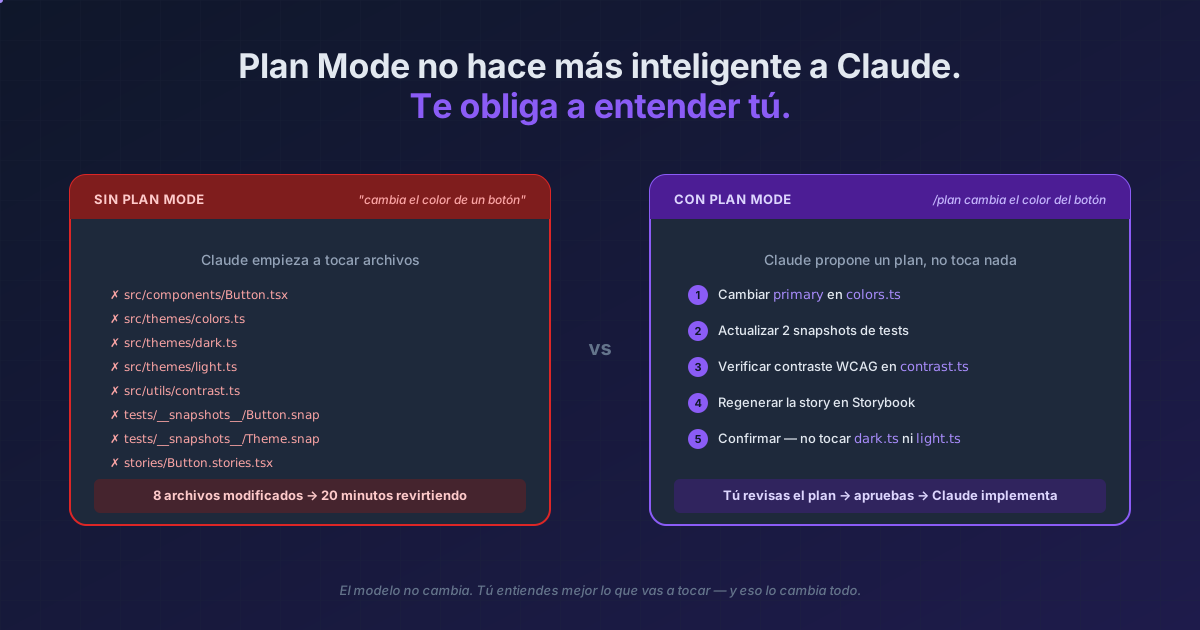
Even to change a button color?
Yes, even then. An unfiltered question can end up touching files you didn't expect — a shared util, a global theme, a test snapshot. Plan mode shows you what Claude plans to touch before it does. Five seconds of "ah, it's going to modify 8 files, not 1" save you 20 minutes of reverting.
The cost of planning is low. The cost of not planning can be anything.
Reference
| Method | When to use it |
|---|---|
Shift+Tab |
Cycle mid-session |
/plan <prompt> |
Single turn in plan |
claude --permission-mode plan |
Whole session in plan |
defaultMode: "plan" in .claude/settings.json |
Plan by default in this project |
Ctrl+G |
Edit the plan in your editor before approving |
Official docs: Choose a permission mode