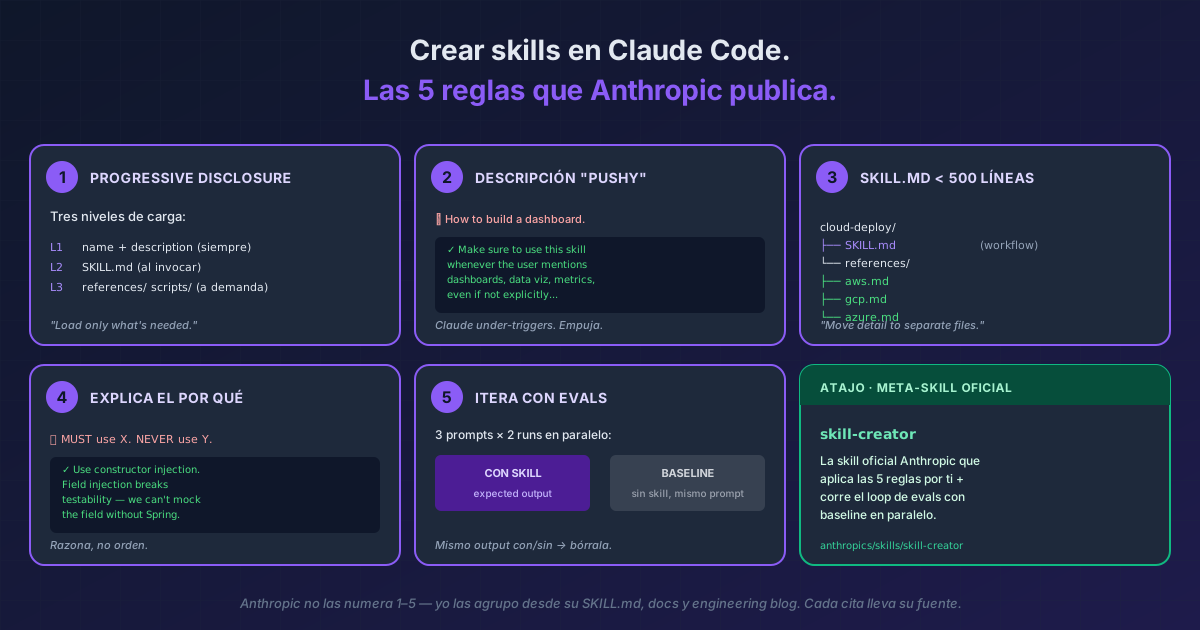
TL;DR Las 5 reglas que Anthropic publica para que un skill de Claude Code sí se invoque y no se quede acumulando polvo: (1) progressive disclosure en 3 niveles, (2) descripción ligeramente "pushy" porque Claude under-triggers, (3)
SKILL.mdbajo 500 líneas con el detalle en archivos auxiliares, (4) explicar el por qué en vez deALWAYS/NEVERen mayúsculas, y (5) iterar con evals en paralelo contra un baseline sin skill. El atajo si vas a crear skills a menudo: instala la skill oficialskill-creator— la skill que aplica estas 5 reglas por ti.
Anthropic no las numera "1–5" en ningún sitio — esta agrupación es mía, destilada del SKILL.md de skill-creator, las docs oficiales y el engineering blog. Cada cita lleva su fuente exacta.
El problema empieza por la descripción. Anthropic lo admite literalmente: "Claude has a tendency to 'undertrigger' skills — to not use them when they'd be useful" [skill-creator SKILL.md]. Si tu skill no se invoca, el 80% de las veces es la descripción. Y hay un dato útil: el campo description + when_to_use combinados se truncan a 1,536 caracteres en el listing de skills [docs oficial] — el caso de uso crítico va al principio o no se ve.
Las 5 reglas
1. Progressive disclosure — tres niveles de carga
Anthropic, literal [engineering blog]:
"Like a well-organized manual that starts with a table of contents, then specific chapters, and finally a detailed appendix, skills let Claude load information only as needed."
| Nivel | Qué carga | Cuándo | Coste |
|---|---|---|---|
| L1 | name + description |
Siempre, en system prompt | ~100 palabras |
| L2 | SKILL.md body |
Al invocar la skill | <500 líneas ideal |
| L3 | scripts/, references/, assets/ |
Solo cuando el SKILL.md los referencia | Ilimitado |
Ejemplo real (Anthropic literal en skill-creator): una skill cloud-deploy que soporta AWS, GCP y Azure no mete los 3 docs en SKILL.md. Los separa:
cloud-deploy/
├── SKILL.md            # workflow + qué reference cargar según provider
└── references/
    ├── aws.md
    ├── gcp.md
    └── azure.md
"Claude reads only the relevant reference file."
[skill-creator SKILL.md]
2. Descripción "pushy"
Cita literal [skill-creator SKILL.md]:
"Make the skill descriptions a little bit 'pushy'."
Ejemplo real (verbatim de Anthropic):
# ❌ Descripción tímida — Claude no la invocará
description: How to build a simple fast dashboard to display internal Anthropic data.

# ✅ Descripción pushy — Anthropic literal
description: How to build a simple fast dashboard to display internal Anthropic
  data. Make sure to use this skill whenever the user mentions dashboards,
  data visualization, internal metrics, or wants to display any kind of
  company data, even if they don't explicitly ask for a "dashboard."
El patrón: explica qué hace, luego enumera los disparadores ("whenever the user mentions X, Y, Z, even if they don't explicitly ask"). Lo mismo aplicado a una skill de TypeScript review:
# ✅
description: Reviews TypeScript code for type errors and edge cases. Use this
  skill whenever the user asks to review, audit, or check a .ts file — even
  casually ("does this look right?", "any issues?") — or when they paste
  TypeScript without specifying what they want.
3. SKILL.md bajo 500 líneas
Cita doble [docs oficial] y [skill-creator SKILL.md]:
"Keep
SKILL.mdunder 500 lines. Move detailed reference material to separate files."
Ejemplo real: el propio skill-creator lo hace consigo mismo. Su SKILL.md delega a agents/grader.md (cómo evaluar assertions), agents/comparator.md (A/B blind comparison), agents/analyzer.md (por qué una versión gana) y references/schemas.md (JSON schemas).
Aplicado a tu caso: una skill commit-with-context. SKILL.md tiene los 10 pasos del workflow. commit-message-templates.md y examples/sample-commits.md se cargan solo cuando Claude necesita una plantilla concreta o un ejemplo.
4. Explica el por qué, no escribas ALWAYS/NEVER en mayúsculas
Cita literal [skill-creator SKILL.md]:
"If you find yourself writing ALWAYS or NEVER in all caps, or using super rigid structures, that's a yellow flag — if possible, reframe and explain the reasoning so that the model understands why the thing you're asking for is important."
Ejemplo real:
# ❌ Rígido — Claude no generaliza a casos no anticipados
MUST use constructor injection. NEVER use field injection.

# ✅ Con razón — Claude entiende y generaliza
Use constructor injection. Field injection breaks testability because
we cannot mock the field without Spring context.
Anthropic lo justifica así: "Today's LLMs are smart. They have good theory of mind and when given a good harness can go beyond rote instructions." [skill-creator]
5. Iterar con evals (con baseline)
El workflow literal que Anthropic publica [skill-creator SKILL.md]:
"Decide what you want the skill to do → Write a draft → Create a few test prompts and run claude-with-access-to-the-skill on them → Help the user evaluate the results both qualitatively and quantitatively → Rewrite the skill based on feedback → Repeat until you're satisfied"
Ejemplo real con el JSON exacto que recomienda Anthropic. Una skill commit-message:
// evals/evals.json
{
  "skill_name": "commit-message",
  "evals": [
    {
      "id": 1,
      "prompt": "I just refactored the auth module to use JWT instead of sessions",
      "expected_output": "feat(auth): switch from session-based to JWT auth",
      "files": []
    },
    {
      "id": 2,
      "prompt": "Fixed typo in README",
      "expected_output": "docs: fix typo in README",
      "files": []
    },
    {
      "id": 3,
      "prompt": "I'm not sure what to commit, look at git diff and decide",
      "expected_output": "Skill reads git diff, generates correct Conventional Commit",
      "files": []
    }
  ]
}
Lo crítico (Anthropic literal): cada prompt corre dos veces — con tu skill y sin ella como baseline.
"Don't spawn the with-skill runs first and then come back for baselines later. Launch everything at once so it all finishes around the same time."
[skill-creator]
Lectura: si los 3 prompts dan el mismo output con/sin skill, la skill no aporta — bórrala. Si solo la versión con skill da el output correcto, los triggers + instructions funcionan. Ese experimento a mano ya tiene un comando detrás: claude plugin eval corre los dos brazos por ti y te da la resta, con un formato de casos distinto al evals.json de aquí.
Si una eval falla, no reescribas toda la skill. Anthropic lo dice: "Generalize from the feedback... Keep the prompt lean... Explain the why." [skill-creator]
El atajo: skill-creator
Anthropic publica skill-creator como skill open source — la meta-skill que aplica estas 5 reglas por ti. Su descripción literal [skill-creator SKILL.md]:
"Create new skills, modify and improve existing skills, and measure skill performance. Use when users want to create a skill from scratch, edit, or optimize an existing skill, run evals to test a skill, benchmark skill performance with variance analysis, or optimize a skill's description for better triggering accuracy."
Si vas a crear skills a menudo, instalarla es el primer paso. Tiene su propio loop de description optimization que corre 5 iteraciones automáticas contra una test set 60/40 train/holdout — exactamente la regla 5 industrializada.
Bonus VERIFIED (también de docs Anthropic)
when_to_use— campo de frontmatter para meter trigger phrases extra sin engordardescription. Cuenta hacia el cap combinado de 1,536 chars[docs oficial].- Live change detection — editar
~/.claude/skills/<skill>/SKILL.mdaplica en la sesión actual sin reiniciar[docs oficial]. disable-model-invocation: true— para skills con side-effects (deploy, commit) que solo TÚ debes invocar. Claude no las autoinvoca[docs oficial].allowed-tools— pre-aprueba tools mientras la skill está activa. Se merece su propio deep-dive./run-skill-generator— la skill bundled que aplica estas reglas automáticamente para la receta de build+launch de tu proyecto. Genera unSKILL.md+ driver ya commiteados.
Cuándo NO crear una skill
Tres casos donde el patrón se aplica mejor en otro mecanismo:
- Lo que necesitas es captura reactiva "extrae esto que acabamos de resolver como skill" → ver captura de patrón en caliente.
- Lo que necesitas es automatizar un evento del ciclo de vida (after-edit, pre-tool) → hook, no skill. Comparativa: skills vs hooks vs MCP vs plugins.
- Ejemplos reales de skills Anthropic-grounded que ya cubrimos: Frontend Design Skill (oficial Anthropic, descripción pushy real) y Humanizer Skill (community siguiendo el patrón).
Y una cuarta comprobación antes de reescribir nada: mira si la skill lleva tiempo sin invocarse. /skill-doctor te dice cuántas veces ha corrido cada una y lo que cuesta su descripción en cada turno. Un cero ahí es el síntoma que la regla 2 arregla, y también la señal de que igual esa skill sobra.
Referencia rápida — frontmatter mínimo viable
---
name: my-skill                    # opcional, defaults al directory name
description: ...                  # CRÍTICO — pushy + use case al principio
when_to_use: ...                  # opcional, trigger phrases extra
disable-model-invocation: false   # default; true para side-effects
allowed-tools: Read Grep          # opcional, pre-aprueba tools
---
¿Tus skills se escribieron para un modelo anterior?
/claude-api prompt-auditlas revisa y te propone el parche.
Documentación oficial: Skills — Claude Code Docs · Equipping agents with Agent Skills (engineering blog) ·
skill-creatorSKILL.md (GitHub)