TL;DR Set
CLAUDE_CONFIG_DIRto a different directory and you get a completely isolated Claude Code: credentials, settings, history, plugins, agents, hooks. Add a shell alias and switch between profiles with one command.
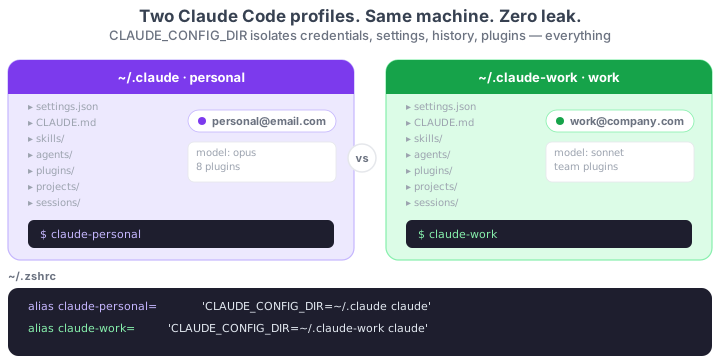
If you use Claude Code for work and personal projects, mixing contexts is a real problem. Your personal MEMORY.md leaks into work sessions. Your company plugins pollute your personal setup. And if you have two different accounts, logging in and out constantly is ridiculous.
The official solution: CLAUDE_CONFIG_DIR. An environment variable that tells Claude Code where to store ALL its configuration. Point it to a different directory and you have a fully isolated parallel install.
What each profile isolates
Each CLAUDE_CONFIG_DIR independently stores:
- Account credentials (claude.ai login)
settings.json(model, permissions, global hooks)- Global
CLAUDE.md - Session history (
/resume) - Installed plugins
- Personal skills (
~/.claude/skills/) - Personal subagents (
~/.claude/agents/) - Auto-memory (
projects/<repo>/memory/)
It's a complete Claude Code install per directory. Nothing is shared. That same inventory is the one to go through when you move Claude Code to a new machine: not every item copies the same way.
Setup
1. Create the second directory
mkdir -p ~/.claude-work
You don't need to copy anything. The first time you launch Claude Code pointing to that directory, it will ask for login and start fresh.
2. Add shell aliases
Add to ~/.zshrc or ~/.bashrc:
# Personal profile (default)
alias claude-personal='CLAUDE_CONFIG_DIR=~/.claude claude'

# Work profile
alias claude-work='CLAUDE_CONFIG_DIR=~/.claude-work claude'
Reload your shell:
source ~/.zshrc
3. Use each profile
# Launch with your personal account
claude-personal

# Launch with your work account (different account, plugins, history)
claude-work
The first time you run claude-work, it will ask you to log in. From then on, each profile keeps its own session.
4. Auto-load a profile per project (optional)
If a project always uses a specific account, add a .env at its root:
CLAUDE_CONFIG_DIR=~/.claude-work
And load env vars when you enter the directory (with direnv or similar). Any claude you run from that project will automatically use the right profile.
Reference
| Aspect | Detail |
|---|---|
| Variable | CLAUDE_CONFIG_DIR |
| Default | ~/.claude |
| What it isolates | Credentials, settings, history, plugins, skills, agents, auto-memory |
| Typical setup | Aliases in .zshrc / .bashrc |
| Per project | .env with direnv or similar |
| Logout/login | Not needed — each profile keeps its session |
Official docs: Environment variables — CLAUDE_CONFIG_DIR