Claude Code lets you customize the bottom status bar with a shell script — think PS1, but for your AI coding session.
With ~50 lines of bash you get: model name, directory, git branch, diff stats, session cost, and a context window usage bar — all color-coded with ANSI.
Result:
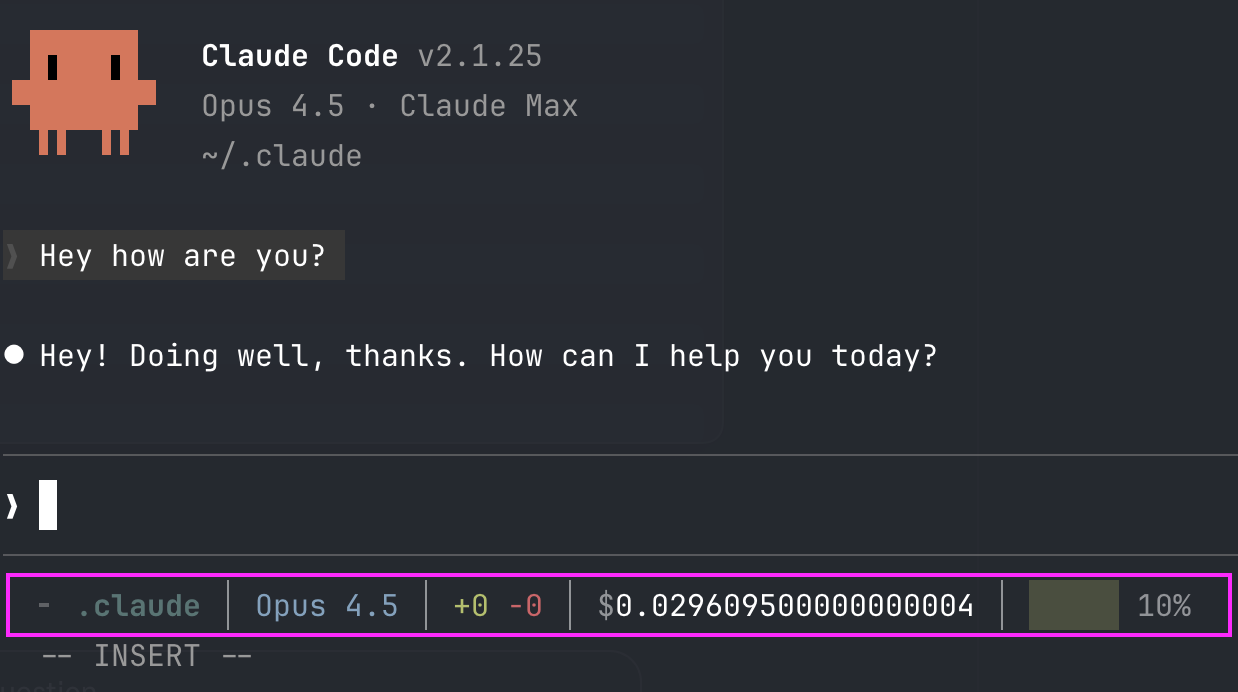
How it works
Claude Code pipes a JSON object with session metadata into your script's stdin on every conversation update (throttled to 300ms). Your script reads it, extracts what it needs, and prints one line to stdout. That line becomes the status bar. ANSI escape codes are fully supported.
The full JSON schema is documented at Status line configuration — it includes model info, workspace paths, cost tracking, and context window usage.
Setup
1. Create the script
#!/bin/bash
input=$(cat)

# --- Extract data ---
MODEL=$(echo "$input" | jq -r '.model.display_name')
DIR=$(echo "$input" | jq -r '.workspace.current_dir' | xargs basename)
ADDED=$(echo "$input" | jq -r '.cost.total_lines_added // 0')
REMOVED=$(echo "$input" | jq -r '.cost.total_lines_removed // 0')
COST=$(echo "$input" | jq -r '.cost.total_cost_usd // 0')
CTX_PCT=$(echo "$input" | jq -r '.context_window.used_percentage // 0' | cut -d. -f1)

# Git branch
BRANCH=""
if git rev-parse --git-dir > /dev/null 2>&1; then
    B=$(git branch --show-current 2>/dev/null)
    [ -n "$B" ] && BRANCH="$B"
fi

# --- ANSI colors ---
RST="\\033[0m"
DIM="\\033[2m"
BOLD="\\033[1m"
CYAN="\\033[36m"
GREEN="\\033[32m"
RED="\\033[31m"
YELLOW="\\033[33m"
MAGENTA="\\033[35m"
BLUE="\\033[34m"

# --- Context bar (5 blocks) ---
filled=$((CTX_PCT / 20))
empty=$((5 - filled))
BAR=""
for ((i=0; i<filled; i++)); do BAR+="█"; done
for ((i=0; i<empty; i++)); do BAR+="░"; done

if [ "$CTX_PCT" -ge 80 ]; then
    BAR_COLOR="$RED"
elif [ "$CTX_PCT" -ge 50 ]; then
    BAR_COLOR="$YELLOW"
else
    BAR_COLOR="$GREEN"
fi

# --- Build line ---
OUT=""
OUT+="${DIM}╸${RST} "
OUT+="${BOLD}${CYAN}${DIR}${RST}"
[ -n "$BRANCH" ] && OUT+=" ${MAGENTA} ${BRANCH}${RST}"
OUT+=" ${DIM}│${RST} ${BLUE}${MODEL}${RST}"
OUT+=" ${DIM}│${RST} ${GREEN}+${ADDED}${RST} ${RED}-${REMOVED}${RST}"
OUT+=" ${DIM}│${RST} ${DIM}\\$${RST}${COST}"
OUT+=" ${DIM}│${RST} ${BAR_COLOR}${BAR}${RST} ${DIM}${CTX_PCT}%${RST}"

echo -e "$OUT"
Save it as ~/.claude/statusline.sh and make it executable:
chmod +x ~/.claude/statusline.sh
2. Enable it in settings
Add to .claude/settings.json:
{
  "statusLine": {
    "type": "command",
    "command": "~/.claude/statusline.sh",
    "padding": 0
  }
}
Restart Claude Code.
The /statusline command
You don't have to hand-roll it: /statusline takes natural-language instructions, generates the script in ~/.claude/, and updates your settings.json for you.
/statusline show the model, git branch and a context bar
To remove it: /statusline delete. If the bar doesn't show up, check that the script is executable (chmod +x).
What each segment shows
| Segment | What it is |
|---|---|
╸ my-project |
Current directory (cyan, bold) |
main |
Git branch (magenta, only inside a repo) |
Opus |
Active model (blue) |
+156 -23 |
Lines added/removed this session (green/red) |
$0.12 |
Session cost in USD |
██░░░ 35% |
Context window usage (green < 50%, yellow 50-80%, red > 80%) |
On Pro/Max? The same JSON carries your usage limit: add your 5-hour and 7-day window percentages to see it without running /usage.
And since v2.1.251 it also carries a prompt_cache object with the same numbers as the Prompt cache (main) line in /cost: the share of input served from cache, the misses, and even the count per cause. If you want to watch whether your cache is working without opening a screen, that is the field you are missing, and here is the segment, already built.
Requirements
jqinstalled (brew install jq/apt install jq).- A terminal that supports ANSI color codes (basically all of them).