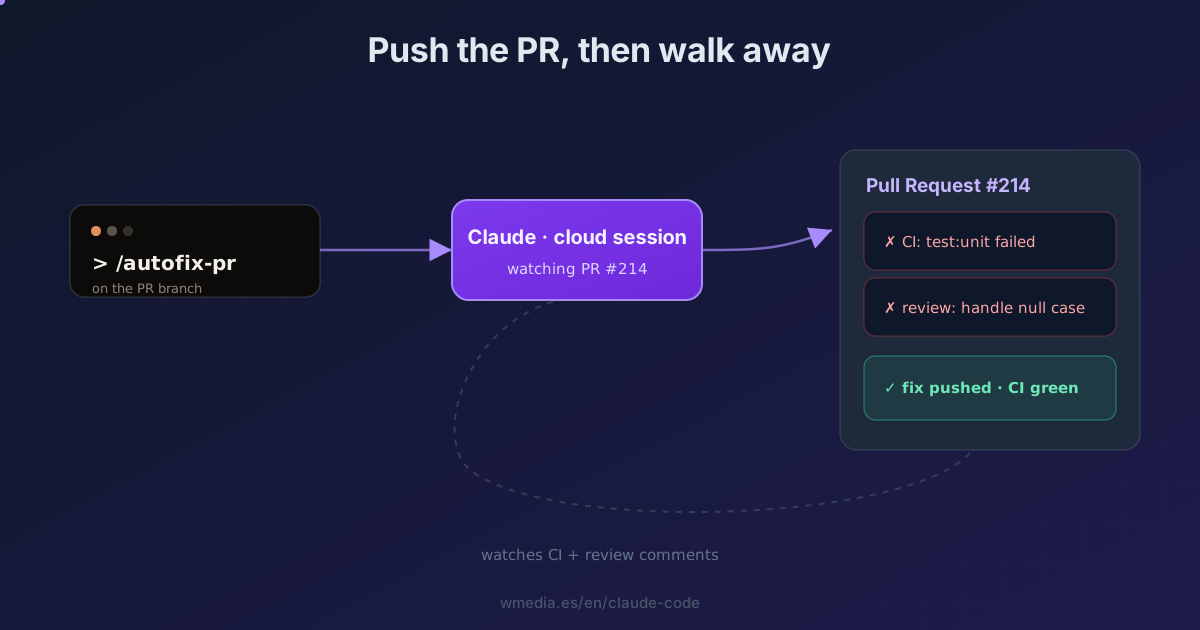
TL;DR On your PR's branch, run
/autofix-pr. Claude detects the PR withgh, spins up a cloud session, and watches it: when CI fails or someone leaves a review comment, it investigates and pushes the fix if it's clear. You need the Claude GitHub App installed and Claude Code on the web (in research preview for Pro, Max, Team, and Enterprise).
You open the PR and sit there refreshing GitHub to see if CI passes. When it fails, you read the log, fix it, push again, and wait some more. That loop is dead time. /autofix-pr moves it to the cloud and takes it off your plate.
Don't confuse it with the GitHub Actions app (that one reacts when you mention @claude in a comment). Here, from the same terminal you already work in, you set a watcher: Claude subscribes to the PR's events and reacts on its own, without you touching anything.
Result:
> /autofix-pr

Detecting the current branch's PR with gh… PR #214
Spinning up a cloud session and turning on auto-fix…

⏺ Watching PR #214 · CI + review comments
⎿  CI red (test:unit) → investigating → fix pushed ✓
How to use it
1. Install the Claude GitHub App (required)
From github.com/apps/claude, or when setup prompts you. Without it, auto-fix won't run.
2. On the PR's branch, run /autofix-pr
Claude detects the open PR with gh pr view, spins up a web session, and turns on auto-fix in one step. No URL to paste, nothing to configure — just be on the right branch. It takes an optional prompt to scope it: /autofix-pr only fix lint and type errors. Other ways in:
- PR created in Claude Code on the web: open the CI status bar and click Auto-fix.
- From the mobile app: "watch this PR and fix any CI failures or review comments".
- Any existing PR: paste the URL into a session and tell Claude to auto-fix it.
3. How it responds to each event
With auto-fix on, Claude receives the PR's events and decides:
- Clear fix: if it's confident and the change doesn't conflict with earlier instructions, it makes it, pushes it, and explains it in the session.
- Ambiguous or architectural: if a comment could be read several ways or touches something significant, it asks you before acting.
- Duplicate or no-op: it notes it and moves on.
4. Stopping it
It's a per-PR toggle. Open the CI status bar in the web session and clear Auto-fix, or tell Claude to stop watching the PR.
Three things so nothing catches you out
- It won't catch merge conflicts on its own. GitHub doesn't emit a webhook when the base branch advances into a conflict, so auto-fix never sees it. Open the session and ask Claude to rebase.
- It replies as you. Claude may answer review threads on GitHub; those replies post under your username (labeled as Claude Code, so reviewers know the agent wrote them).
- Security heads-up. If your repo uses comment-triggered automation (Atlantis, Terraform Cloud, Actions on
issue_comment), Claude's replies can set it off. Turn auto-fix off on repos where a PR comment can deploy infrastructure.
Reference
| Way in | How you turn it on |
|---|---|
| Terminal | /autofix-pr on the PR's branch |
| Claude Code on the web | CI status bar → Auto-fix |
| Mobile | "watch this PR and fix CI / review comments" |
| Existing PR | Paste the URL into a session and ask |
| Stop | Clear the Auto-fix toggle, or "stop watching the PR" |
Where it fits
- It's not Claude reviewing PRs via GitHub Actions: that reacts to
@claudein a comment through a workflow on your API key; this watches the PR on its own and pushes fixes from a cloud session. - To review your diff locally before you open the PR:
/code-review. - It runs on top of Claude Code on the web, the infrastructure the session lives in.
Official docs: Auto-fix pull requests
Requirements
- The Claude GitHub App installed on the repo.
- The
ghCLI installed and authenticated (it uses it to detect the branch's PR). - Claude Code on the web (in research preview) on Pro, Max, Team, or Enterprise (premium seats or Chat + Claude Code seats).