TL;DR Run
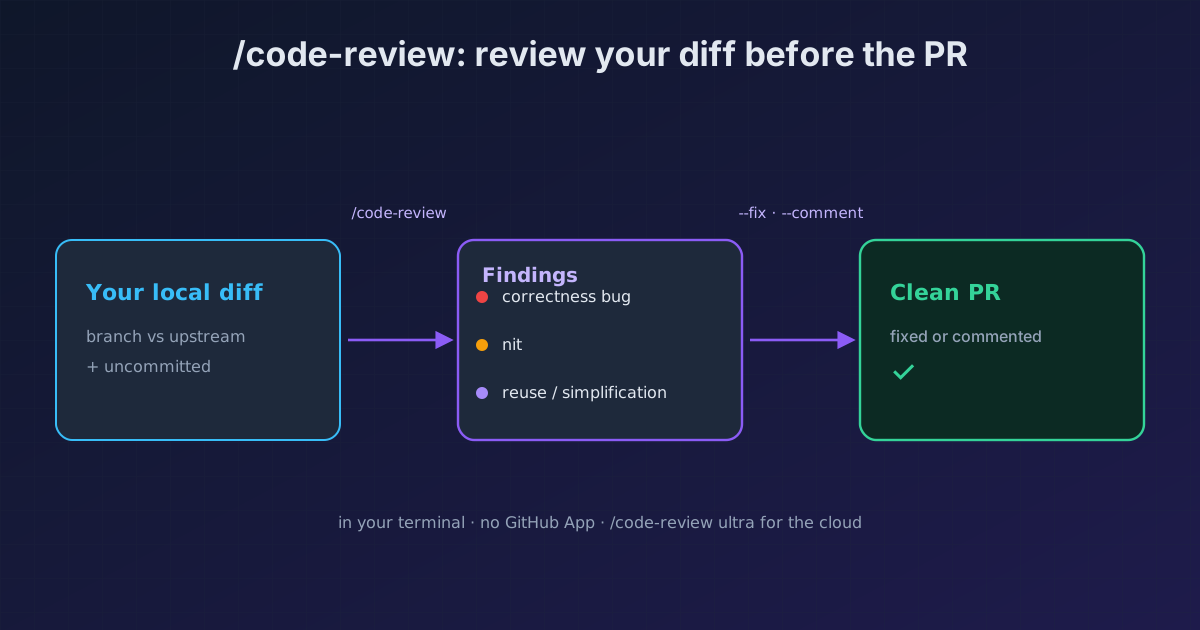
/code-reviewin any session and Claude reviews your branch's diff (the commits ahead of your upstream plus anything uncommitted): correctness bugs, and on top of that reuse, simplification, and efficiency cleanups.--fixapplies the findings to your working tree;--commentposts them inline on the PR. Pass a file, a PR number, or amain...branchrange to scope it. Zero GitHub App.
Search "Claude Code code review" and everything points to the same place: the Team/Enterprise GitHub App that comments on your PRs in the cloud. It exists, but it's not the only thing. There's a /code-review that runs in your terminal, in any session, with nothing to install, and reviews your diff before you open the PR. It's the shift-left almost every solo dev misses.
The docs put it plainly: run /code-review in any Claude Code session and it reviews a diff without installing the GitHub App.
> /code-review

Reviewing: 3 commits ahead of origin/main + 2 uncommitted files
  src/auth/session.ts · src/api/rate-limit.ts

🔴 src/auth/session.ts:142   token refresh races with logout
🟡 src/api/rate-limit.ts:33  rate-limit window doesn't reset on failure
🟣 reuse  validateUser duplicates the logic in src/auth/guards.ts

Apply with --fix · post to the PR with --comment
How to use it
1. What it reviews, and which diff it picks
By default it reviews your branch's diff: the commits you're ahead of your upstream by, plus anything uncommitted in the working tree. It looks for correctness bugs and, since v2.1.151, also reuse, simplification, and efficiency cleanups. It's not a style linter; it's a reviewer that understands your code.
2. Scope it with a target
Plain /code-review uses the default diff. Pass something to narrow it:
/code-review src/auth/session.ts      # a single file
/code-review 1234                      # a GitHub PR
/code-review main...my-feature         # the diff that PR would contain
3. --fix and --comment
--fix: applies the findings to your working tree after the review. You review them like any other change before committing.--comment: posts the findings as inline comments on the PR.
4. Raise the bar with effort, or go to the cloud
A low effort returns fewer, higher-confidence findings; high through max give broader coverage and the odd uncertain one. Without an argument, it uses your session's effort. For the deep, agent-fleet review in the cloud, /code-review ultra launches ultrareview and, with --fix, applies its findings when they come back to your session.
Coming from /simplify?
That was this command's name before v2.1.147, when it applied fixes by default. Since v2.1.154, /simplify is a different thing: a cleanup that applies fixes without hunting for bugs. If you scripted /simplify for bug-finding, it's now /code-review --fix.
Reference
| Invocation | What it reviews |
|---|---|
/code-review |
Default diff: branch vs upstream + uncommitted |
/code-review <file> |
That file only |
/code-review <PR#> |
A GitHub PR |
/code-review main...branch |
The diff that PR would contain |
--fix |
Applies the fixes to the working tree |
--comment |
Posts the findings inline on the PR |
/code-review ultra |
Ultrareview in the cloud (agent fleet) |
Where it fits
- Before reviewing anything, if what you want is to watch the diff grow while Claude works, the
/diffpanel stays docked beside the conversation. - Don't confuse it with Claude reviewing PRs inside GitHub: that lives in the cloud and fires on the PR; this runs in your terminal, before.
- For Claude to not just review but fix the PR on its own until CI is green:
/autofix-pr. - For a big change, the deep review with verification is
/ultrareviewin the cloud. - To run a PR instead of only reading its diff:
claude --worktree "#1234"fetches it into its own worktree and Claude runs the tests. - And the earliest layer, as Claude writes, is the security plugin: it chains in-session security → PR review → CI.
- On Opus 5, be careful narrowing the review prompt: asking for "high-severity issues only" makes it report less than it sees. Anthropic's 8 tips recommend asking for everything and filtering in a separate pass.
Official docs: Review a diff locally
Requirements
- The reuse/simplification/efficiency cleanups land in v2.1.151; the
/simplifychange, in v2.1.154.