TL;DR
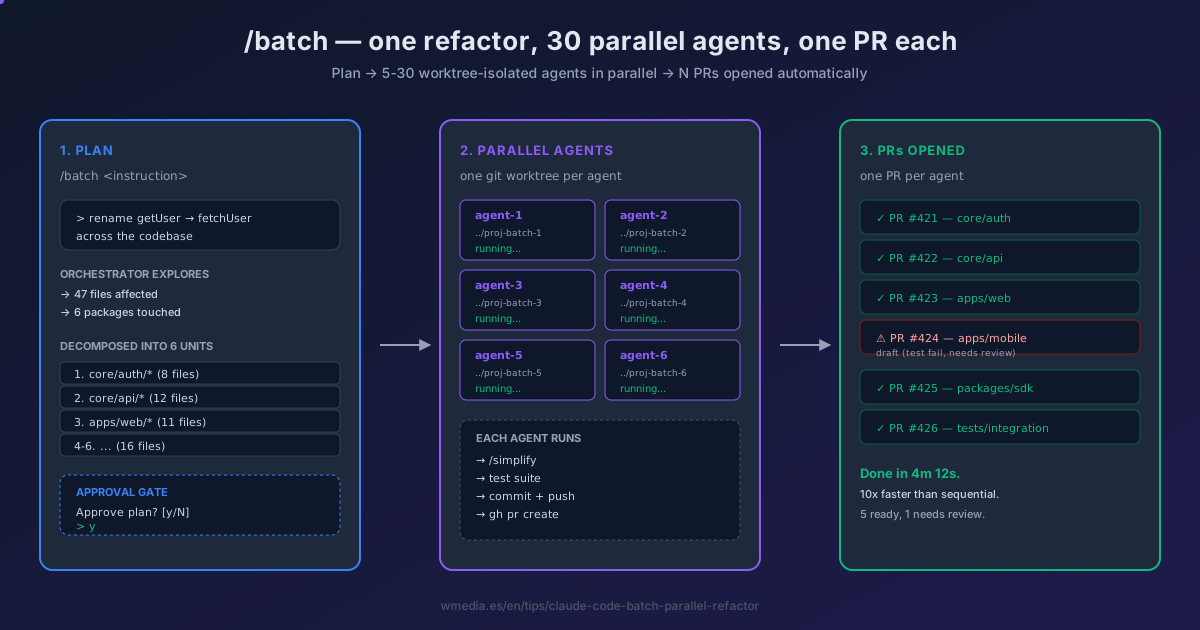
/batch <instruction>launches an orchestrator that (1) explores your codebase and decomposes the change into 5-30 independent units, (2) presents the plan for you to approve, (3) executes each unit in parallel in its own git worktree, and (4) opens one PR per agent. Up to 10x faster than running the same refactor sequentially.
You have a sweeping change — rename getUser to fetchUser across 200 files, migrate from axios to fetch, swap a deprecated component for its successor in every screen. Sequentially that's an afternoon of find/replace followed by an hour of fixing the test suite. /batch does it in 5 minutes by spinning up parallel agents, each in an isolated git worktree.
How it works internally
/batch runs in three phases:
Phase 1 — Plan. The orchestrator enters plan mode and launches Explore agents to research everything your instruction touches: every file, every call site, every related test. It then decomposes the work into 5 to 30 self-contained units depending on codebase size and change complexity. You see the plan before anything mutates.
Phase 2 — Parallel execution. Once you approve, the orchestrator dispatches one background agent per unit — all in a single message block so they run in true parallel. Each agent gets isolation: a clean git worktree with its own branch. No interference, no merge conflicts mid-flight.
Phase 3 — Close. Each worker, after applying its changes:
- Runs
/simplifyon its own diff (sibling cleanup command). - Executes the test suite for its unit.
- Commits, pushes, and opens a PR with
gh pr create.
You wake up to a queue of N PRs, each scoped to one independent piece, each green on CI.
Result preview
> /batch rename `getUser` to `fetchUser` across the codebase

⏺ Orchestrator (Plan mode)

Exploring affected files...
Found 47 files in 4 packages.

Decomposed into 6 units:
  1. core/auth/* (8 files)
  2. core/api/* (12 files)
  3. apps/web/* (11 files)
  4. apps/mobile/* (9 files)
  5. packages/sdk/* (4 files)
  6. tests/integration/* (3 files)

Approve plan? [y/N]
> y

⏺ Launching 6 parallel agents...

[agent-1] worktree: ../proj-batch-1  branch: batch/rename-getuser-1
[agent-2] worktree: ../proj-batch-2  branch: batch/rename-getuser-2
[...]

[agent-1] ✓ /simplify ✓ tests pass ✓ PR #421 opened
[agent-3] ✓ /simplify ✓ tests pass ✓ PR #422 opened
[agent-2] ✓ /simplify ✓ tests pass ✓ PR #423 opened
[agent-5] ✓ /simplify ✓ tests pass ✓ PR #424 opened
[agent-4] ✓ /simplify ✗ test failure  ⚠ PR #425 opened (draft)
[agent-6] ✓ /simplify ✓ tests pass ✓ PR #426 opened

Done in 4m 12s. 6 PRs open. 1 needs attention.
When to use it (and when not to)
Use /batch for |
Skip /batch for |
|---|---|
| Bulk renames across many files | Tightly coupled changes (touching one cross-cutting concern) |
Library migrations (axios → fetch) |
Anything that needs sequential decisions |
| Upgrading every component to a new API | Single-file edits — overkill |
| Adding the same instrumentation everywhere | Changes where one unit's output feeds the next |
| Mass deprecation cleanup | Refactors where you don't yet know the right shape |
The mental test: can the work be decomposed into independent units? If unit B depends on unit A's result, /batch is the wrong tool — use a normal session with the Explore subagent pattern instead. And if what you need is to orchestrate hundreds of agents on a single task with cross-checked verification — not one PR per unit but one verified answer — those are dynamic workflows.
Reference
| Aspect | Detail |
|---|---|
| Invocation | /batch <instruction> (instruction required) |
| Decomposition | 5-30 independent units, sized by orchestrator |
| Agent isolation | One git worktree per agent |
| Approval gate | Plan presented before any execution |
| Per-agent post-step | /simplify → tests → commit → push → gh pr create |
| Speed | Up to 10x faster than sequential |
Requirements
- Git repository with a remote
gh(GitHub CLI) installed and authenticated- Disk space for N worktrees (each is a full checkout)
Official docs: Claude Code commands reference (search for
/batch)
Sister mechanic:
/batchruns each agent in its own git worktree — the same isolation pattern you can drive manually.