TL;DR
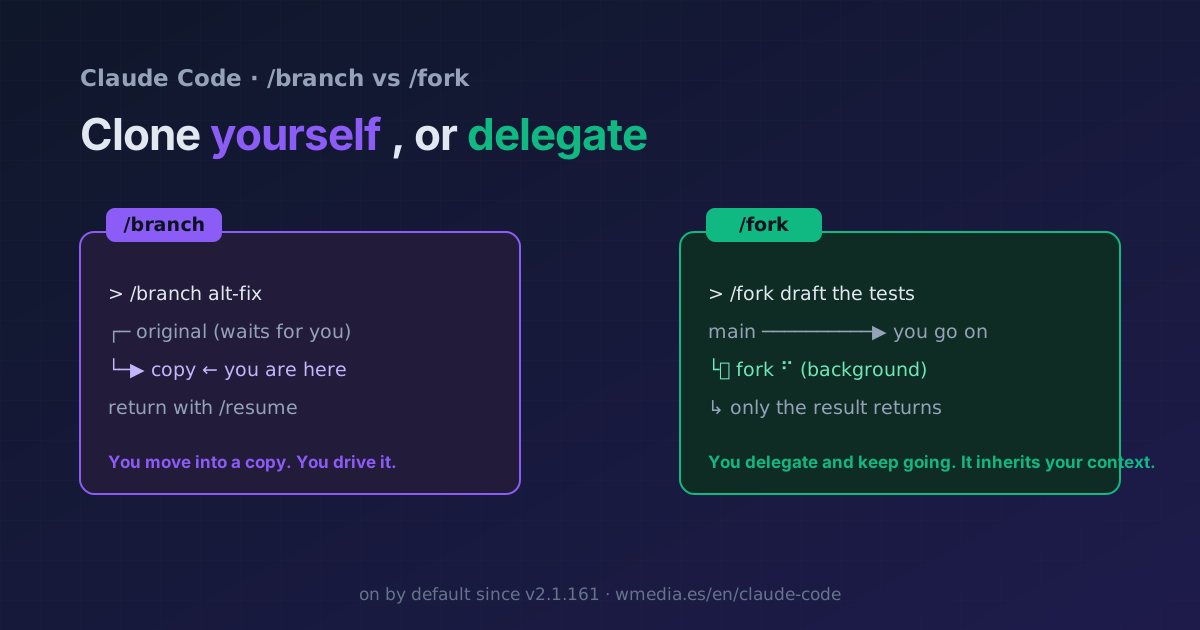
/branchmoves you into a copy of the conversation (the original stays put, you return with/resume): it'sgit checkout -bfor your chat./fork <directive>doesn't move you: it spawns a background subagent that inherits your whole conversation, works the directive while you keep going, and only its final result comes back to the chat. Before v2.1.161/forkwas an alias for/branch; since 2.1.161 it's on by default. And because it inherits your exact prefix, it reuses the parent's cache: cheaper than a normal subagent.
If you learned /fork a few months ago, your mental model is wrong. Until v2.1.161 /fork was literally an alias for /branch. Now they're two different mechanisms, and mixing them up is what makes people reach for the wrong one.
/branch: you clone and switch in
/branch [name] creates a branch of the conversation at this point, switches you into it, and preserves the original (you return with /resume). It's for exploring a different direction without losing what you have. Want it as a fresh, independent session from outside? claude --continue --fork-session does exactly that, covered in branch your sessions with fork-session.
/fork: you delegate and stay on task
/fork <directive> doesn't move you. It spawns a background subagent that inherits the whole conversation (same system prompt, tools, model, and history), works the directive while you keep going in the main thread, and when it's done only its final result comes back as a message. Its tool calls never touch your context window.
The typical use case: you're mid-implementation and, without stopping, you fire /fork draft the tests for this change or /fork figure out why the build is failing. The fork starts with your exact context (no re-explaining), works in parallel, and drops the result back when you finish your own task. It's also ideal for trying two approaches at once from the same starting point.
> /fork draft unit tests for the parser changes so far

  ┌─ main                                  working…
  └─ draft unit tests for the parser ⠋    (fork, in background)
     Enter: open and steer · x: dismiss
The fork shows up in a panel below your prompt: Enter opens its transcript so you can send it messages, x dismisses or stops it. You can spawn several and compare them.
Why it isn't a normal subagent
A normal subagent starts fresh: it doesn't see your history or the files you already read; Claude writes it a summary message and it works from there (which is why they sometimes lose context). A fork is the exception: it inherits everything, so you don't re-explain a thing. And because its system prompt and tools are identical to the parent's, its first request reuses the parent's cache (prompt caching): that's why forking is cheaper than spinning up a subagent from scratch.
Reference
/branch [name] |
/fork <directive> |
|
|---|---|---|
| What it does | A branch of the conversation | A background subagent |
| Do you switch? | Yes, you move into the copy | No, you stay in the thread |
| Context | It is your conversation | Inherits your whole conversation |
| What comes back | Nothing (it's you) | Only the final result |
| Where it runs | Your session | In the background (panel below) |
| The original | Preserved (/resume) |
Untouched, you stay in it |
Details worth knowing
- Version: on by default since v2.1.161. On v2.1.117–2.1.160 you need
CLAUDE_CODE_FORK_SUBAGENT=1. Before 2.1.117 it doesn't exist. - Force the mode:
CLAUDE_CODE_FORK_SUBAGENT=1enables it,=0disables it (in interactive, SDK, andclaude -p). - A fork can't spawn another fork (it can spawn other subagent types).
Official docs: Fork the current conversation · Commands
Requirements
- Claude Code v2.1.161+ for
/forkby default; v2.1.117+ by enabling it withCLAUDE_CODE_FORK_SUBAGENT=1.