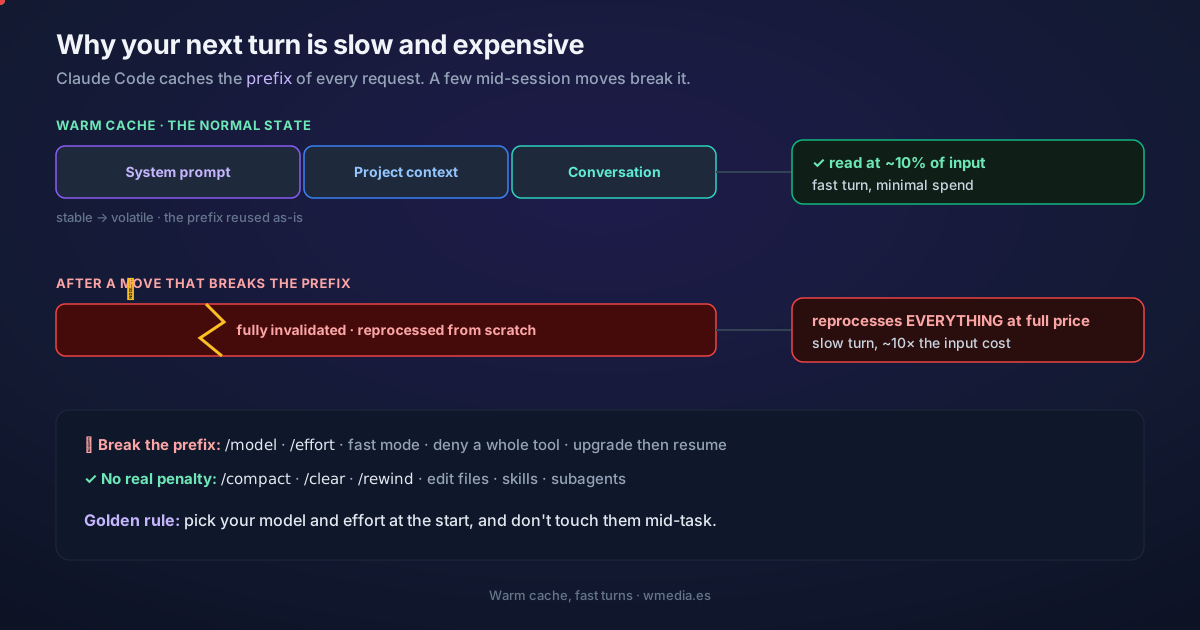
TL;DR Sometimes a session suddenly turns sluggish and burns through tokens, and at first you have no idea why. It's almost always the cache. Claude Code caches the prefix of every request automatically; a few mid-session moves invalidate it, and your next turn reprocesses the entire conversation at full price. The golden rule: pick your model and effort at the start, and don't touch them mid-task.
Claude Code handles prompt caching for you, so it isn't something you configure. It's something worth not breaking by accident. Knowing what invalidates it is the difference between a session that flows and one that suddenly grinds.
How the cache works
On every turn the model remembers nothing from the last one, so Claude Code re-sends all the context (system prompt, your CLAUDE.md, every prior message) and appends the new part at the end. The API caches by prefix: it matches the start of your request against what it already processed. The match is exact, so a change anywhere in the prefix recomputes everything after it. There's no per-file or per-segment cache.
To make the most of it, Claude Code orders each request from most stable to most volatile:
| Layer | Content | Changes when |
|---|---|---|
| System prompt | Core instructions, tool definitions, output style | The set of loaded tools changes, or Claude Code is upgraded |
| Project context | CLAUDE.md, memory, rules | The session starts, or after /clear or /compact |
| Conversation | Your messages, Claude's responses, tool results | Every turn |
A change in the conversation leaves the two top layers cached. A change in the system prompt invalidates everything. And two things that aren't even text are still part of the cache key: the model and the effort level. Change either one and you start a fresh cache from scratch.
What it looks like
# Healthy cache (the normal state)
cache_read_input_tokens:      48,231   ← reused, ~10% of the input price
cache_creation_input_tokens:     412   ← only what's new this turn

# The turn right after switching models mid-session
cache_read_input_tokens:           0   ← zero hits
cache_creation_input_tokens:  48,643   ← reprocesses EVERYTHING at full price
A cached read costs ~10% of the input price (per the official docs). A cache miss pays full price, which is why that turn is slow and costs roughly 10× as much on input.
That 10% stopped being universal on September 1, 2026: on Fable 5.1 and Mythos 5.1 a cached read costs 2.5% of input, a quarter of the usual rate. On Opus 5.5 it is 5%: $0.20 per million against $4 for input. Every other Claude model is still at 10%. What doesn't change anywhere is the cache miss, which is charged in full.
The three buckets you need to tell apart
1. What breaks the cache (avoid mid-task)
- Switching models with
/model(and theopusplanplan-mode toggle, which is a model switch in disguise). - Changing effort with
/effort. Claude Code asks you to confirm precisely because it knows it costs you, but only while the cache is still warm: once it has expired there is nothing left to lose, so it switches without asking. Same goes for/model. There is an exception: on Opus 5.5 and Fable 5.1 with an API key or a Claude subscription, changing effort keeps the cache and Claude Code applies the new level without asking (on Fable 5.1, since v2.1.260). It does not hold on Bedrock, Google Cloud's Agent Platform or behind a gateway. And that level is also saved per model. If you only need one deeper turn, ultrathink doesn't change effort, so it stays off this list. - Turning on fast mode.
- Denying a whole tool (a bare
BashorWebFetch; scoped rules likeBash(rm *)and all allow/ask rules break nothing). - Upgrading Claude Code and then resuming a long session: the first turn reprocesses the whole history, often the most expensive request you'll send.
2. What resets the cache by design, but is cheap (don't fear it)
/compact: invalidates only the conversation layer. The summary is generated by reading the cache, and the next turn rebuilds a much shorter history, so it's not the slow part. That holds only while the cache is still alive: compact after a long break and that same request reprocesses your entire history at full price, which is why it pays to compact before you step away rather than when you get back. It barely costs you in spend, but not all your instructions come back the same: what survives /compact./clear: you start fresh on purpose./rewind: truncates back to a prefix that was already cached, so you abandon a path without rebuilding the cache, unlike/compact, which builds a new one.
3. What's always safe
- Editing files, invoking skills and commands,
/recap, spawning subagents. Switching permission modes doesn't touch the cache either, with one exception: entering or leaving auto mode does break it, and Claude Code lists it asauto mode toggledamong the miss causes it can name. - Delegating with
/fork: the fork inherits your prefix, so its first request reuses your cache instead of paying from scratch (cheaper than a normal subagent). - Switching folders with
/cd: it moves the session but appends the new folder'sCLAUDE.mdas a message instead of rewriting the system prompt, so the prefix holds. - Editing CLAUDE.md or the output style mid-session doesn't break the cache, but it also doesn't apply: Claude keeps using the version loaded at startup until the next
/clearor restart.
If you're going to switch models anyway, the order matters: compact first, not after, so the unavoidable reprocess lands on an already-short history. That move, and when dropping from one model to another is worth it, is in Sonnet 5, Opus 5 and Fable 5. Sonnet 5.5 adds a second cost: no other model reads its thinking blocks, so switching drops its reasoning.
About MCP and plugins: by default, on Opus and Sonnet, MCP tools are deferred with Tool Search, and connecting or disconnecting a server doesn't touch the cache. It only breaks when tools load into the prefix (Haiku, Vertex, a custom gateway, or
alwaysLoad). In the common case, relax.
Check whether your cache is healthy
Since v2.1.251 you no longer have to work it out. /cost carries a Prompt cache (main) line with the share of your input served from cache, the misses you have so far in the session and, since v2.1.260, the cause of the last one by name, drawn from a closed set of sixteen: how to read that line, and what to do about each cause.
If you'd rather keep the number in front of you, the JSON your statusline script receives carries a prompt_cache object with that same share, the TTL, and how many tokens you would re-cache by typing once it has gone cold: that is where the segment goes.
The two raw counters behind it ship in every API response:
cache_read_input_tokens: tokens served from cache (at ~10% of input).cache_creation_input_tokens: tokens written to the cache this turn.
A high read-to-creation ratio means caching is working for you. For a sense of what a normal ratio looks like, I added up those two counters across three whole sessions and reads came out between 16 and 61 times creation.
Stretch the cache if you work in bursts (TTL)
The cache expires after a stretch of inactivity, and every hit resets the timer. How long that stretch is isn't a single number: it depends on which request it is and on how you pay.
| Requests | Claude subscription, within plan usage | Usage credits, API key or cloud provider |
|---|---|---|
| Main conversation | One hour | Five minutes |
| Everything else: subagents, workflows, forks and compaction itself | Five minutes | Five minutes |
Two details that don't show up on any screen. First: the moment you go past your plan's included usage and start drawing on usage credits, your main conversation drops itself to five minutes, because from there on you're billed for it. Second: the request that generates a summary lives in the bottom row, so it inherits five minutes even when you have an hour.
If you'd rather pin the TTL yourself, there's a control per row. promptCacheTtl (or the CLAUDE_CODE_PROMPT_CACHE_TTL variable) governs the main conversation, and subagentPromptCacheTtl (or CLAUDE_CODE_SUBAGENT_PROMPT_CACHE_TTL) governs everything else. Both take 5m or 1h and nothing else. Above all of them, FORCE_PROMPT_CACHING_5M=1 forces five minutes on both rows, which is what you want while debugging. And ENABLE_PROMPT_CACHING_1H=1 is still the shortcut for asking for the hour on both.
This is the flip side of 10 habits to save tokens: there you shrink the context; here you avoid paying for it twice. The third side, how much of your spend is that context being re-sent turn after turn with a healthy cache, is measured in why Claude Code burns so many tokens. And to see the real spend, /usage and /stats lay it out. And to understand what actually cuts you off, how your usage limits work.
Official docs: How Claude Code uses prompt caching
Requirements: keeping the fast-mode header across toggles needs Claude Code v2.1.86+. The promptCacheTtl and subagentPromptCacheTtl settings, and their two environment variables, need v2.1.242+. The ENABLE_PROMPT_CACHING_1H, FORCE_PROMPT_CACHING_5M, and DISABLE_PROMPT_CACHING variables go in the env block of your settings.