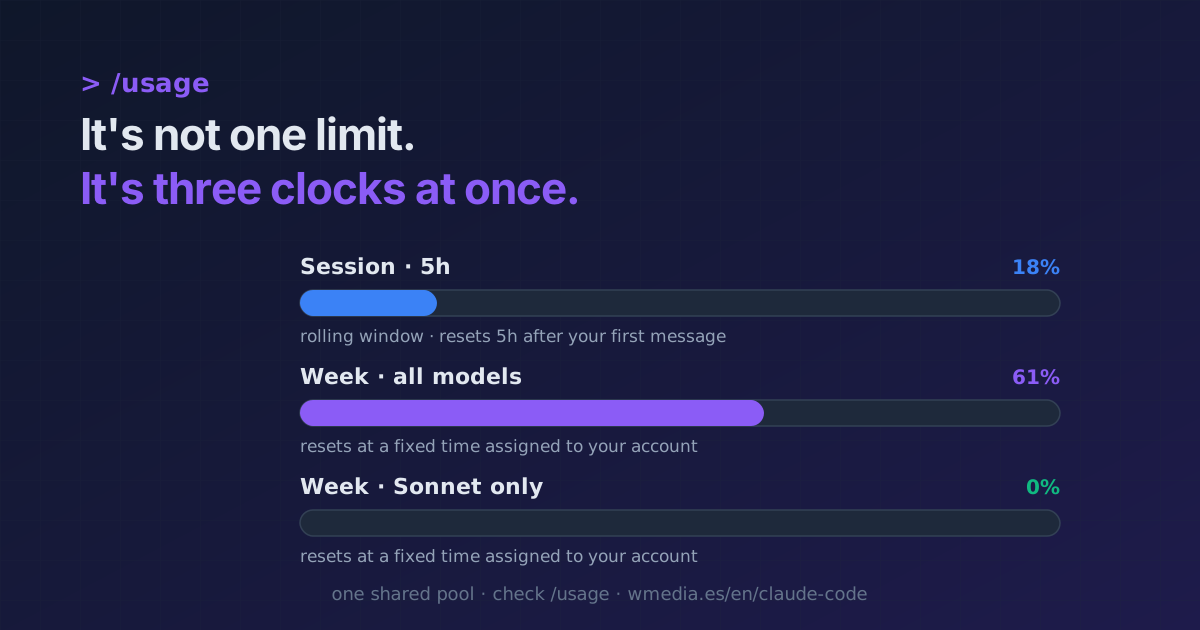
TL;DR It's not one limit, it's three bars at once. The 5-hour window starts with your first message and renews 5 hours later (a rolling window). On top of it run two weekly limits: one across all models and one for Sonnet only, both resetting at a fixed time assigned to your account. What drains it fastest: the model (Opus costs far more than Sonnet), the effort level, and long sessions. Check your bars in
/usage(d/wfor 24h / 7 days). Any of the three cuts you off until it resets.
I spend many hours a day in Claude Code and, honestly, I never fully understood why it sometimes cut me off mid-afternoon. The catch is that it isn't one counter, it's several clocks running at once, with different rules. Once you separate them, it stops feeling random.
> /usage

Current session       ████░░░░░░  18% · resets 3:50pm
Current week (all)    █░░░░░░░░░   3% · resets Jun 25, 8pm
Current week (Sonnet) ░░░░░░░░░░   0%
The clocks
1. The 5-hour window (the "session")
It's a rolling window: it starts counting from your first message and renews 5 hours after that start. It's not wall-clock (not "at midnight"), it's "5 hours from when you began." /usage shows how much you've spent and what time the current session resets. It's the cap most people hit on a heavy day.
2. The weekly limits (there are two)
Above the window run two weekly caps, and here's the key difference: they reset at a fixed time assigned to your account, not a rolling one. It even shows the date of your next reset (e.g. Resets Jun 25 at 8pm). Your reset day and time don't change no matter what you do, and you get your full allowance each cycle.
The two bars are Current week (all models) and Current week (Sonnet only): one counts all your usage, the other only your Sonnet usage. That's how it shows on a Max plan; check your own bars for your plan.
Exception: on an Enterprise seat the pool resets on a rolling window, not a fixed time. The above is for Pro and Max.
What drains it fastest
Not every turn costs the same. The heavy hitters:
- The model. Opus burns far more than Sonnet for the same work. Choosing the right model is the number-one lever.
- Long sessions.
/usagewarns you itself: above ~150k of context, every turn costs more even when cached./compactbetween tasks and/clearwhen you switch topics. - Long breaks with the session open. Once the cache expires, the first message on your return reprocesses the entire history at full price, and if you compact right then you pay for it twice. Compact before you step away rather than when you get back.
- Breaking the cache. A cache miss reprocesses the whole prefix at full price: switching models mid-task can cost 10× on that turn. Covered in prompt caching, and if you want to check whether it is happening to you,
/costcounts the misses and names the cause of the last one. - The effort level, attachments, and tools (web search) add up too. To spend less, the 10 habits to save tokens.
The detail that makes the numbers not add up
Your plan is one shared pool: what you spend on claude.ai, the desktop app, and Claude Code all goes to the same place. But the CLI's /usage is computed locally, and it says so itself: "based on local sessions on this machine, does not include other devices or claude.ai." That's why it sometimes "cuts you off" earlier than /usage suggests: the real server-side counter is ahead of the one you see in the terminal.
Reference
| 5-hour window | Weekly limits | |
|---|---|---|
| Type | Rolling window | Fixed assigned reset |
| Starts | With your first message | Fixed day/time for your account |
| How many | One | Two: all models + Sonnet only |
| Where to see it | /usage · Settings > Usage |
/usage (w) · Settings > Usage |
Where it fits
- Keep them always in sight, without running
/usage: your 5-hour and 7-day window % in the status line. - To see your bars:
/usageand/stats. And to find out what is eating that cap, with the name of the skill or MCP server and its percentage: the/usagebreakdown. - Why one turn suddenly spikes: prompt caching, and what broke your cache this time.
- How to spend less: 10 habits to save tokens.
- And with those limits clear, which plan actually pays off for how you work.
- Why a styled page (an artifact) costs more tokens: Artifacts in Claude Code.
Official docs: Usage limit best practices · Models, usage, and limits in Claude Code
Requirements
- The plan bars in
/usage(session + weekly) require a subscription plan (Pro, Max, Team, or Enterprise). The exact numbers get bumped from time to time, so always check your own.