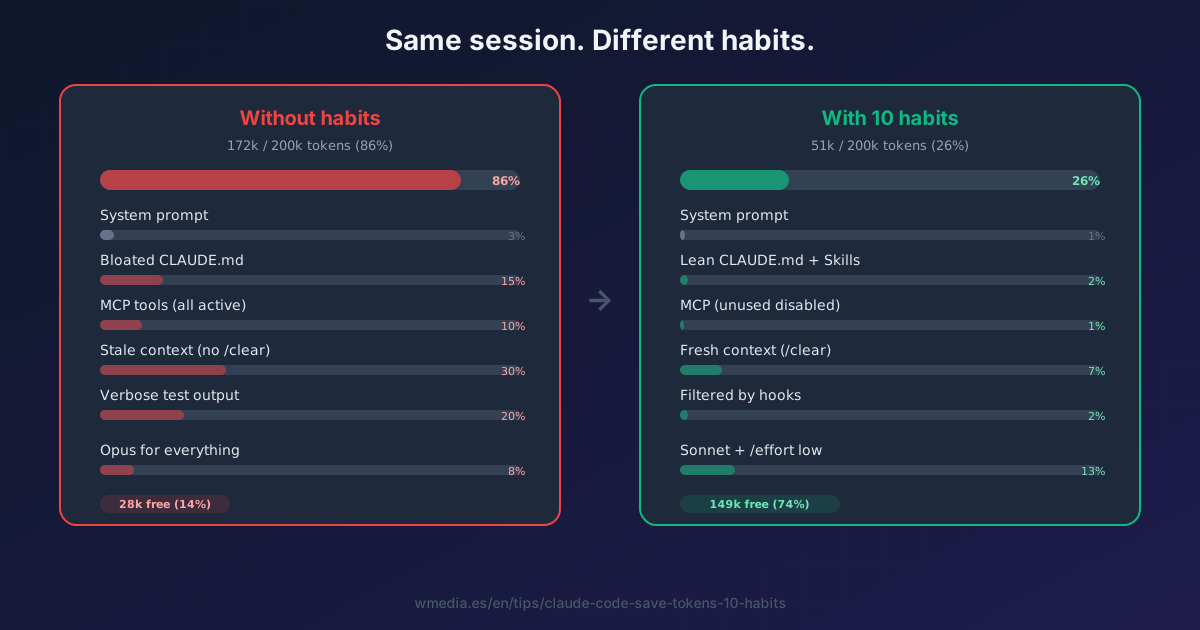
TL;DR If your Claude Code session is running out faster than it used to — it's not just you. Real complaints all over the place. But part of the fix is on you. Anthropic has a full page in the docs ("Manage costs effectively") with 10 verifiable habits. Here are all 10, with the exact docs citation when relevant.
The funny thing about these 10 habits: none of them is esoteric. They're common sense. And precisely because they're common sense, they're the first ones you skip — when something is obvious, you dismiss it as "I already know that" before applying it.
The 10 habits
1. Monitor where your tokens go
/context breaks down each category: system prompt, MCP tools, messages, free space. If you don't check it periodically, you're driving blind. Dedicated tip: /context to monitor token usage. For long-term trends and plan limits, see /usage and /stats. And to find out which skill, plugin or MCP server takes each percentage of your limit, the /usage breakdown.
One instrument is still missing, and it measures the other half: the Prompt cache (main) line in /cost tells you what share of your input arrives from cache and, when it doesn't, what broke it. A small context and a healthy cache are two different things, and both decide your bill.
2. Clean between tasks
/clear when switching tasks. Before that, /rename so you can find the session later with /resume.
"Stale context wastes tokens on every subsequent message."
This is the one with the most room in it, for a specific reason: every turn re-sends the whole conversation, so whatever you drag over from the last task, you pay for again on every turn the session has left.
3. Compact with explicit instructions
/compact is not just "summarize". You can tell Claude exactly what to preserve:
/compact Focus on code samples and API usage
You can also drop the instructions into CLAUDE.md under # Compact instructions. And note: not everything comes back the same after compacting — see what survives /compact. The other half of this habit is timing: compacting before a long break costs a tenth of compacting when you get back, because the summary is paid for by reading the whole conversation, and that read only comes from cache while the cache is still alive.
4. Sonnet by default. Opus only for architecture
/model to switch on the fly. Simple subagents with model: haiku in their config.
"Sonnet handles most coding tasks well and costs less than Opus. Reserve Opus for complex architectural decisions or multi-step reasoning."
Dedicated tip: How to choose the right model in Claude Code. And with the new /advisor toggle you can keep Opus as a point-in-time advisor while Sonnet keeps executing — same savings without switching models.
5. Disable unused MCP servers, prefer native CLI tools
/mcp to see and disable servers. Each active server still leaves its tool names in context even though the definitions are deferred. Prefer gh, aws, gcloud, sentry-cli over MCP servers — CLI tools don't even add the listing. If you're going to keep a small set, start with the five MCPs that earn the slot and drop the rest.
6. Preprocess verbose output with hooks
A PreToolUse hook intercepts the command before it runs and can rewrite it via updatedInput. It turns 10,000 lines of test output into the 50 that matter. Claude only sees the filtered output. Dedicated tip: Hooks in Claude Code: automate your workflow. And if the output grows so large that the command dies on volume rather than on time, that is one of the three possible endings of a long command.
Long before it dies, verbose output is already costing you information: when the command fails, Claude only gets to read about 10,000 characters, and the reason it failed is left outside. Which makes the cheapest habit of all the one where the command never prints that much, with its quiet flag written into CLAUDE.md.
7. Move instructions from CLAUDE.md to Skills
CLAUDE.md is loaded at session start. Those tokens are in your context from the first turn to the last. Skills load on-demand only when invoked. Move everything workflow-specific into a Skill. Docs target: keep CLAUDE.md under 200 lines.
8. Lower the thinking budget on simple tasks
Thinking tokens are billed as output, and the default budget can be tens of thousands of tokens per request. /effort low when you don't need deep reasoning. Dedicated tip: How to adjust the effort level in Claude Code.
Correction (July 2026): this habit also recommended MAX_THINKING_TOKENS=8000 to cap the global budget. That no longer applies: adaptive models (Fable 5, Sonnet 5 and every Opus from 4.7 onwards) ignore any value other than 0. Effort is the only control still wired to anything, and the full map is in you're turning knobs that aren't connected to anything.
9. Delegate verbose operations to subagents
npm test, gh pr view, processing logs: all of that burns context in your main conversation. Delegated to a subagent, the verbose output stays in its context — only the summary comes back. Watch out for the gotchas though: subagents lose context.
"the verbose output stays in the subagent's context while only a summary returns to your main conversation."
10. Plan mode before implementing
Shift+Tab cycles between permission modes — plan is one of six. Claude explores the codebase and proposes an approach before touching anything. If the initial direction is wrong, you find out in plan mode (cheap) instead of mid-implementation (expensive, with re-work). For the deep dive on the mode — including the /evaluate combo before and after — see Plan Mode forces you to think.
"preventing expensive re-work when the initial direction is wrong."
Why it matters right now
There's a growing volume of complaints about sessions running out faster. The structural side you don't control — but the habits side you do. And the official docs tell you exactly how to fix it in 10 concrete points.
There's now an eleventh lever working the same bill from the other end: the Concise output style trims the narration out of the answers, and that narration is output tokens too.
None of these is magic. They're all common sense. And precisely because they're common sense, they're the first ones you skip. If you would rather understand the mechanism before applying the recipe, why Claude Code burns so many tokens is the reasoning underneath these ten.
Official docs: Manage costs effectively · See also: /context · 1M context window · When features load into context · Prompt caching · What broke your cache · What survives /compact · How your usage limits work · The effort you think you have