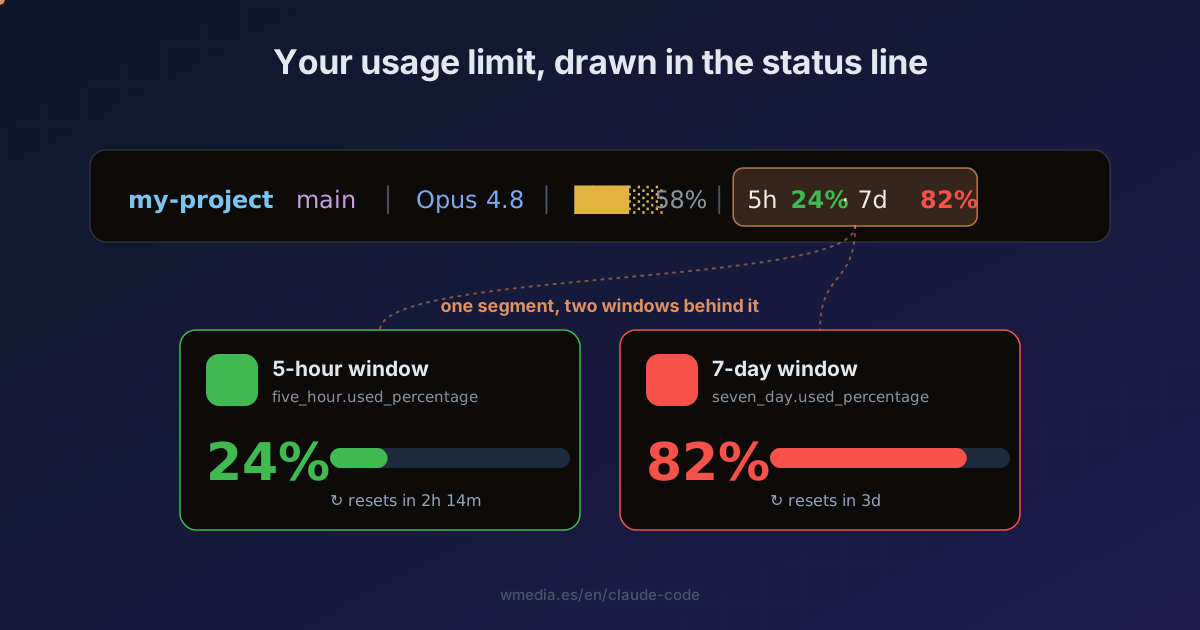
TL;DR The JSON your status line receives carries
rate_limitswith two windows,five_hourandseven_day, each withused_percentageandresets_at. Read them withjqand paint the percentage in the bar. It only shows on a subscription (Pro/Max) and after the first response of the session, so handle the absence with// empty.
You're on Pro or Max. Mid-way through a long task, the 5-hour limit runs out and Claude stops. No heads-up. There's /usage, but you have to stop, type it, and read it. The number already ships in every response: put it in the status line and you see it without looking up from your code.
How it works
Claude Code pipes a JSON object to your status line script on stdin. It now includes rate_limits, with two windows:
"rate_limits": {
  "five_hour":  { "used_percentage": 23.5, "resets_at": 1738425600 },
  "seven_day":  { "used_percentage": 41.2, "resets_at": 1738857600 }
}
used_percentage runs 0 to 100. resets_at is Unix epoch seconds (when the window resets).
Result, a real status line with the new segment at the end:
 my-project   main │ Opus 4.8 │ ███░░ 58% │ 5h 24% · 7d 82%
                                            ╰── you add this
Green while you've got room, red as you near the wall.
How to set it up
1. Point the status line at your script
In ~/.claude/settings.json:
{
  "statusLine": { "type": "command", "command": "~/.claude/statusline.sh" }
}
2. Read both windows in the script
#!/usr/bin/env bash
in=$(cat)
fh=$(jq -r '.rate_limits.five_hour.used_percentage // empty' <<<"$in")
sd=$(jq -r '.rate_limits.seven_day.used_percentage // empty' <<<"$in")

# Pro/Max only, and only after the first response: if absent, print nothing
[ -z "$fh" ] && exit 0

bar() {                       # $1 = percentage
  local p=${1%.*} c
  if   [ "$p" -ge 80 ]; then c=31   # red
  elif [ "$p" -ge 50 ]; then c=33   # yellow
  else                       c=32   # green
  fi
  printf '\033[%sm%s%%\033[0m' "$c" "$p"
}

printf '5h %s · 7d %s' "$(bar "$fh")" "$(bar "${sd:-0}")"
The script prints one line to stdout, and that line is your status line. Nothing more.
3. The // empty is not optional
rate_limits only exists on a Claude.ai subscription (Pro/Max) and shows up after the first response of the session. Each window can be absent on its own. Without the // empty and the exit 0, you'd see a broken status line at startup until the first message.
Reference
| Field | What it is |
|---|---|
rate_limits.five_hour.used_percentage |
% consumed of the 5-hour window (0–100) |
rate_limits.seven_day.used_percentage |
% consumed of the 7-day window |
rate_limits.five_hour.resets_at |
Epoch (s) when the 5-hour window resets |
rate_limits.seven_day.resets_at |
Epoch (s) when the 7-day window resets |
For a countdown, subtract resets_at from the current time: jq -r '.rate_limits.five_hour.resets_at' and format it with date.
Official docs: Status line — rate limit usage
This extends the status line script with the fields almost nobody uses. When one of the two bars spikes and you want to know what filled it, by the name of the skill or MCP server, that's the /usage breakdown; for the overall figures, /usage and /stats; and to understand the three windows, how your usage limits actually work. This is the always-on glance.
And the same JSON carries a sibling field, prompt_cache, with the share of input arriving from cache and the miss count per cause. It is the permanent-bar version of the line that tells you what broke your cache, and the segment is already written: the bar repaints itself when the cache goes cold.
Requirements
- Claude Code v2.1.x,
jq, and a subscription plan (Pro/Max). API accounts have norate_limits. Theprompt_cachefield needs v2.1.251 and does not depend on your plan.