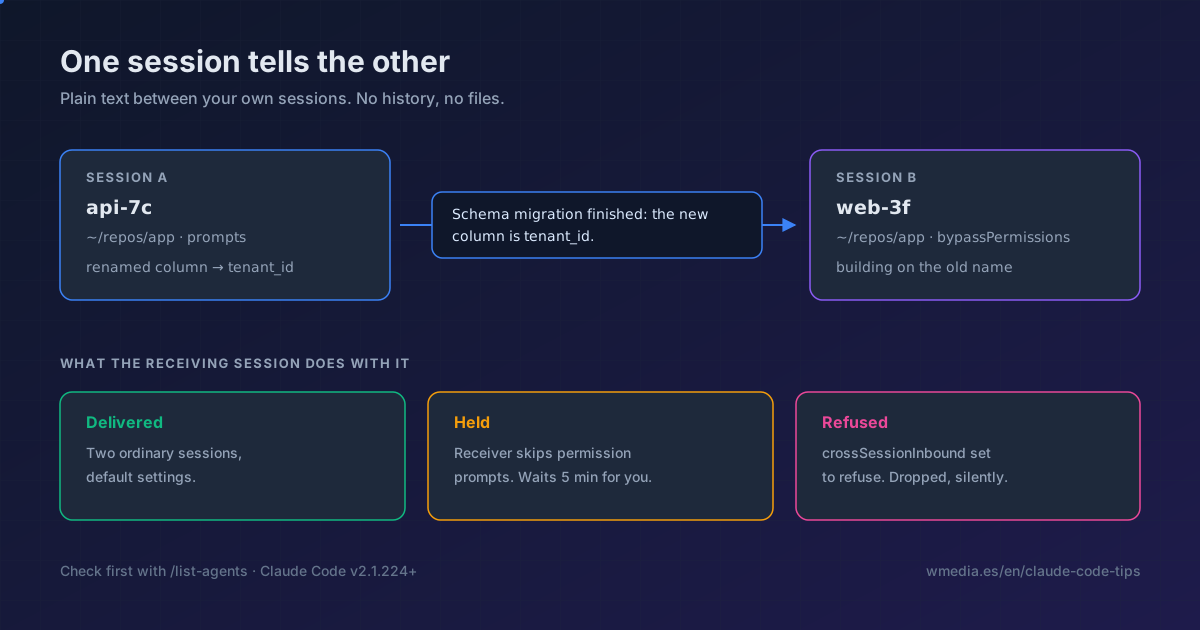
TL;DR As of v2.1.224, one Claude Code session can write to another with nothing to enable, and between sessions on the same machine the text never leaves your disk. Ask for it in plain language ("tell the session in repo X that the migration landed") and Claude finds the target and sends. Check with
/list-agentsfirst that it can see the session: if it isn't on that list, there's nothing to send to. And if the receiving session runs inbypassPermissionsand the sender doesn't, the message sits held, waiting for your approval in the other window.
Two terminals open on the same repository. In one of them you just renamed a database column. In the other, Claude has spent twenty minutes building on the old name and has no way of knowing. The way to warn it has always been the same: copy the summary out of one window, switch tabs, paste it in. You as the cable between two Claudes.
Since version 2.1.224 that cable exists. One session can hand a piece of text to another, and there's nothing to switch on: if your session meets the requirements, it's already running.
First, check they can see each other
/list-agents
On my machine, with a background session working on another project:
Other Claude sessions (1):
  [idle]  ·  wmedia  ·  /Users/juan.nunez/Herd/wmedia  ·  started 20h ago
Every row is a session Claude can reach, and the row's name is the address it writes to. The command is also available as /peers. The working directory shows up for a practical reason: two sessions can end up with the same name, and that column is what tells them apart. The name comes from /rename or the --name flag, and when you set neither, Claude Code derives one from the folder (myapp-3f).
The listing covers your subagents, your other local sessions (including the ones in Agent View) and, while Remote Control is connected, your sessions on other machines and on the web, labeled Remote Control.
If /list-agents isn't recognized, your send isn't failing: the session doesn't have the feature at all. Check the requirements at the end before you go further.
How you ask for it
You never call a tool yourself. You tell Claude what the other session needs to know:
Ask the session running in my other terminal whether the migration finished
Explain what we just changed to the session working on the payments API
Claude writes the text that travels, not you. Under the hood it uses two tools: ListAgents to discover who it can reach, and SendMessage to deliver the message to one of them by name. And you don't have to ask: Claude can send one on its own when it sees that a change it just made affects what another session is building.
What lands on the other side is plain text and nothing else:
Schema migration finished: the new column is tenant_id, and rebasing on main is safe now.
No history, no files, no conversation context. If what you want is to move the whole conversation to another terminal, that's /resume (or claude --resume from another terminal), not this.
In the receiving session the message shows up with the sender's name. If Claude is mid-turn it queues and gets read between tool calls, so nothing gets cut off; if the session was idle, it starts a new turn with it. Once read, it collapses to a one-line Message from row that Ctrl+O expands again. And it counts toward usage exactly like a prompt you typed.
What a message can't do
Claude Code tells the receiving session that this came from another session, not from you, and that strips out a lot of attack surface:
| The message asks for… | What happens |
|---|---|
| Approving a pending permission | It doesn't count as your consent. No approval |
Editing CLAUDE.md, permissions or any config |
The receiver is told never to change configuration because another session asked |
Running /compact or any slash command |
It arrives as plain text. Nothing executes |
| Something needing a permission it lacks | You get the same permission prompt as always |
Permissions stay per-session. Claude is told never to ask another session for something denied or blocked in its own, and to route that work back to you instead. If you've never separated modes, rules and permissions, here are the three concepts.
When the message doesn't arrive
This is the part that decides whether the feature helps you or annoys you. Between two ordinary interactive sessions with default settings, the message gets delivered. Outside that case there are three possible endings:
- Delivered: Claude reads it.
- Held: Claude Code sets it aside undelivered and shows you a notice. It only lands if you approve it, or if a later mode or settings change allows it.
- Refused: dropped without delivering anything.
When you've configured nothing, the call is made by comparing the two sessions' permission modes. Claude Code groups sessions that skip permission prompts into one class and everything else into the other (auto, acceptEdits and dontAsk all count as prompting; plan mode counts as skipping, in sessions where bypass is available):
| The receiving session | What it does with the message |
|---|---|
| Prompts for permissions | Delivers it. Holds it only when the sender identifies itself as skipping prompts |
| Skips permission prompts | Holds it for your approval. Delivers it only when the sender also skips |
Translated: the riskiest session, the one running with no brakes, is precisely the one that stops receiving. Send something from a normal terminal to one you left in bypassPermissions and it won't arrive until you walk over to that window and approve it in a dialog that expires after five minutes (dialogExpiry, configurable). Past the deadline, the message is dropped.
When the sender is on the same machine, it hears what happened: one notice when the message is held, and a follow-up later with the outcome (delivered, denied or expired). A message refused on arrival produces no sender-side notice at all.
And the worst case, the one that shows up as soon as you automate anything: a claude -p session can't show that dialog. A held message stays held there forever. To let an unattended worker take messages, start it with crossSessionInbound set to accept in its --settings.
Its twin, for the day a session is missing from the list: an ordinary -p session does bind its socket and does appear in /list-agents, but one started in bare mode doesn't bind it, so it neither receives nor shows up.
{
  "crossSessionInbound": "accept"
}
The three values are accept (deliver), hold (notice, no delivery) and refuse (drop). Claude Code reads managed settings first, then the --settings flag, then your user settings, and applies the first value it finds. A value in project or local settings applies only when it's stricter on the accept < hold < refuse ladder than what those sources give. Meaning: a file checked into the repository can tighten the policy, never loosen it.
Two more limits, for the day you see messages vanish: at most 100 are held, and past that the oldest get dropped, while the delivery queue caps at 50 waiting for Claude to read them. Repeats are rate-limited per sender and identical ones arriving back to back get dropped, which is what makes a loop between two sessions answering each other die on its own.
Beyond your machine, you can only reply
| Where the other session runs | How the message travels | What Claude here can send |
|---|---|---|
| On this machine | A per-session socket, never through Anthropic servers | New messages and replies |
| On another of your machines | Through Anthropic servers, to that machine's Remote Control connection | Replies only |
| On Claude Code on the web | Through Anthropic servers | Replies only |
Local delivery works because each session registers itself in files on disk and binds its inbox socket there. That carries a practical consequence: two sessions reach each other only when they can see the same files. A container has its own filesystem, so a session inside one and a session on the host can't see each other. Two sessions inside the same container can.
If you want nothing to leave the machine without your say-so:
{
  "isolatePeerMachines": true
}
With that set, even bypassPermissions asks for your approval before a reply crosses off the machine. A true from any settings scope wins, so a checked-in project file can turn the requirement on but not off.
Where this sits
| If you want… | Look at… |
|---|---|
| Your independent sessions warning each other | This (/list-agents and just ask Claude) |
| A team of Claudes it spawns and supervises itself | Agent Teams |
| Every session of yours on one screen | Agent View |
| To continue one conversation in another terminal | /resume (and the rest of the between-sessions commands) |
| To steer a session of yours from your phone | Remote Control |
| To push external events (CI, chat) into a session | Channels |
The easy mix-up is with Agent Teams, and the line is clean: a team is Claudes that Claude spawns and supervises, with their own message protocol that never leaves the team. This one is sessions you open and steer yourself, sessions that didn't know about each other, and all they pass around is plain text.
Turning it off
Receiving and sending are separate controls:
- Stop receiving: set
crossSessionInboundtorefuse. - Stop sending and listing: deny rules naming
SendMessageandListAgents. Both take the bare tool name with no specifier.
{
  "permissions": {
    "deny": ["SendMessage", "ListAgents"]
  },
  "crossSessionInbound": "refuse"
}
Watch the side effect: denying SendMessage also removes messaging to subagents and agent-team teammates, since it's the same tool.
And there is one case where those two tools come apart on their own, with nothing denied: a subagent running in the background keeps SendMessage but loses ListAgents, so it can send without being able to discover who to send to. That is the background tool cut.
Reference
| Aspect | Detail |
|---|---|
| Minimum version | v2.1.224 |
| Systems | macOS and Linux, including WSL 2. Not on native Windows |
| Providers | Not on Amazon Bedrock, Claude Platform on AWS, Google Cloud Agent Platform or Microsoft Foundry |
| How to check | /list-agents (also /peers). /status shows your own address in the Peer address row, prefixed uds: |
| Tools | ListAgents to discover, SendMessage to send |
| Payload | Plain text only. No history, no files, no agent-team protocol |
| Settings | crossSessionInbound (accept / hold / refuse), isolatePeerMachines, dialogExpiry (default 5m) |
| Caps | 100 messages held, 50 in the delivery queue, repeats rate-limited per sender |
| Turns it off entirely | CLAUDE_CODE_DISABLE_NONESSENTIAL_TRAFFIC, DISABLE_TELEMETRY, DO_NOT_TRACK or DISABLE_GROWTHBOOK, because they knock out the feature-flag evaluation this depends on |
That last row is the one that will cost people the most time. If you're the kind who turns telemetry off by default, you won't see an error: /list-agents simply won't exist in your session, and nothing on screen connects the two facts. Those variables can come from your shell, from a settings file's env block, or from your company's managed settings.
Official docs: Message your other Claude Code sessions