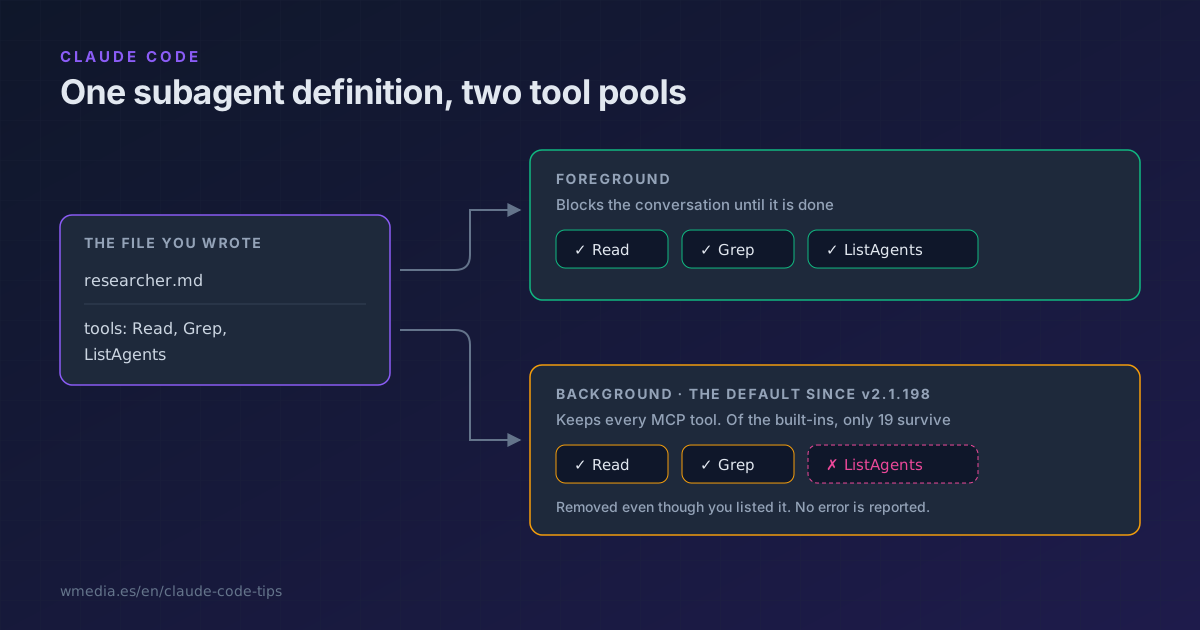
TL;DR In the background a subagent keeps every MCP tool but only 19 built-in ones. Check your
toolsfield against that list and ask for the foreground when it declares something outside it, because the filter applies anyway and says nothing. That is how you stop debugging a subagent that looks like it ignores its own config.
You put ListAgents in your subagent's tools. You dispatch it. It doesn't have the tool. No error, no warning, and the file is written correctly.
The cause isn't your config. It's where the subagent runs. As of v2.1.198 subagents start in the background by default, and the background comes with its own tool cut.
Two filters, not one
A subagent inherits the built-in and MCP tools of the main conversation, then passes through two filters in sequence.
The first one hits every subagent, wherever it runs, and removes these even when you list them:
AskUserQuestion   EndConversation   EnterPlanMode   ExitPlanMode
ScheduleWakeup    TaskOutput        WaitForMcpServers   Workflow
ExitPlanMode survives when the subagent has permissionMode: plan. And Agent only goes when the subagent is already at the depth limit, so an ordinary subagent can still spawn its own.
That is the first surprise: a subagent can never ask you anything. Not a background thing, a subagent thing. It does what it can with what it understood.
The second filter applies only in the background. It keeps every MCP tool, and of the built-ins it leaves exactly these 19:
Read     Grep       Glob        Bash      PowerShell
Edit     Write      NotebookEdit  WebFetch  WebSearch
TodoWrite  Skill    ToolSearch  EnterWorktree  ExitWorktree
Monitor  TaskStop   SendMessage  Artifact
Everything else goes. Including whatever you wrote in tools. And silently: the removal only complains when it leaves your list empty, in which case the subagent never launches.
Which means one definition resolves to different tools depending on where it ends up running.
The one you feel first
SendMessage is on the list. ListAgents is not. So a background subagent can send a message to another session but can't discover who to send it to. Give it work that depends on talking to your other sessions and it works in the foreground, then quietly half-works in the background.
Agent team teammates are the exception: on top of the 19 they keep TaskCreate, TaskGet, TaskList, TaskUpdate, CronCreate, CronDelete, and CronList.
As of v2.1.233 there is one more layer over those task tools: TodoWrite and the four Task* also depend on the model, and a subagent only receives them when your session has them, even when the subagent runs a different model. The whole story is in the task list your model no longer saves.
The other exception is conversation forks, which skip both filters and get the main conversation's exact tool pool.
And where it runs decides one more thing that stings just as much: what a background subagent edits does not come back with a rewind. Only a skill with context: fork running in the foreground is covered by checkpoints, and since July 2026 you have to ask for that with background: false in the skill's frontmatter, because those go background by default too. For everything else your undo button is git.
How you steer it
1. Diff your tools against the 19
If your subagent declares anything outside that list, and it isn't a fork or a teammate, the background version won't have it.
2. Ask for the foreground when you delegate
A subagent's frontmatter has no background: false (that one belongs to skills). The documented way is to say it in the request itself:
Investigate the auth failure with a subagent, in the foreground
A foreground subagent blocks the conversation until it's done, and in exchange it keeps every tool the first filter left it.
3. Or pin it the other way
In the subagent's frontmatter:
---
name: researcher
description: Investigates and summarizes, never writes
background: true
---
With background: true that subagent goes to the background even when Claude needs its result right away. Leave the field out and Claude decides, defaulting to the background. It's the field missing from the field table in how to create an agent, which covers the neighbouring piece: --agent turns your main session into the agent, and no background filter applies there.
What you get for the trade
The cut buys you something real: the background is why your session no longer freezes behind a delegate. As of v2.1.186, when a background subagent hits a call that needs permission, the prompt surfaces in your main session naming the subagent that's asking. Approve it, or press Esc to deny that one call without killing the subagent. Before that version, a background subagent auto-denied anything requiring permission, in silence, which is a good deal worse than losing ListAgents.
While it runs you'll find it in the /tasks panel, where finished ones stay listed below the work still going. To push something already running into the background, that's Ctrl+B and it lives in bash mode. And if the level you care about is whole sessions rather than subagents inside one, the map is background agents.
Reference
| You want… | Use |
|---|---|
| A subagent that keeps all its tools | Ask for the foreground when you delegate |
| It to always run in the background | background: true in its frontmatter |
| To see what's running | /tasks |
| To raise or lower the 20 concurrent cap | CLAUDE_CODE_MAX_CONCURRENT_SUBAGENTS |
| To turn background tasks off entirely | CLAUDE_CODE_DISABLE_BACKGROUND_TASKS=1 |
With 20 subagents running, the next one fails with Concurrent subagent limit reached, and Claude is told not to retry. Spawning works again as soon as one finishes.
And mind that last row, because the variable does two things at once: it turns off the background for subagents and also the rescue for bash commands that run out their timeout, which from then on die instead of carrying on behind you.
Official docs: Create custom subagents