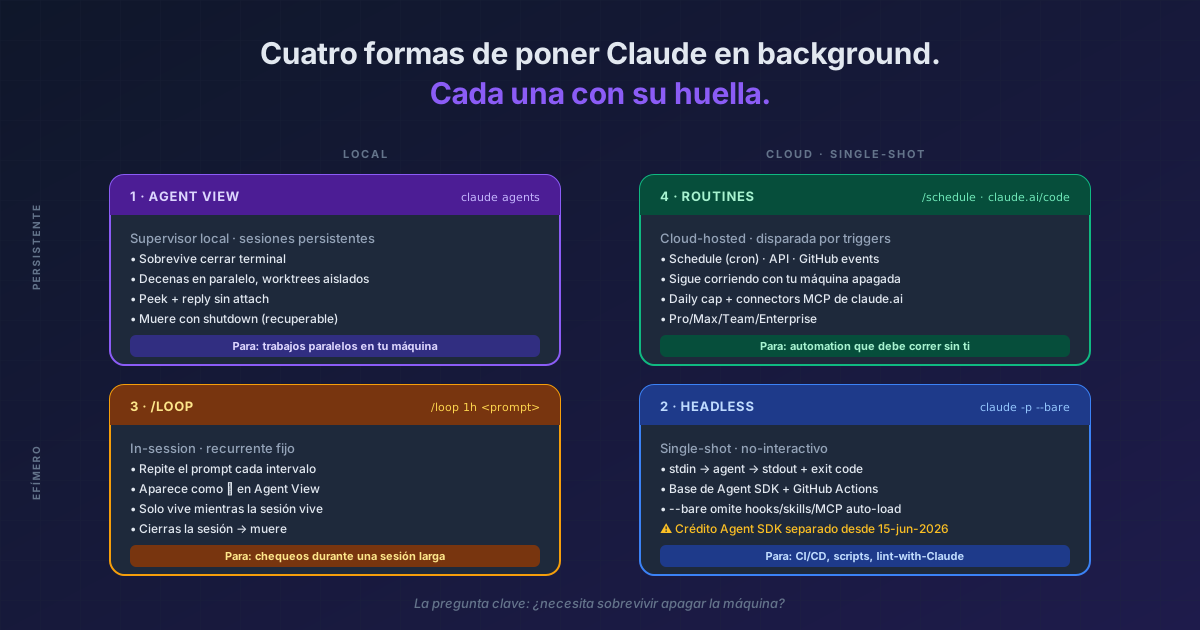
TL;DR There are four mechanisms in Claude Code for letting Claude keep working without you watching: Agent View (
claude agentsorclaude --bg— local persistent sessions managed by a supervisor independent of your terminal), headless mode (claude -p— single-shot, ideal for CI/CD and scripts),/loop(in-session, repeats a prompt at intervals inside an active session), and Routines (cloud at claude.ai, recurring or triggered by schedule/API/GitHub). Decision rule: does it run on your machine or in the cloud? Once or recurring? Started interactively or fired by an external event? Confusing them is the main source of wasted time in "autonomous" setups.
"Background agent" isn't one feature in Claude Code — it's a category with four tools that overlap in purpose and diverge in mechanism. People Google "claude code background agent" and land on Anthropic's autonomy blog post, but that page doesn't compare: it just announces. The practical question — which of the four do I need today — goes unanswered.
What they share: all four let Claude keep working without continuous input from you. What separates them: where they run, how long they live, what triggers them, and which quota they consume.
Result:
> claude agents

Pinned
  ✽ payment-retry-fix      Edit src/payments/retry.ts            3m

Ready for review
  ∙ stripe-webhook         github.com/acme/api/pull/2048      ●  2h

Needs input
  ✻ feature-flag-cleanup   needs input: rollout 50% or 100%?     1m

Working
  ✽ flaky-test-investig    run 12 · all checkpoints cleared      4m
  ✢ nightly-deps-check     /loop · next run in 18m
Each row is a full Claude Code session running in the background. Close the terminal, come back tomorrow, they're still there.
The four mechanisms
1. Agent View (claude agents) — persistent local sessions
claude agents
# or create one without opening the view:
claude --bg "investigate the flaky SettingsChangeDetector test"
# or background the current session:
/bg
A local supervisor keeps N sessions alive independently of your terminal. Each session is a full Claude Code conversation with its skills, hooks, MCPs, permissions. Close your shell — they survive. Reboot the machine — they fail, but you can attach to them again.
It's the canonical entry point to "background". Covered in depth in Agent View: one screen for every agent you've dispatched. My real workflow with Agent View — Warp + Neovim and the gaps I still patch by hand — is in the article. If what you need is to see what's alive inside one session (subagents, monitors, background commands), that's the Tasks panel — they complement: Agent View shows sessions; Tasks shows the tasks inside each one. And one level further down sits the subagent itself: running in the background trims its built-in tools even when you declared them, and that list is worth knowing.
When: parallel local work (PR review + bug fix + investigation + refactor). Edits isolated in .claude/worktrees/ automatically — pair this with worktrees for parallel tasks and you get per-session isolation without stepping on your main branch. To review a specific PR, claude --worktree "#1234" fetches it into its own worktree.
2. Headless mode (claude -p) — single-shot for CI and scripts
claude -p "explain the root cause of this error" --bare < build.log
Non-interactive, one agent turn. Reads stdin, writes stdout, exits with a status code. It's the basis of the Agent SDK and of Claude Code in GitHub Actions. Covered in headless mode as autonomous agent.
📝 Billing note: Anthropic announced that from June 15, 2026, claude -p on subscription plans would draw from a separate monthly Agent SDK credit, but it cancelled the change before it shipped; for now it still comes out of your subscription. The story is in the Agent SDK credit tip.
When: CI/CD, build scripts, package.json hooks, Claude-as-linter, pipes from external tooling.
3. /loop — in-session recurrence
> /loop 1h /goal Verify the design system still matches the latest
  Figma export pixel-perfect and ping me if any diverged.
Repeats a prompt every interval (m/h/d) inside an active session. Shows up as a "Working/sleeping" row in Agent View. Useful for continuous monitoring or periodic checks during a long session. Covered in /loop for recurring tasks. The most common combo — /loop with /goal as a stop condition on each iteration — lives exemplified in the pixel-perfect Figma + Chrome MCP pipeline. If you want to watch events in real time while it runs, the Monitor tool is the natural complement.
When: checks during a long session (smoke tests during a refactor, dev server monitoring, polling a remote CI). Local — dies if you close the session.
4. Routines — cloud with triggers
> /schedule daily PR review at 9am
Routines run on claude.ai/code (cloud, not your machine). They fire on:
- Schedule (cron, hourly/daily/weekly, or one-off natural language)
- API (HTTP POST with bearer token, ideal for alerts and deploys)
- GitHub events (PR opened, release, etc.)
Your laptop doesn't need to be on. Covered in Routines: cloud agents with triggers. The full map of /schedule vs /loop vs cron lives in Schedule vs Loop vs Cron. If you need the routine to ping you via chat without opening the web, wire it through Channels and Telegram or remote control from your phone — those are the canonical paths for notification + intervention without a terminal.
When: recurring automation that must run whether or not you're there (nightly PR review, alert triage, docs drift), or external-system triggers (Sentry → routine, deploy → routine).
The decision table
| Question | Agent View | Headless -p |
/loop |
Routines |
|---|---|---|---|---|
| Where does it run? | Local (supervisor) | Local (single-shot) | Local (in-session) | Cloud (claude.ai) |
| Persists without terminal? | ✅ Yes | ❌ Exits on completion | ❌ Only while session lives | ✅ Yes, always |
| Recurring? | ❌ Not natively | ❌ Use cron externally | ✅ Yes, fixed interval | ✅ Yes, cron/events |
| Multi-session parallel? | ✅ Yes, dozens | Manual | ✅ Inside one session | ✅ Yes |
| External triggers? | ❌ No | Stdin / pipe | ❌ No | ✅ API + GitHub webhooks |
| Machine off? | ❌ Dies | ❌ N/A | ❌ Dies | ✅ Keeps running |
| Quota? | Your plan | Your plan (the separate credit announced for June 2026 was cancelled) | Your plan | Your plan + daily routine cap |
The most common mistake
"I put
/loopto review PRs every hour but it stopped when I closed my laptop."
/loop is local in-session. Close the session → it dies. What you wanted was a Routine (cloud + schedule trigger). The reverse pattern: putting in a Routine something that runs once a day for 10 seconds — overkill. Use claude --bg with a clear name.
The golden rule: does this need to survive turning off the machine? If yes, Routine. If no, the other three depending on the rest of the flowchart.
Quick reference
| I need | Mechanism | Entry command |
|---|---|---|
| Launch 5 parallel jobs locally | Agent View | claude agents + Enter 5 times |
| One background task NOW, no view | --bg |
claude --bg "<prompt>" |
| Move current conversation to background | /bg |
/bg inside session |
| Claude-as-linter in CI | Headless | claude -p --bare "<prompt>" |
| Check every hour while I work | /loop |
/loop 1h <prompt> |
| Nightly PR review while I sleep | Routine | /schedule daily PR review at 9am |
| Trigger from Sentry/deploy | Routine + API | claude.ai/code/routines |
Official docs: Agent View · Run Claude Code programmatically (headless) · Routines ·
/loopand in-session scheduling
Requirements
- Agent View: Claude Code v2.1.139+
--permission-mode/--effortonclaude agents: v2.1.142+- Routines: Pro/Max/Team/Enterprise plan with Claude Code on the web enabled
- Separate Agent SDK credit: announced for June 2026 and cancelled; for now headless comes out of your subscription