TL;DR Claude Code has three native ways to schedule recurring work —
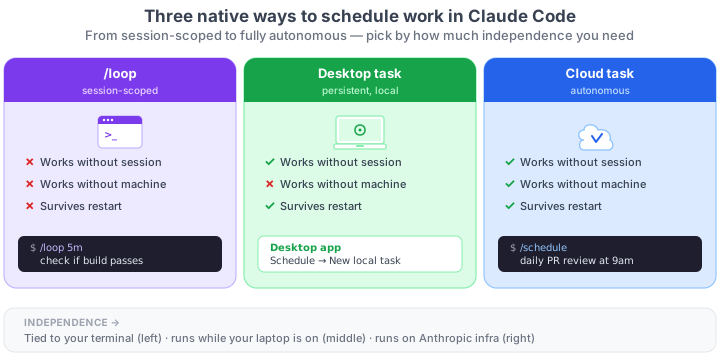
/loop, Desktop tasks, and Cloud tasks — plus the old-school option: system cron withclaude -p. The key difference in one line:/loopneeds an open session, Desktop tasks need your machine powered on, and Cloud tasks run on Anthropic's infrastructure even when your laptop is off. And if what you're after is not just recurrence but understanding every way to send Claude Code to background (including Agent View for parallel local sessions and headless-pfor single-shot), the map of the four mechanisms zooms out one level.
"Recurring task", "cron", "scheduled", and "schedule" get used for different things inside Claude Code. /loop is not /schedule, and neither is the same as setting up a system cron. If you've been mixing them up, here's the difference in a table and the rule for picking one.
Result:
# /loop — watch something while you keep working
> /loop 5m check if the staging deploy finished
Loop started (every 5m). Task ID: loop-a1b2c3

# /schedule — creates a Cloud task
> /schedule daily PR review at 9am
Setting up a scheduled task. Which repo? Which environment?...
The three native options
/loop |
Desktop task | Cloud task | |
|---|---|---|---|
| Runs on | Your machine | Your machine | Anthropic cloud |
| Needs open session | Yes | No | No |
| Needs machine on | Yes | Yes | No |
| Survives restart | No | Yes | Yes |
| Access to local files | Yes | Yes | No (fresh clone) |
| Minimum interval | 1 min | 1 min | 1 hour |
| Auto-expiry | 7 days | No | No |
| How to create | CLI: /loop <prompt> |
Desktop app → Schedule → New task → New local task | CLI: /schedule, or web claude.ai/code/scheduled, or Desktop app → New remote task |
To react to events instead of polling inside your active session, none of these is the right answer — for stdout of local processes, Monitor; for external push from other systems, Channels. For the full picture of all 6 autonomous primitives in a 2×3 matrix, see the map.
How to pick (one-line rule)
- Watching something while you work in your current session →
/loop - Daily task that needs access to your local code → Desktop task (from the Desktop app)
- Task that must run even when your laptop is off → Cloud task / Routine (via
/schedulein the CLI or from the web) - System cron +
claude -p→ reserve it for rare cases where none of the three native options fits - Full local parallel sessions (not just recurrence) → Agent View (
claude agents) — outside this tip's scope, but covered in the global map
And the specific worry of "can I close my laptop without killing this?" has its own tip with the survival table.
Setup
1. /loop — during your current session
/loop 15m check open PRs for new comments
Runs in the background while the session stays open. Cancels when you close the terminal and auto-expires after 7 days. Track its progress in the /tasks panel, where it converges with the rest of your parallel work. Full details in the dedicated /loop tip.
2. Desktop task — persistent on your machine
Created only from the Desktop app: Schedule in the sidebar → New task → New local task. You define name, prompt, frequency, permissions, and working folder. You can also ask Claude in natural language inside any Desktop session: "set up a daily code review that runs every morning at 9am".
Runs on your machine with access to your local files (including uncommitted changes) and survives restarts, but needs the computer awake at the scheduled time. If your laptop is asleep at 9am, the run is skipped (with catch-up on wake, which can fire it at 11pm: the 3 common failures and how to fix them).
3. Cloud task (Routine) — persistent without your machine
/schedule daily code review at 9am
Claude walks you through it conversationally: you pick the GitHub repo, the prompt, the schedule, the environment (network access, env vars, setup script), and the MCP connectors. The task runs on Anthropic's infrastructure even when your laptop is off, but starts from a fresh clone of the repo — it doesn't see your uncommitted changes. Minimum interval: 1 hour.
You can also create them from claude.ai/code/scheduled or from the Desktop app by picking New remote task.
4. System cron (the old way)
0 9 * * * claude -p "review my PRs" --allowedTools "Bash(gh *)"
Survives everything. No context between runs. Use it only if the three native options don't fit — which today is rare. See the headless mode tip.
Why the three exist
/loop was built for watching inside the session: each iteration sees your context, the files you changed, the whole conversation. That's impossible with system cron, which starts from scratch every time.
Desktop tasks and Cloud tasks were built for unattended, persistent work: things you want to happen even when you close Claude Code. The difference between them is where they run and what they see: Desktop uses your machine and your real files (including uncommitted changes); Cloud uses Anthropic's infrastructure and a fresh clone of the repo.
System cron is still around for historical compatibility and unusual cases, but today the three native options cover 90% of what you need without touching crontab.
Reference
| Aspect | Detail |
|---|---|
| Session command | /loop [interval] <prompt> |
| Cloud task command | /schedule <natural language description> |
| Desktop tasks | Only from the Desktop app (no equivalent CLI command) |
| Internal tools (session-scoped) | CronCreate, CronList, CronDelete |
| Cron expression (5 fields) | minute hour day-of-month month day-of-week |
| Timezone | Local, not UTC |
Disable /loop + session cron |
CLAUDE_CODE_DISABLE_CRON=1 |
Official docs: Run prompts on a schedule · Cloud scheduled tasks · Desktop scheduled tasks