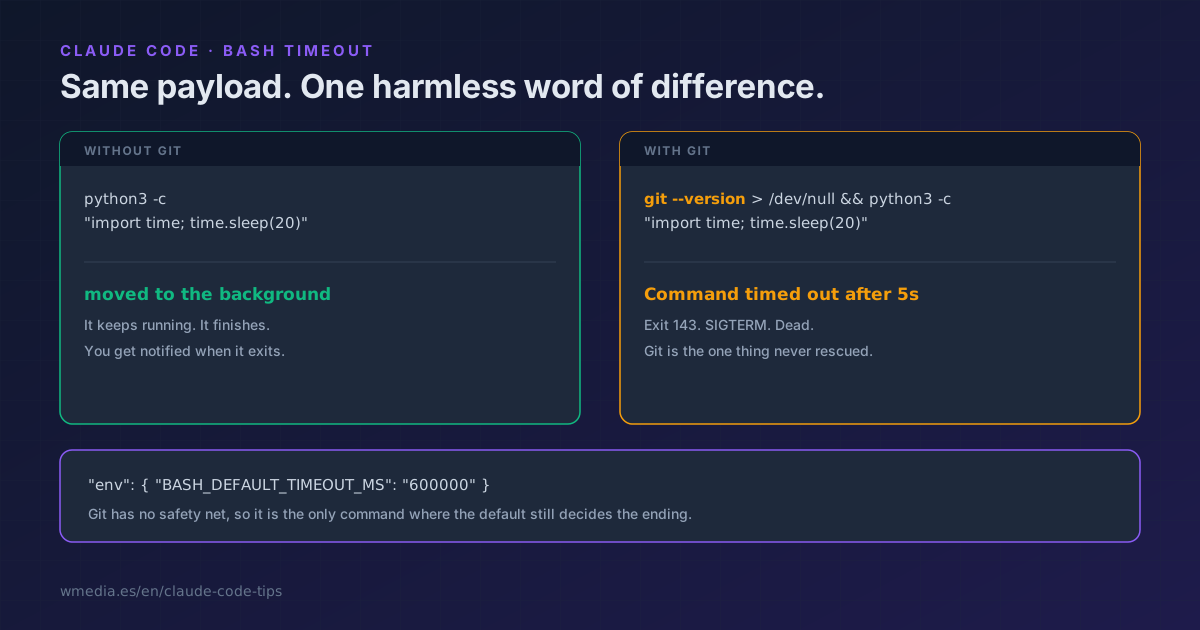
TL;DR At two minutes Claude Code no longer kills your command, it moves it to the background. Except git, which meets none of the five conditions and still dies on a SIGTERM. Git being the only one without a net, it is the only one where the default still decides: set
BASH_DEFAULT_TIMEOUT_MSto your slowest clone.
You ask Claude to install, build or run the tests. It takes a while. At two minutes the thing cuts off and you read "it failed".
Most of the time it didn't. It's still alive, running behind you. But there is one case where it really does die, and it's the one you'd least expect.
The experiment
Two commands. Identical apart from a git --version at the front, which does nothing. Same time limit on both, dropped to 5 seconds so the demo doesn't take two minutes.
$ python3 -c "import time; time.sleep(20)"

Command did not complete within its 5s timeout and was moved to the background
(ID: b1s1kxjyl). Output is being written to: .../tasks/b1s1kxjyl.output
$ git --version > /dev/null && python3 -c "import time; time.sleep(20)"

Exit code 143
Command timed out after 5s
Same payload, same limit. The first one goes to the background and finishes. The second dies on a SIGTERM, which is what that 143 means.
The only difference is that the word git shows up in the second one.
The five conditions
For your command to be moved to the background instead of killed, all five have to hold:
| Condition | What it means |
|---|---|
CLAUDE_CODE_DISABLE_BACKGROUND_TASKS unset |
Turn it on and there is never a rescue |
| The command parses | If Claude Code can't parse it, it won't rescue it |
| It isn't "too complex" | Complex doesn't mean long, it means odd. Control characters, Unicode whitespace, backslash-escaped whitespace, zsh syntax like ~[ or =cmd |
| No part of it is git | It catches git, git ... and even xargs ... git |
It doesn't start with sleep |
That single word is the entire denylist |
Four of those are plumbing. The one that will bite you is the fourth, because git is what actually takes time: a clone of a repo with years behind it, a large push, a git lfs pull.
How to put it right
1. Measure your slowest git
time git clone --depth 1 <your-biggest-repo> /tmp/timeout-test
That number, plus headroom, is your value.
2. Put it in your settings
In ~/.claude/settings.json:
{
  "env": {
    "BASH_DEFAULT_TIMEOUT_MS": "600000"
  }
}
Ten minutes. Set once, never thought about again.
3. For a one-off, just ask
You don't need to configure anything for a single command: tell Claude to use a longer timeout on that one. The model can request up to the ceiling, and it works on git just as well. The variable exists so you don't have to remember every time.
What "moved to the background" does not mean
Surviving isn't the same as being handled.
The result doesn't come back on its own: it lands in a file someone has to go read, and to see everything running in parallel there's the /tasks panel.
And there's one case where the rescue is short-lived: when the command belongs to a synchronous subagent, it gets terminated the moment that subagent gives its final answer. In your main session that doesn't happen, it keeps running and you get notified when it's done. Subagents have more surprises of this kind.
The third ending
There's a third way to die that has nothing to do with time:
Command killed: output file exceeded <limit>
Your command didn't take too long, it talked too much. A noisy build or a verbose test run can go down on output volume alone. The lever there is BASH_MAX_OUTPUT_LENGTH, and the elegant fix is filtering before Claude ever reads it, which is habit 6 of the ten for saving tokens.
And there is a fourth ending, the quietest of them all, because no message shows up at all: the command finishes, it fails, and Claude gets a ~10,000 character excerpt with the middle removed, so the reason it failed never reaches it.
Reference
| Variable | Default | What it does |
|---|---|---|
BASH_DEFAULT_TIMEOUT_MS |
120000 (2 min) | The limit when nobody asks for another |
BASH_MAX_TIMEOUT_MS |
600000 (10 min) | The ceiling the model can request. The real ceiling is the larger of this and the one above, so raising the default raises the ceiling too |
BASH_MAX_OUTPUT_LENGTH |
30000 (max 150000) | Characters of output Claude reads back |
CLAUDE_CODE_AUTO_BACKGROUND_TIMEOUT_MS |
unset | Lengthens nothing. It only makes Claude give up sooner and background earlier, with a 2 second floor |
CLAUDE_CODE_DISABLE_BACKGROUND_TASKS |
unset | Switches the rescue off entirely |
Official docs: Environment variables