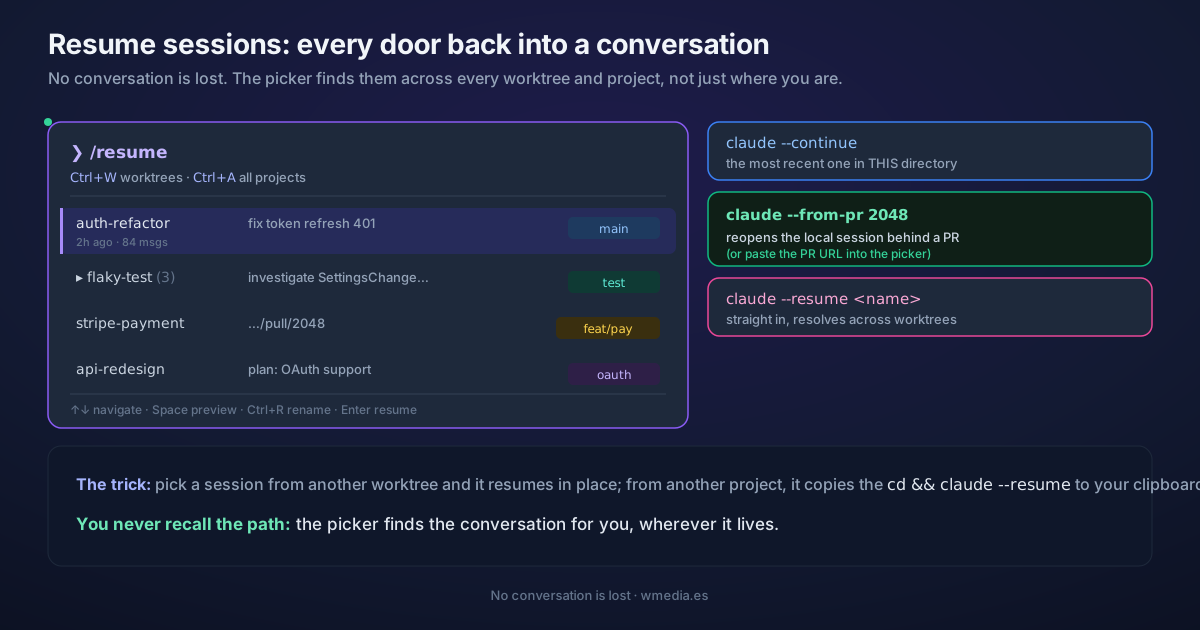
TL;DR Claude Code saves every conversation, so none of them is lost.
claude --continuereopens the most recent session in this directory;claude --resumeopens the picker;claude --resume <name>jumps straight to a named session; andclaude --from-pr <number>reopens the local session behind a PR. Inside the picker,Ctrl+WandCtrl+Asearch sessions in other worktrees and projects, not just the directory you ran the command from.
For me, resume went from nearly unusable to one of the things I lean on most. These days I mostly reach for agent view for parallel work, but resume picked up a trick that changed everything: it now searches your sessions across all directories, not just the one you run the command in, and takes you to that conversation without you having to find the folder yourself.
How it works
Each session is saved locally as you work. The picker (/resume, or claude --resume) reads those sessions and, by default, shows the ones from your current worktree. A couple of keystrokes widen the search to the rest of the repo or the whole machine, so you pick the one you want without remembering where each conversation lived.
What it looks like
> /resume        resume a conversation · Ctrl+W worktrees · Ctrl+A everything

  auth-refactor       fix token refresh 401          2h ago    · 84 msgs   main
▸ flaky-test (3)      investigate SettingsChange…     1d ago    · 51 msgs   test
  stripe-payment      github.com/acme/app/pull/2048   3d ago    · 120 msgs  feat/pay

  ↑↓ navigate · Space preview · Ctrl+R rename · Enter resume
The five doors back in
1. The last one, no thinking
claude --continue
Reopens the most recent session in this directory. That's why the picker matters: when the one you want lives in another folder, --continue can't see it.
2. Pick from the picker
claude --resume # or /resume from inside a session
Each row carries a name or summary, time since last activity, message count, and branch. Forked sessions are grouped under their root: press → to expand them.
3. Straight to a name
claude --resume auth-refactor
It resolves across worktrees: on an exact match it resumes directly, even if the session lives in another worktree. Name and color-code your sessions first, or the picker is a soup of IDs.
4. From a PR
claude --from-pr 2048
Reopens the local session that produced that PR. And inside the picker you can paste the URL of a PR or MR (GitHub, GitLab, Bitbucket) and it finds the session that created it.
5. The picker shortcuts almost nobody uses
Ctrl+W: widen to all worktrees of the repo.Ctrl+A: widen to all projects on the machine.Ctrl+B: filter to the current branch (hereCtrl+Bis the picker's, not background mode).Space: preview the conversation without entering.Ctrl+R: rename the session on the fly.
When you pick a session from another worktree of the same repo, it resumes in place. If it's from an unrelated project, it copies a ready-to-paste cd <dir> && claude --resume <id> to your clipboard. Either way, you never have to remember the path.
Reference
| Entry point | What it does |
|---|---|
claude --continue |
The most recent session in this directory |
claude --resume |
Opens the picker |
claude --resume <name> |
Jumps straight to that named session (resolves across worktrees) |
claude --from-pr <number> |
Reopens the local session behind that PR |
claude --resume <session-id> |
Resume a claude -p or SDK session (these don't show in the picker) |
/resume |
Switch conversations from inside a session |
| Picker shortcut | Action |
|---|---|
Ctrl+W |
All worktrees of the repo |
Ctrl+A |
All projects on the machine |
Ctrl+B |
Filter to the current branch |
Space |
Preview without entering |
Ctrl+R |
Rename |
To fork instead of resume (try a different route without touching the original), see branch your conversations. And if what you want is the session summarizing where you left off when you return, that's session recap.
Before you resume anything you have to quit, and quitting is not the same as ending the session: in a background session, /exit only detaches you.
Official docs: Manage sessions