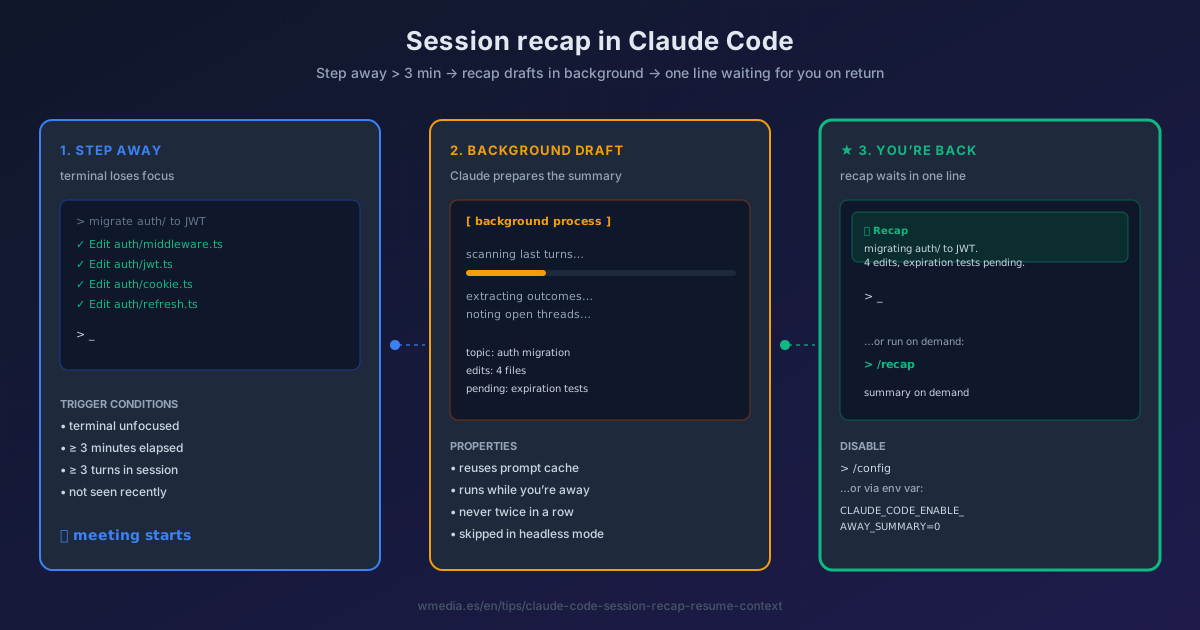
TL;DR Leave the terminal unfocused for more than 3 minutes and Claude Code drafts a session summary in the background, ready when you return. Also works on demand with
/recap. On by default across every plan and provider.
You step away from the laptop for a forty-minute meeting. Your Claude Code session is still open, but the "wait, where was I?" beats every other thought when you sit back down. You scroll the last few messages to rebuild context. Three minutes lost before every block of work, several times a day.
Anthropic packaged that into a single feature in v2.1.114 (Week 17, April 2026): session recap. If you stay away from the terminal for more than three minutes, Claude Code drafts a summary in the background. When you come back, it's there, in one line, ready. Same principle as /btw — information available at the exact moment you need it, without polluting the main context.
How it works internally
Claude Code fires an automatic recap under three simultaneous conditions:
- Terminal unfocused for at least 3 minutes since the last completed turn.
- Session with at least 3 turns behind it (short sessions don't qualify).
- Never twice in a row — once you've seen a recap, the next one waits for fresh activity.
The summary computes in the background while you're in another app, so it appears with zero latency when you switch back. In non-interactive mode (claude -p, hooks, headless) the recap is always skipped.
Result preview
[returning to the terminal after a meeting]

⏺ Recap: you were migrating the `auth/` module to JWT.
   Edited 4 files; expiration tests still missing.

>
One line. Picks up exactly where you left off — no scroll, no re-read.
How to use it
1. Do nothing (automatic mode)
It's already on by default. Just move focus away from the terminal for over 3 minutes and come back. If you've had at least 3 turns, you'll see the recap.
2. On demand with /recap
When you need it mid-long-session — before switching subtasks, before a commit, before asking Claude for a plan:
> /recap
Useful after a 2-hour session to audit what's been done before opening the PR.
3. Turn it off if it gets in the way
Two ways:
# A. From inside Claude Code:
> /config
# Navigate to "Session recap" and disable

# B. Via environment variable (in .zshrc / .bashrc):
export CLAUDE_CODE_ENABLE_AWAY_SUMMARY=0
Reference
| Aspect | Detail |
|---|---|
| Auto trigger | Terminal unfocused ≥ 3 min + session with ≥ 3 turns |
| Manual command | /recap |
| Cost | Minimal — runs in the background reusing the prompt cache |
| Frequency | Never twice in a row without fresh activity |
| Non-interactive mode | Always skipped |
| Disable | /config → Session recap, or CLAUDE_CODE_ENABLE_AWAY_SUMMARY=0 |
| Availability | Every plan and provider (Bedrock, Vertex, Foundry included) |
That cost row has fine print: the recap is free because it reuses the cache, and the cache dies if the meeting runs long. If you'll be away more than an hour, the move that actually saves you money is compacting before you stand up rather than when you get back.
The recap shows up when you return to a session; to choose which session to return to (the picker, by name, or from a PR), see resume sessions.
Requirements
- Claude Code
v2.1.114or later
Official docs: Interactive mode — Session recap