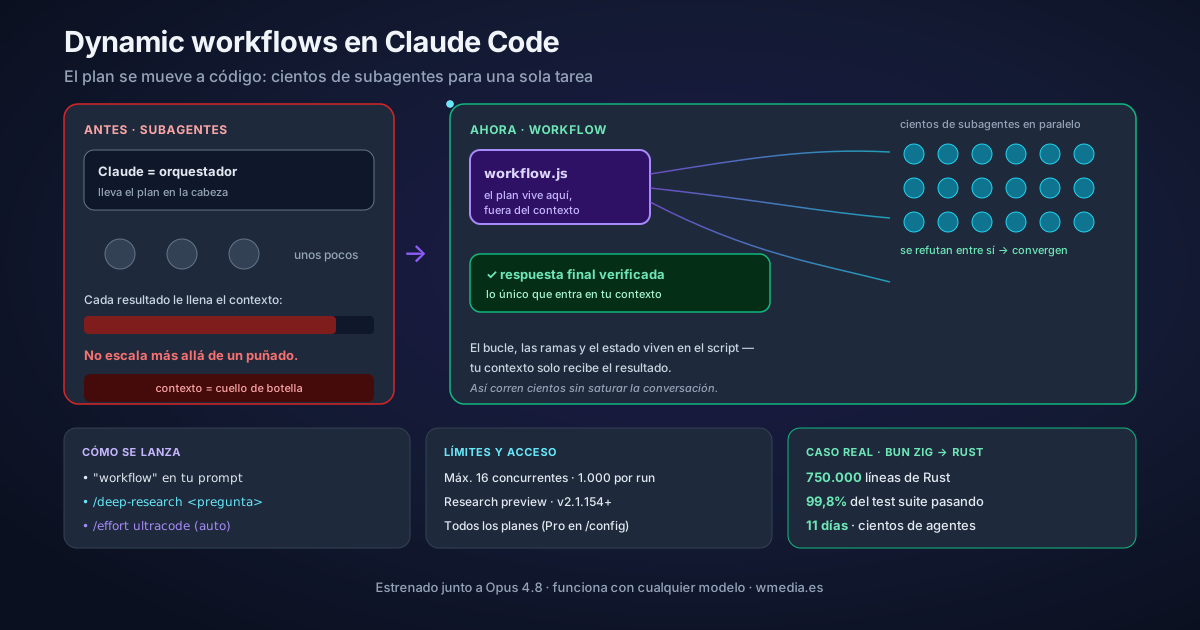
TL;DR Put
ultracodein your prompt, or just ask in your own words (or run the bundled/deep-research), and Claude writes a JavaScript script that orchestrates up to hundreds of subagents in the background, with the plan and intermediate results outside its context, and agents that refute each other until they converge before reporting back. It's a research preview, needs Claude Code v2.1.154+, ships on all paid plans (on Pro you enable it in/config), and burns meaningfully more tokens: start on a scoped task.
Opus 4.8 dropped today (same price as 4.7, ~4× less likely to let code flaws pass unremarked). But the thing that actually changes how you work in Claude Code shipped the same day and isn't the model: dynamic workflows. It runs on whatever model you've got selected.
The problem it solves: until now, if you wanted to delegate a huge task to many subagents, Claude was the orchestrator. It decided turn by turn what to spawn, and every intermediate result landed in its context. That's why it didn't scale past a handful of agents.
The shift: the plan moves into code
| Subagents | Skills | Workflows | |
|---|---|---|---|
| What it is | A worker Claude spawns | Instructions Claude follows | A script the runtime executes |
| Who decides what runs | Claude, turn by turn | Claude, following the prompt | The script |
| Where results live | Claude's context | Claude's context | Script variables |
| Scale | A few per turn | Same as subagents | Dozens to hundreds per run |
A workflow moves the plan (the loop, the branching, the state) into a JavaScript script Claude writes on the fly. A runtime executes it in the background, isolated from your conversation. Your context only gets the final answer. That buys two things: running hundreds of agents without blowing context, and a repeatable quality pattern, with agents that adversarially review each other's findings before reporting them.
Try it today without writing anything: /deep-research
The zero-cost on-ramp is a workflow that already ships built in:
/deep-research What changed in the Node.js permission model between v20 and v22?
It fans out searches across several angles, cross-checks the sources, votes on each claim, and returns a cited report with claims that didn't survive the cross-check already filtered out. Your session stays free while it runs. Track progress with /workflows.
The three ways to launch one
# 1. The keyword "ultracode", or asking in your own words (Claude writes the script)
ultracode: audit every endpoint under src/routes/ for missing auth checks

# 2. A bundled workflow
/deep-research <question>

# 3. Let Claude decide (opt-in)
/effort ultracode
Watch the keyword, because it moved: before v2.1.160 the literal word was workflow, and today it is ultracode. Asking in your own words ("run a workflow", "use a workflow") works on both versions. If you didn't mean to trigger one, Option+W on macOS drops the highlight for that prompt, and the Ultracode keyword trigger row in /config turns it off for good.
With ultracode, Claude decides on its own whether each task warrants a workflow. It's opt-in, lasts the session, and you drop back with /effort high for routine work. By default it does not spin up agent fleets unless you ask. When to flip it on, what it costs, and how to switch back is in its own tip.
The control: before anything runs, Claude shows you the planned phases and you can read the raw script (Ctrl+G). It's not a black box. And if a run does what you wanted, press s in /workflows and it's saved as /your-command forever, on every branch, for every teammate who pulls. This is the "skills 2.0" feel.
What it's actually for
Migrations across hundreds of files, security or bug audits across a whole codebase, research with cross-checked sources. The extreme case: Jarred Sumner ported Bun from Zig to Rust with workflows: 750,000 lines, 99.8% of the test suite passing, 11 days from first commit to merge, hundreds of agents in parallel with two reviewers per file.
What to know first (honest)
- Research preview · needs v2.1.154+ · all paid plans (on Pro, enable in
/config) - Limits: max 16 concurrent agents, 1,000 total per run
- Cost: a run burns meaningfully more tokens than doing the task in conversation. Anthropic says it plainly: start on a scoped task to get a feel for it. And since v2.1.202 you can tell Claude how many agents to aim for before it writes the script: choose the size before a run chooses it for you
- Subagents run in
acceptEditsand inherit your allowlist; file edits are auto-approved
If you came from parallel worktrees or the background agents map, workflows are the next rung: not several of your own sessions, but one that orchestrates hundreds of agents with the plan held in code.
And outside a workflow, in ordinary conversation, Opus 5 reaches for subagents more readily than earlier models. There the cap is yours to set: Anthropic's 8 tips for Opus 5 include the exact criteria worth writing down.
Official docs: Orchestrate subagents at scale with dynamic workflows