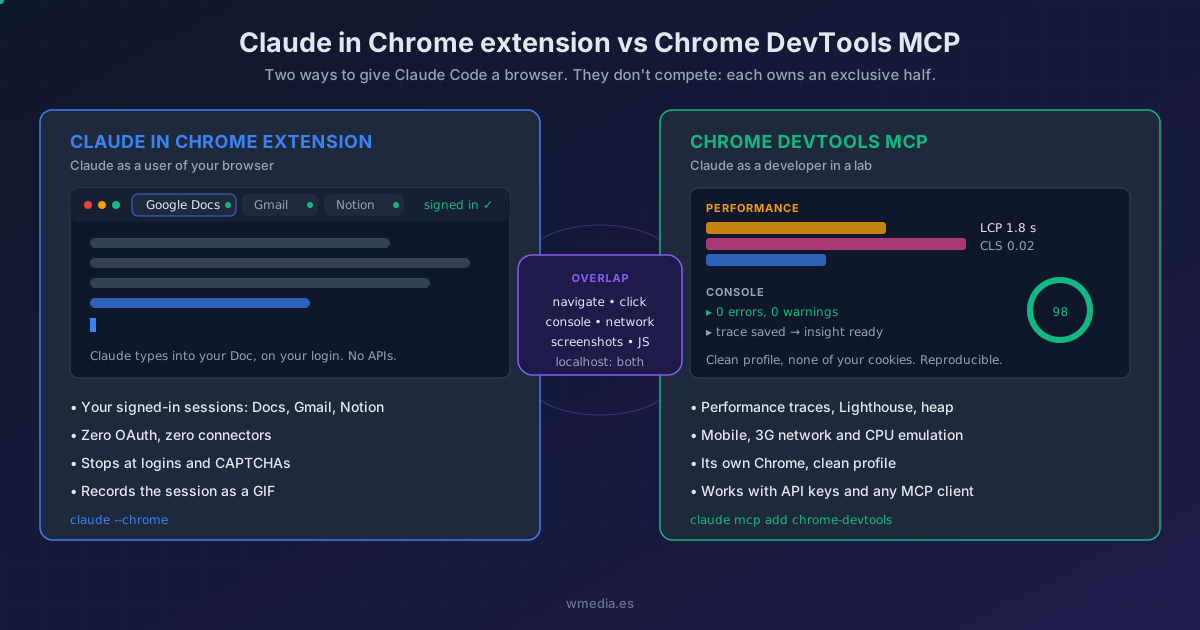
TL;DR The Claude in Chrome extension is Claude using YOUR browser, with your Google Docs, Gmail or Notion sessions already signed in: zero APIs, zero connectors.
chrome-devtools-mcpis Claude as a developer with DevTools open in a clean Chrome: traces, Lighthouse, emulation. They overlap on the basics (navigate, click, read the console), which is why everyone mixes them up. I use the extension for admin-style tasks and the MCP daily: somewhere between 20 and 25% of my inference goes there.
There are two ways to give Claude Code a browser, and I kept mixing them up myself, despite using one of them every day. It's not on you: between "Claude for Chrome", "Claude in Chrome", "the extension" and "Chrome DevTools MCP", the naming seems designed to confuse. This is the map I wish someone had handed me.
First, the naming mess
Claude for Chrome and Claude in Chrome are the same product: the official extension from the Chrome Web Store. Marketing uses one name, the docs use the other. There is no "extension-free" version: Claude Code talks to Chrome over native messaging, a channel that can only end at an extension. If you don't have it installed, /chrome shows you the install dialog and waits.
And the third layer: Cowork doesn't have its own browser either. It connects to the same extension as a connector. One extension, four clients: the sidebar on any page, Claude Code, Claude Desktop, and Cowork.
The extension: Claude as a user of your browser
claude --chrome (or /chrome mid-session) connects Claude Code to your real Chrome, the one you have open, with your cookies and your logins. That's why it can do this without wiring up a single API:
> Draft the weekly summary from the latest commits and add
  it to my Google Doc docs.google.com/document/d/abc123

⏺ Opening tab → docs.google.com
  Clicking into the editor...
  Typing summary (3 paragraphs)...
  Done: draft added to "Weekly notes"
No OAuth, no Google or Notion connectors: it opens the tab, clicks into the editor and types, the way you would. If it hits a login page or a CAPTCHA, it stops and hands it to you. It can even record the whole session as a GIF to document the flow.
The fine print: it requires a direct Anthropic plan (Pro, Max, Team, or Enterprise) with /login. With an API key, setup-token, or Bedrock/Vertex it stays off. The Claude Code integration officially runs on Chrome and Edge, and it also detects and sets up the extension on Brave, Arc, Vivaldi and Opera (not on WSL); the extension's standalone sidebar, for now, remains a Chrome and Edge affair. Full setup, and what that Claude started debugging this browser bar Chrome drops on every tab actually is.
One detail that changes the day to day: you may not be the one switching it on. Claude Code can offer to use your browser by default the moment it detects the extension, and that yes does not mean the same thing in every mode. What it actually switches on, and why Don't Ask skips actions in silence, is in Chrome in Claude Code.
The MCP: Claude as a developer with DevTools open
chrome-devtools-mcp is an official MCP server from the Chrome team, with Puppeteer and the CDP protocol underneath. It launches its own Chrome with a clean profile, none of your cookies, and gives Claude programmatic access to everything you see in DevTools: performance traces with insights, Lighthouse audits, heap snapshots, device, slow-network and CPU emulation, console with stack traces.
claude mcp add chrome-devtools --scope user -- npx chrome-devtools-mcp@latest
This one is my workhorse: 20 to 25% of my inference goes here. First-pass end-to-end testing, iterating on designs, hunting LCP and latency problems. With Sonnet the speed is almost human. And the difference from an IDE test is the one that matters: it's not a script that breaks on the first change, it's an LLM that looks at the page and decides as it goes. The full workflow with Figma is in the agent chasing pixel perfect.
Since it's a regular MCP server, how you pay doesn't matter: it works with an API key, with Bedrock, and with any MCP client, not just Claude Code.
The overlap that confuses everyone (and each tool's exclusive half)
Both navigate, click, fill forms, take screenshots, read the console and the network, and run JavaScript. For debugging your localhost either one works, and that's exactly where people get lost. The decision lives in the exclusive halves:
| You need | Extension | DevTools MCP |
|---|---|---|
| Write into Docs, Gmail or Notion with your signed-in session | Yes | No (clean Chrome, no cookies) |
| Performance trace, Lighthouse, heap snapshot | No | Yes |
| Emulate mobile, 3G network, or a slow CPU | No | Yes |
| Record the session as a GIF | Yes | No |
| Use it with an API key, Bedrock, or another MCP client | No | Yes |
| Debug localhost: console, clicks, screenshots | Yes | Yes |
The mental model that untangles it: the extension is Claude acting as a user of your browser (your session, your tabs, your life inside). The MCP is Claude acting as a developer in a lab (clean profile, profiler, reproducible). They don't compete: each one owns a half the other can't touch.
Reference
| Claude in Chrome extension | Chrome DevTools MCP | |
|---|---|---|
| Made by | Anthropic | Chrome team (Google) |
| Install | Web Store + claude --chrome |
claude mcp add chrome-devtools ... |
| Browser | Yours, visible, with your logins | Its own, with a clean profile |
| Requires | Direct plan + /login, extension v1.0.36+ |
Node.js LTS + Chrome |
And if you use Desktop, there is a third route that is neither of these two: the browser the app ships with, clean profile, nothing to install. There is a fourth, on the same side of the map as the MCP: Playwright MCP, which hands over the accessibility tree as text instead of the profiler, far cheaper in context when what you want is Claude checking its own change and fixing it.
Official docs: Use Claude Code with Chrome · Chrome DevTools MCP