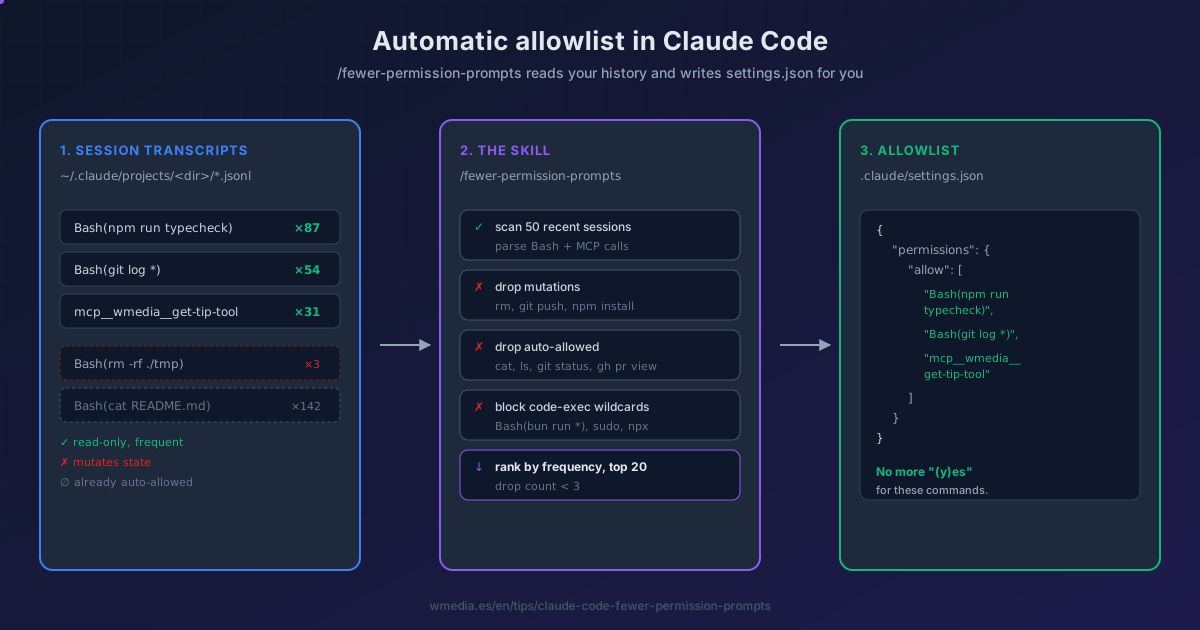
If you don't use auto mode but you're sick of approving npm run typecheck for the hundredth time, this skill is your shortcut. Anthropic shipped it specifically for people who keep the 6 permission modes and the manual friction, but want out of the daily approval fatigue.
How it works internally
When you run /fewer-permission-prompts, Claude Code:
- Finds your transcripts at
~/.claude/projects/<dir>/*.jsonl(capped at the 50 most-recent sessions). - Extracts every Bash and MCP call, groups by command + first subcommand:
git log,gh pr view,mcp__slack__read_thread. - Filters down to pure read-only: drops
rm,git push,npm install, builds with side effects. - Drops what Claude Code already auto-allows without an allowlist entry (
cat,ls,git status,gh pr view,docker logs...). - Blocks dangerous wildcards:
Bash(python3:*),Bash(bun run *),sudo, interpreters and shells — anything that grants arbitrary code execution. - Ranks by frequency, drops anything appearing fewer than 3 times, shows you the top 20.
The result
| # | Pattern                          | Count | Notes                |
|---|----------------------------------|-------|----------------------|
| 1 | Bash(npm run typecheck)          | 87    | type-check loops     |
| 2 | Bash(git log *)                  | 54    | history exploration  |
| 3 | mcp__wmedia__get-tip-tool        | 31    | tip lookups          |
And your project's .claude/settings.json ends up like this (preserving anything that was already there):
{
  "permissions": {
    "allow": [
      "Bash(npm run typecheck)",
      "Bash(git log *)",
      "mcp__wmedia__get-tip-tool"
    ]
  }
}
How to invoke it
/fewer-permission-prompts
It's a built-in skill in Claude Code (v2.1+). No install, no setup. It generates the table, explains what it added and what it skipped, and writes to the current project's .claude/settings.json — not to the global ~/.claude/settings.json, not to .claude/settings.local.json.
If the skill seems to "miss" commands you run daily (ls, cat, git status, gh pr view...), that's a good sign: those are already auto-allowed without needing an allowlist entry. And if a command already on the list prompts again, check whether Claude chained it with another: each part of a && needs its own rule.
Allowlist patterns you'll see
| Form | When it's used |
|---|---|
Bash(foo) |
Exact match, one specific invocation |
Bash(foo *) |
Prefix + space: matches foo, foo bar, foo --opt |
Bash(foo*) |
No space: careful, Bash(ls*) also matches lsof |
mcp__server__tool |
Full MCP tool name, no wildcards |
The sibling command on the same data
If you like this "read my transcripts, suggest config" pattern, there's a cousin: /insights. It reads the same .jsonl files but instead of building an allowlist it generates an HTML report with friction points and CLAUDE.md rules pulled from your most-repeated instructions. Worth running both on a cadence: /fewer-permission-prompts for approval friction, /insights for comprehension friction.
The allowlist is the first of five steps to stop Claude Code asking for permission; the rest, in order, are in this guide.
Official docs: Configure permissions