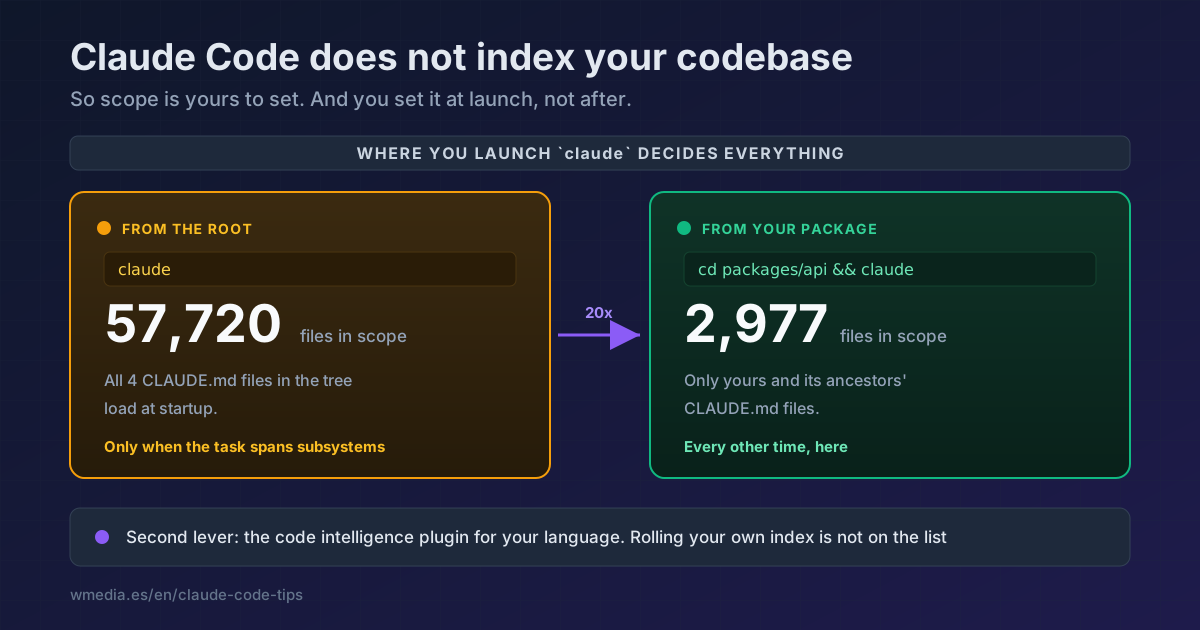
TL;DR It does not index, and you do not need to bolt a search MCP onto it. With no index, scope is yours to set, and you set it at launch: run
claudefrom the subdirectory you are actually working in, not from the repo root. On one monorepo of mine that takes the scope from 57,720 files to 2,977. Second lever, the code intelligence plugin for your language. And if your repo is small, you have nothing to do.
Almost nobody arrives at this question out of curiosity. They arrive with a decision pending. You can see it in what people search right after:
Claude Code semantic search
Code-index-MCP
Claude Code context
Which really means: am I missing something? do I need to plug an index into this?
The short answer is no. The long one is that there are two things you should do, and neither is that.
No, and it is deliberate
The first question in Anthropic's FAQ is exactly this:
"Does Claude Code index my entire codebase or use a vector database to store information about my codebase?" "No. Claude Code has access to a system prompt and a series of tools that it can use to navigate your codebase on command. For example, if Claude Code needs to understand something about your codebase, it will use a search tool to search through your codebase and read files on command."
You can check it without taking anyone's word for it:
find ~/.claude -maxdepth 3 \
  \( -iname "*index*" -o -iname "*embed*" -o -iname "*vector*" \
     -o -iname "*.db" -o -iname "*.faiss" \) 2>/dev/null
One sessions-index.json comes back, and it indexes your conversations, not your code: sessionId, firstPrompt, summary. Not one symbol. (What you will find deeper is ~/.claude/projects/<project>/memory/, which are the notes Claude writes for itself, not an index.)
What you get instead is three tools: Glob finds files by name, Grep searches inside contents, and Read opens them. The first two are the same ripgrep, which Claude Code ships bundled.
What that saves you: no wait when you open the project, and never an answer pulled from an index three commits out of date. What it costs: every session starts blind, and locating something costs reads, and reads cost context.
Everything else follows from that. If there is no index, scope is yours to set.
Move 1: launch where you work, not at the root
It is free, it is instant, and it moves the needle more than anything else here.
The directory you launch claude from decides three things at once: which files it can read and edit without asking you, which CLAUDE.md files load at startup, and which .claude/settings.json applies.
On a work monorepo of mine, measured:
claude                        # from the root
# scope: 57,720 files

cd <the-package-i-touch> && claude
# scope: 2,977 files
Twenty times less surface to crawl, with nothing installed. And of the four CLAUDE.md files scattered through that tree, only your package's and its ancestors' load, instead of quietly picking up ones from teams whose code you never open.
The price, and it is a real one: from there Claude cannot reach sibling packages. When a task does cross them:
claude --add-dir ../shared
Or make it permanent in that package's .claude/settings.json:
{ "permissions": { "additionalDirectories": ["../shared"] } }
The working rule: launch at the root only when the task genuinely spans subsystems. The rest of the time, scoped.
Move 2: switch on the language server
The second biggest, and for the same reason. Without a language server, asking where a function is defined sends the answer through grep: you get every textual match (comments, strings, similar names) and Claude opens several files to disambiguate. With LSP, goToDefinition returns one semantically resolved location. The disambiguation reads disappear, and those are the expensive ones.
/plugin install typescript-lsp@claude-plugins-official
There are official plugins for Python, Rust, Go, Java, PHP and eight more. Careful though: the plugin does not install the language server. If you get Executable not found in $PATH you are missing the binary, and that is covered in full in why your LSP plugin won't start. And once it is on, it pays to know which files the diagnostics report covers and which it doesn't.
And no, do not build yourself an index
The docs do mention the route, but read the wording slowly, because it is conditional rather than a recommendation: "if your organization already runs a code search or RAG index over the repository, expose it as an MCP tool".
Meaning: if you already have one running and maintained for other reasons, plug it in. Building one just for Claude means taking on the work Anthropic decided not to do, and it hands back the problem you did not have, which is keeping it fresh. The two moves above never go stale.
If noise still bothers you
In order of how much you feel it:
| Setting | Where | What it cuts |
|---|---|---|
permissions.deny with Read(...) |
.claude/settings.json |
Opening vendored or generated code that is committed |
claudeMdExcludes |
.claude/settings.local.json |
Loading other teams' CLAUDE.md when you launch at the root |
worktree.sparsePaths |
.claude/settings.json |
Checking out the whole tree into every worktree |
CLAUDE_CODE_GLOB_NO_IGNORE=false |
Environment variable | Results from vendor/ and node_modules/ (see below) |
That last one deserves an explanation, because the asymmetry behind it makes sense to nobody: Grep respects your .gitignore and Glob does not. The odd part is that they are the same engine. In the 2.1.220 binary, Glob is built like this:
Yt(process.env.CLAUDE_CODE_GLOB_NO_IGNORE || "true")  // defaults to true
Yt(process.env.CLAUDE_CODE_GLOB_HIDDEN    || "true")  // defaults to true

["--files", "--glob", pattern, "--sort=modified",
  ...noIgnore ? ["--no-ignore"] : [],
  ...hidden   ? ["--hidden"]    : []]
It runs literally rg --files --no-ignore --hidden. Which is why searching **/*Controller* in my Laravel app makes Glob hand back vendor/orchestra/... while Grep gives you your own app/Http/Controllers/.... That second variable, CLAUDE_CODE_GLOB_HIDDEN, appears on no page of the documentation.
Official docs: Monorepos and large codebases · Tools reference

