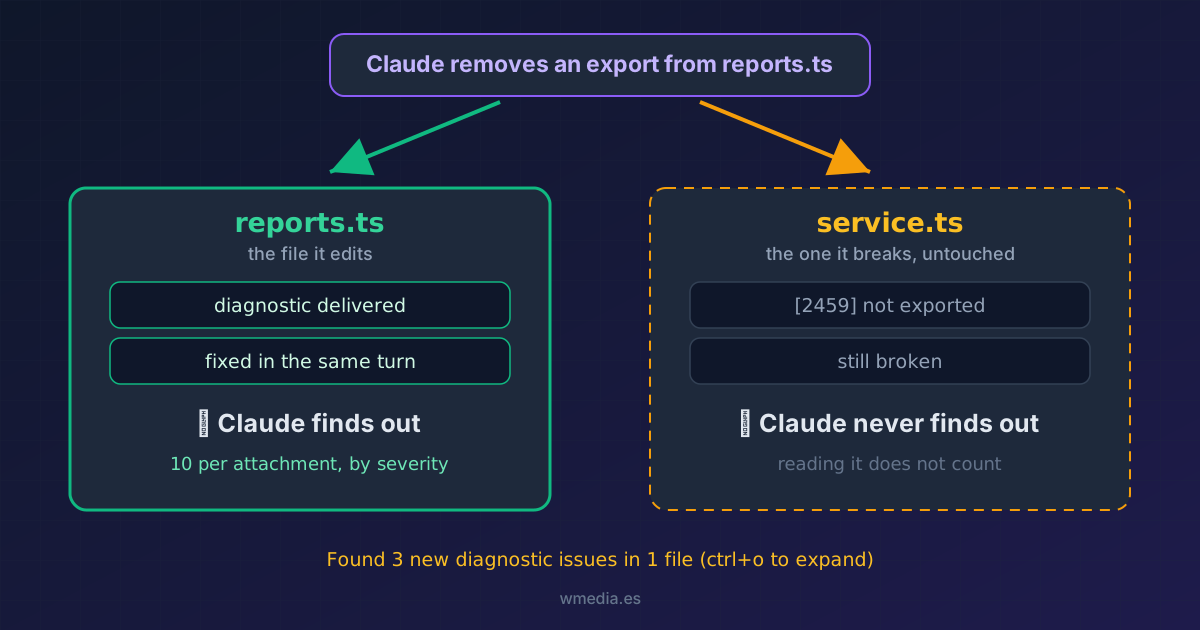
TL;DR That line is not a notice for you, it is an attachment for Claude. Your language server publishes the errors and Claude Code injects them on the next turn, which is why it fixes a broken type without ever running
tsc. It only covers the files Claude has edited. I tested it by breaking an export: the file consuming it stayed silent until Claude touched it. After you change a signature or an export, run your owntsc --noEmitor ask Claude to open the consumers. That line is not your build.
Claude edits a file and this shows up:
⎿ Found 3 new diagnostic issues in 1 file (ctrl+o to expand)
Press Ctrl+O and the detail unfolds:
service.ts:
  ✘ [Line 1:10] Module '"./reports"' declares 'scoreFor' locally, but it is not exported. [2459] (typescript)
You get it because you have a code intelligence plugin installed (typescript-lsp, pyright-lsp, rust-analyzer-lsp). If it never shows up, you don't have it switched on: that's the other tip.
What is actually happening
The language server isn't talking to you. It publishes diagnostics, Claude Code collects them and attaches them to the next turn inside a block Claude reads like any other content:
<new-diagnostics>The following new diagnostic issues were detected:

service.ts:
  ✘ [Line 1:10] Module '"./reports"' declares 'scoreFor' locally, but it is not exported. [2459] (typescript)</new-diagnostics>
That is where the behavior you've already seen comes from: it introduces a broken import and fixes it in the same thread, without dumping compiler output into your context. The line on screen is just the collapsed summary of that attachment.
Which files make the cut
I set up two files to measure it, reports.ts exporting scoreFor and service.ts importing it, then removed the export:
| What Claude did | What got reported |
|---|---|
Edited reports.ts (broke the export) |
only reports.ts, and only a minor hint |
Read service.ts, already broken |
nothing |
Edited service.ts |
there it is: [2459] declares 'scoreFor' locally, but it is not exported |
Reading a file doesn't count. Only files Claude edits make the cut. The consumer you just broke stays quiet until Claude touches it for some other reason, and if it never does, the error never surfaces at all.
So the attachment is a good detector of local mistakes and a poor detector of regressions. A refactor that changes a public signature breaks files Claude is never going to open, and not one of them will appear on that line.
The limits of the attachment
Before being sent, diagnostics are sorted by severity and trimmed: on this path, 10 per file and 30 in total per attachment. Whatever doesn't fit is left out of that delivery, silently, from you and from Claude.
I measured it with a file holding 15 identical type errors. The first attachment carried lines 1 to 10 and the remaining five were left out, with nothing in the block to say anything was missing. Those five turned up later, in a subsequent attachment, once the server published again. The trim doesn't erase anything permanently, but it does mean what Claude has in front of it on a given turn can be part of the problem with nothing to flag it.
| Severity | Trim order |
|---|---|
| Error | 1, always survives |
| Warning | 2 |
| Info | 3 |
| Hint | 4, first to go |
The ordering works in your favor: errors survive the trim and hints are what gets left behind. Even so, in a file with 40 errors Claude sees at most 10 per turn and responds to those. Errors carry ✘ and hints carry ★, so one glance tells you whether the attachment is real work or noise.
An unfixed error comes back
Claude Code tracks what it has already delivered so it doesn't repeat itself, but that memory is cleared per file every time the file is edited. In practice: if Claude edits service.ts, ignores the error and edits service.ts again, the same error is delivered again. It isn't lost just because it was shown once.
What to do with this
- After changing a signature or an export, don't sign the change off on the diagnostics line. Run
tsc --noEmit(or your build), or ask Claude to open and edit the consumers. - When the line appears, press Ctrl+O before letting it move on. Reading the exact
[Line L:C]takes two seconds and tells you whether it is fixing what you think it is. - In monorepos, treat unresolved imports with suspicion. The official docs warn that language servers report them as false positives when the workspace isn't configured correctly.
Reference
| Element | What it means |
|---|---|
Found N new diagnostic issues in M files |
Collapsed summary of the attachment Claude will receive |
| Ctrl+O | Expands the detail on screen |
[Line 15:10] |
Line and column, 1-based |
[2459] |
Diagnostic code, straight from the language server |
(typescript) |
Which server reported it |
| Files included | Only the ones Claude has edited this session |
| Cap | 10 per file and 30 total per attachment, by severity (LSP plugin path) |
With the VS Code or JetBrains extension connected there is a second path feeding that same line, with its own internal logic and a different limit: a character budget on the block rather than a count of diagnostics. Everything above is the LSP plugin path, the one that works in a plain terminal.
The underlying reason is the usual one: Claude Code does not index your codebase, so everything it knows about types and symbols arrives through here or not at all.
Official docs: Code intelligence

