TL;DR Open
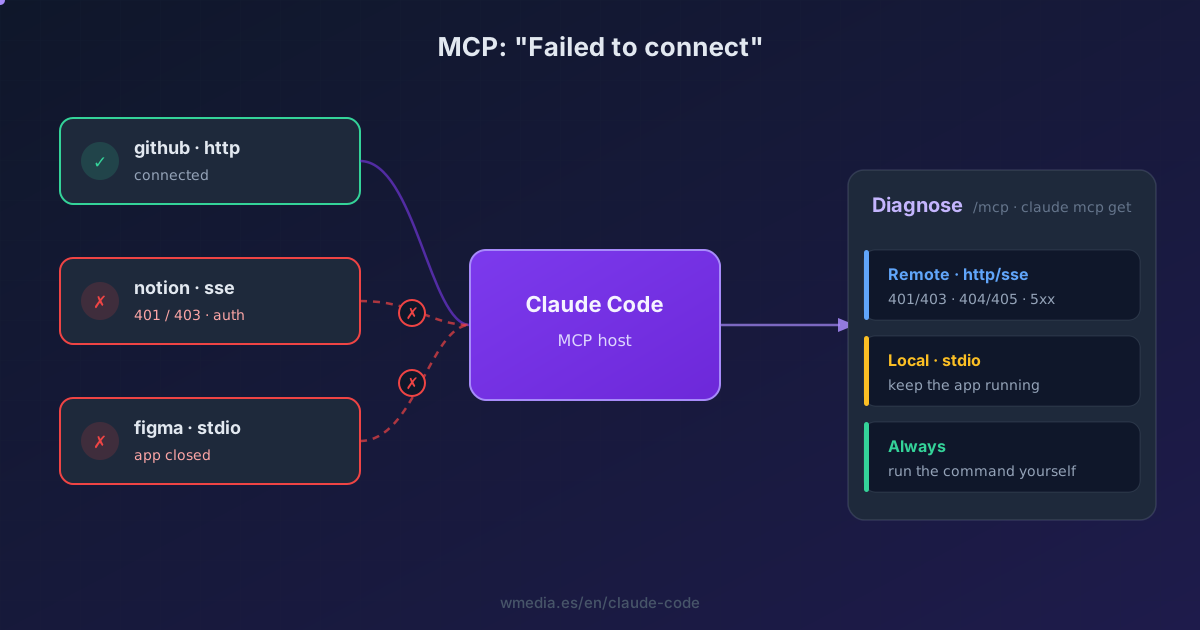
/mcpto see which server failed. If it's remote (http/sse), the pattern tells you everything: 401/403 is expired auth (re-authenticate from/mcp), 404/405 means the server is alive but the URL is wrong, and 5xx or timeout is transient and Claude retries on its own (3 times at startup, 5 mid-session). If it's local (stdio), it won't reconnect by itself: the app behind it (Figma, Chrome) has to be open. And the move that closes the case: if it says "Connection closed" instantly, run the server's command yourself in the shell and read the real error.
You keep wiring up more MCP servers, and sooner or later one goes red with a terse "Failed to connect". The message tells you nothing, so you start poking at the config blind. It's almost never your config: it's one of three things, and you can tell them apart in thirty seconds.
The key is that Claude Code behaves differently per transport. A remote server (HTTP/SSE) reconnects on its own with retries; a local one (stdio) is a process on your machine and never reconnects by itself. And auth or "not found" errors aren't retried at all: they need you to change something.
First: who failed, and why
> /mcp

  figma            ✓ connected    8 tools
  notion           ✗ failed       (auth)
  chrome-devtools  ⏸ pending
Inside the session, /mcp shows each server's status and tool count. From the terminal:
claude mcp list          # status of all of them
claude mcp get notion    # detail of one (shows ⏸ Pending approval / ✗ Rejected)
The decision tree
1. Remote (http/sse)? Read the failure pattern
- 401 / 403 → it's auth. The token expired or you never authenticated. This is the classic for enterprise MCP servers behind SSO or IAM: they expire on a schedule and you have to re-authenticate from
/mcp(or from the terminal withclaude mcp login, so it never interrupts you mid-session). Claude Code does not retry auth errors, so waiting won't fix it. - 404 / 405 → the server is alive, the URL isn't. It does respond, so this isn't a network problem; check the endpoint path you passed to
claude mcp add. - 5xx, connection refused, or timeout → transient. Claude retries with backoff: up to 3 times at startup (since v2.1.121) and up to 5 if it drops mid-session. If it's still
failedafter that, the server is down or the network is in the way; retry manually from/mcp.
2. Local (stdio)? The process has to be alive
Stdio servers are processes on your machine, and Claude Code does not reconnect them automatically. Two causes:
- The app behind it closed. The Figma MCP and the Chrome one depend on their app being open and running. Close the app and the MCP dies. Reopen it and reconnect from
/mcp. - "Connection closed" right at startup. The server command never even runs.
3. The universal move: run the command yourself
Grab the server's exact command (you can see it with claude mcp get <name>) and run it in your shell. If it fails there, that's your real error (a missing binary, a bad argument, an unset environment variable), and it has nothing to do with Claude Code.
# if this blows up in your terminal, there's your problem
npx -y @your/mcp-server
Two stdio classics: on Windows, npx needs the cmd /c wrapper (claude mcp add --transport stdio my-server -- cmd /c npx -y @package); and if the server writes logs to stdout, it corrupts the protocol stream (logs must go to stderr).
Quick reference
Signal in /mcp |
What it means | What you do |
|---|---|---|
✗ failed + 401/403 |
Expired auth (typical enterprise SSO/IAM) | Re-authenticate from /mcp |
✗ failed + 404/405 |
The server responds, the URL is wrong | Check the URL in claude mcp add |
✗ failed + 5xx/timeout |
Transient | Claude retries (3 at startup, 5 mid-session); then manually |
⏸ pending |
Reconnecting, or awaiting approval | Wait, or approve by running claude |
| stdio down | The process or app closed; no auto-reconnect | Open the app (Figma, Chrome) and reconnect |
| "Connection closed" instantly | The command doesn't start | Run it yourself in the shell and read the error |
| Transport | Reconnects on its own? |
|---|---|
| HTTP / SSE | Yes, with backoff. Auth and 404 are NOT retried |
| stdio (local) | No, never: restart it manually |
To wire up and organize many servers without eating your context, see MCP in Claude Code. And before adding a new one, only connect servers you trust: an MCP that pulls in external content can smuggle instructions into your session.
Official docs: Connect Claude Code to tools via MCP
Requirements
- The initial-connection retry (3 attempts on transient errors) lands in Claude Code v2.1.121. Mid-session reconnection and the per-transport behavior apply on recent versions.