TL;DR
/teleport(or/tp) pulls a session that was running in the cloud down into your terminal, branch and full history included. It doesn't sync it: from that point the terminal holds its own copy and nothing you do goes back to claude.ai. Don't mix it up with--remote-control, which does the opposite: it leaves your code on your machine and opens a window for your phone.
Run claude --help and look. That's 234 lines of output. --remote-control is there. So are --resume and --continue. --teleport is not. Neither is --cloud.
The two flags that move work between your machine and the cloud are registered with hideHelp(), so the only one of the family that --help shows you is the one that does the opposite of what you were probably after. That's where half the confusion comes from.
Same argument, opposite outcomes
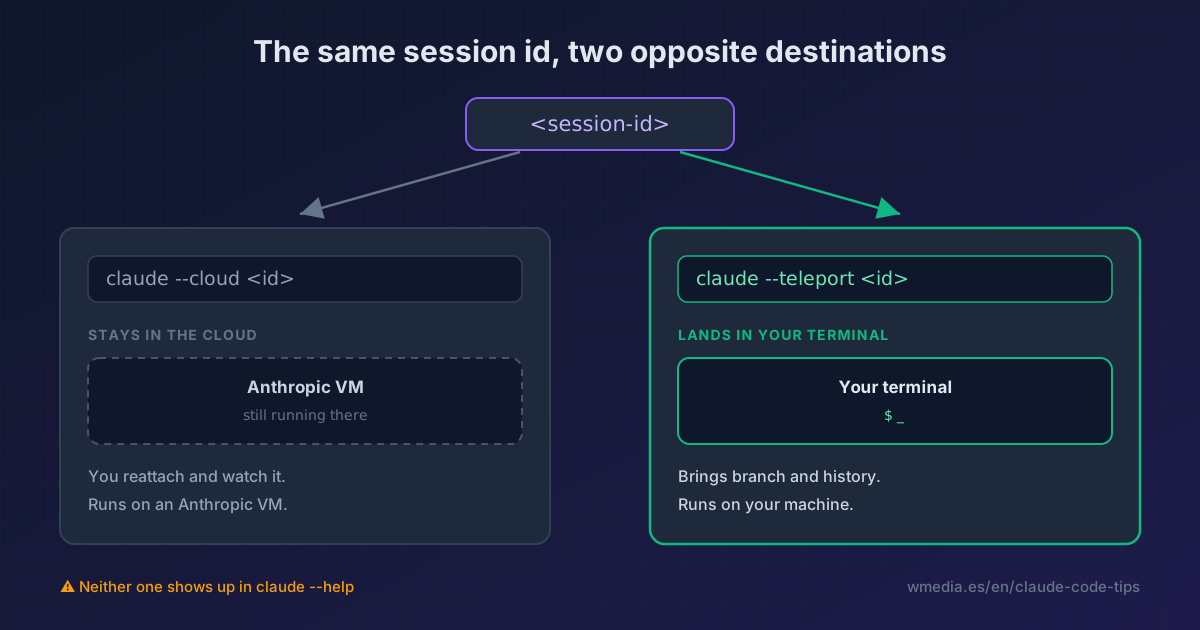
This is the part that really trips people. --cloud and --teleport both accept a session ID, and given the same ID they do contrary things. These descriptions come straight from the binary's flag registration:
--teleport [session]                  Resume a teleport session, optionally specify session ID
--cloud [description|session_id|url]  Create a cloud session with the given description,
                                      or attach to an existing one by session ID or claude.ai/code URL
| Command | Where Claude executes | Where the session ends up |
|---|---|---|
claude --cloud "task" |
An Anthropic VM | A new cloud session is born |
claude --cloud <session-id> |
An Anthropic VM | You reattach to a running one. It stays in the cloud |
claude --teleport <session-id> |
Your machine | You pull it down to your terminal. It stops living in the cloud |
claude --remote-control |
Your machine | Nothing moves. A window opens from outside |
Teleport relocates the session. --cloud <id> merely looks in on it. Remote Control exposes your local one. And --remote, which you'll still see in tutorials from a few months ago, is none of the three: the binary treats it as the same option as --cloud, so it's the old spelling, deprecated but alive. One hyphenated word between --remote and --remote-control, opposite behaviors.
See it yourself:
claude --help | grep -c -- "--teleport"        # 0
claude --help | grep -c -- "--cloud"           # 0
claude --help | grep -c -- "--remote-control"  # 2
Four ways to pull a session down
# Interactive picker across your cloud sessions
claude --teleport

# Straight to a specific one
claude --teleport <session-id>
From inside a session that's already open, without restarting Claude Code:
/teleport
And from the task panel, which is the easiest route if you were already watching it run: /tasks, land on the session, press t. The fourth is the Open in CLI button in the web interface, which hands you the assembled command to paste.
On arrival, Claude checks you're in the right repository, fetches the session's branch, and loads the entire conversation. You don't start over: you pick the thread up where it was.
The part almost everyone misses
Teleporting is not syncing. The terminal keeps its own copy. Everything you do from then on stays local and stops showing up on claude.ai or in the mobile app. The cloud session freezes at the moment you pulled it.
So if the plan was to keep steering from your phone, teleport isn't the tool: teleport first, then start /remote-control in the local session. They compose, in that order. And if your worry runs the other way (leaving it in the cloud precisely so you can close the laptop), that table lives in can you close your laptop while Claude Code is working?
Since v2.1.314 /teleport also goes the other way: its menu adds Continue this session in the cloud, with a catch I cover in moving a session to the cloud.
The four requirements it checks first
| Requirement | What happens otherwise |
|---|---|
| Clean working tree | It offers to stash your changes before continuing |
| Same repository | It must be a checkout of the same repo, not a fork |
| Branch pushed | The cloud session's branch has to exist on the remote. It fetches and checks out |
| Same account | You must be signed in to the claude.ai account that created the session |
When the command simply isn't there
In the binary, /teleport is declared with an isHidden that kicks in when the remote-sessions gate is missing or you aren't on a claude.ai account. So it doesn't fail with an error: it hides from the menu, and you're left hunting for a command your install won't offer you.
The three cases and what they print:
- On an API key:
Unable to get organization UUID. Run/loginand sign in with your claude.ai account. - On Bedrock, Vertex, or Foundry:
Cloud sessions aren't available with <provider>. Cloud sessions run on Anthropic infrastructure, so there's no way through. - Errors that talk about Remote Control:
Remote Control session expiredorAccess deniedwhile you were teleporting. You didn't pick the wrong command. Teleport travels over the same session plumbing as Remote Control, so it inherits its error vocabulary. Run/loginand retry.
If you're on a claude.ai account and it's still missing, your organization has cloud sessions turned off.
Reference
| Command | What it does |
|---|---|
claude --teleport |
Picker of cloud sessions to pull down |
claude --teleport <session-id> |
Pull one specific session |
/teleport or /tp |
Same, from inside an open session |
/tasks then press t |
Teleport from the task panel |
claude --cloud "task" |
The opposite: creates a cloud session |
claude --cloud <session-id> |
Reattaches to a cloud session without pulling it down |
claude --remote-control or --rc |
Neither: exposes your local session |
Two limits that will save you an error message: --cloud can't be combined with --print (cloud sessions are interactive, full stop), and --teleport can't be combined with other remote backends, because both pick where the session lives and only one can win.
One more distinction worth holding on to: --teleport is not --resume. --resume reopens a conversation from this machine's local history and lists nothing from the cloud. --teleport pulls a cloud session along with its branch.
If you haven't set up the upstream half of this yet, start with cloud sessions, which is where the sessions you'll be pulling down get created.
To launch a cloud session already filled without the menu, you can also build the URL with query params.
Official docs: Claude Code on the web
Requirements
- Pro, Max, Team, or Enterprise subscription. API keys won't do
- claude.ai account authentication (
/login), notANTHROPIC_API_KEY - Not available on Amazon Bedrock, Google Cloud Agent Platform, or Microsoft Foundry
- Verified on Claude Code v2.1.223

