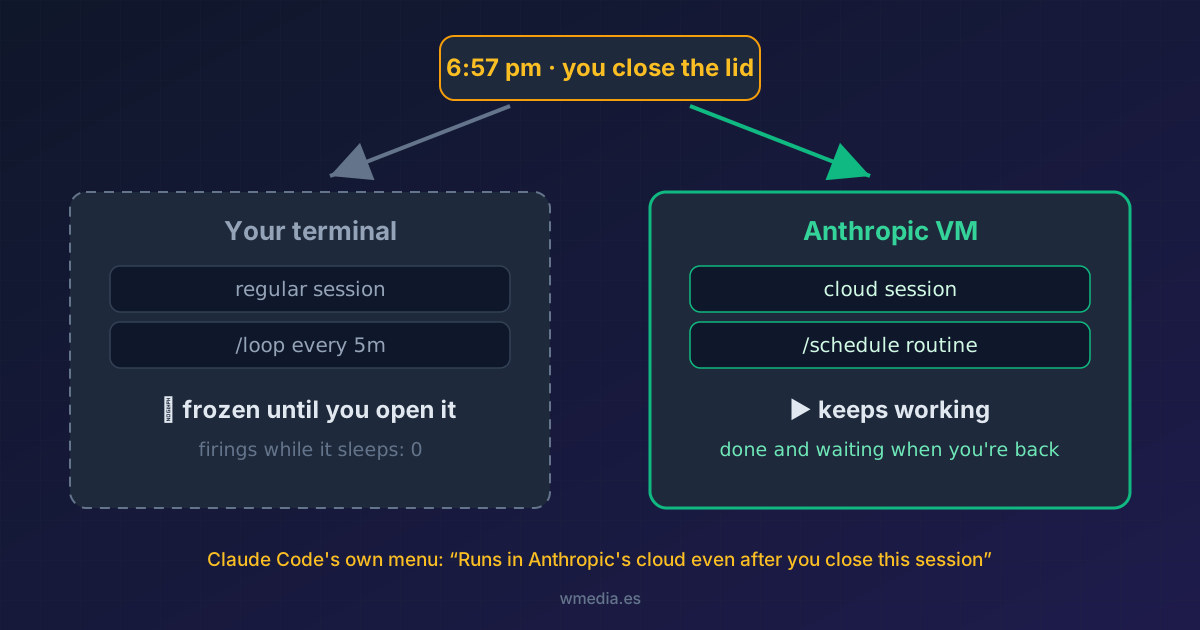
TL;DR Closing the lid doesn't kill every session equally. Whatever runs in your terminal (the regular session,
/loop) freezes until you open it again; whatever runs in the cloud (/schedule, cloud sessions) keeps working on an Anthropic VM as if nothing happened. Claude Code spells out the difference in a two-option menu almost nobody reads.
It's 6:57 pm, you've asked Claude Code to migrate two hundred tests, and your train leaves in twenty minutes. The question you're asking with your hand on the lid is the same one people type into Google: can I close the laptop, or does that kill the work?
The short answer is that it depends on where the session lives. The long answer is that Claude Code has the full explanation written inside it, literally.
Where each thing lives
| What you launched | Where it runs | You close the lid | You close the session |
|---|---|---|---|
| Regular terminal session | Your machine | Freezes until you open it | Dies |
/loop every 5m ... |
Your machine | No firings while it sleeps | Dies |
/remote-control |
Your machine | Freezes all the same | Dies |
| Local Desktop scheduled task (its 3 failures) | Your machine | Skipped; one catch-up run on wake | Doesn't depend on a session |
| Cloud session (the cloud sessions tip) | Anthropic VM | Keeps working | Keeps working |
/schedule routine |
Anthropic VM | Keeps firing | Keeps firing |
The treacherous row is Remote Control. It sounds like "I control Claude from outside, so Claude lives outside", but the binary itself tells you otherwise when you start it: "The session keeps running on this machine". Your phone is a remote; the code and the process stay on the laptop you're about to close. If that mix-up sounds familiar, teleport and remote control run in exactly opposite directions.
Claude Code already warns you (in a menu almost nobody reads)
When you create a loop, Claude Code ends the confirmation with this line in italics:
Runs until you close this session · For durable cloud-based loops, use /schedule
And if the interval is an hour or more, or your phrasing sounds like a daily routine ("every morning", "daily"), it goes beyond a warning: it puts up a two-option menu where the answer to this tip comes pre-written by Anthropic:
This loop stops when you close this session.
Set it up as a cloud schedule instead so it keeps running?

❯ Cloud schedule (recommended)   Runs in Anthropic's cloud even after you close this session
  This session only              Runs in this terminal until you exit
It's all there: "runs in Anthropic's cloud even after you close this session". Both the warning line and the menu only show up when you're signed in to claude.ai (the same requirement that hides /teleport when you're not); without an account, the cloud half of this story doesn't exist for you. /schedule routines are not cron jobs on your machine; each one spins up an isolated session in Anthropic's cloud, which makes your laptop irrelevant. If you still mix up the three mechanisms, this tip untangles /schedule, /loop and cron.
What to do before closing the lid
- A one-off task that can't wait: send it to a cloud session and close in peace. From claude.ai/code or the app, or with
claude --cloud "migrate the tests"from your terminal. If it's already underway in a local session, move that session to the cloud instead of starting over; from the terminal, push first, because unpushed work stays on the laptop. - Recurring work: turn it into a routine with
/scheduleand pick the cloud option. This is exactly the case it exists for. - When you're back: if you want to pick up where the cloud left off,
/teleportpulls the session down into your terminal, branch and history included.
To have a cloud session start with your dependencies already installed, give it a cloud environment from Claude Code Desktop.
The nuance about the lid
Closing the lid is not shutting down. On a Mac, the local session suspends with the system: open it and it's still there, at the same point. What doesn't exist is the work in between: a /loop firing every 5 minutes fired exactly zero times while the machine slept. Actually killing a local session takes closing the terminal or shutting down; making it immune to all of this takes never having lived on your machine in the first place.
The same goes for the usage-limit wait: if the laptop sleeps for more than 30 minutes and the limit resets meanwhile, Claude Code asks you to press Enter to continue when you open it; after a shorter sleep it carries on by itself.
Quick reference
| I want | Command |
|---|---|
| A task that survives the lid | claude --cloud "task" or create it at claude.ai/code |
| A loop that survives the lid | /schedule → Cloud schedule (recommended) |
| A loop for as long as the terminal stays open | /loop <interval> <task> (how it works) |
| Drive the local session from my phone (without closing the lid) | /remote-control (the tip) |
| Get a phone alert when it finishes or stops to ask me something | Both push toggles (the tip) |
| Pull the cloud session down when I'm back | /teleport or /tasks and press t |