TL;DR The command is
/artifact-diagramming, and the part nobody tells you is that it takes text after it. On its own it loads the guide and stops there. With the job on the same line you hand over the manual and the work at once, and you stop getting boxes with names in them. No mermaid MCP server needed: it hand-draws SVG inside the artifact.
Anthropic put it in writing: a Markdown file over 100 lines doesn't get read, it gets skimmed. That's why artifacts exist. But an artifact is still almost entirely text, and the one thing on that page nobody skims is the drawing.
Since 4 August there's a new skill that handles the drawing. It arrived through the back door.
It exists, and nobody announced it
I found it by diffing binaries: it's absent from 2.1.220 and present in 2.1.221. It's not in that version's changelog, and it's not in the official artifacts docs either, which do document its sibling artifact-design. The only place it surfaces is the command menu:
/artifacts             Browse your published and shared artifacts
/artifact-design       Design guidance and fundamentals for Artifacts.
/artifact-diagramming  Diagramming know-how for Artifacts, when a picture
                       earns its place, how to draw one that shows the real
                       mechanism, and the inline-SVG mechanics that keep it
                       legible in both themes.
One detail matters: outside the workshop lane, nothing forces Claude to load it. That's its call. When the diagram is the main event it loads on its own; when it's one detail inside a bigger task, it competes for attention with everything else.
What it actually teaches
The thesis is in the first line, and it's more opinionated than I expected:
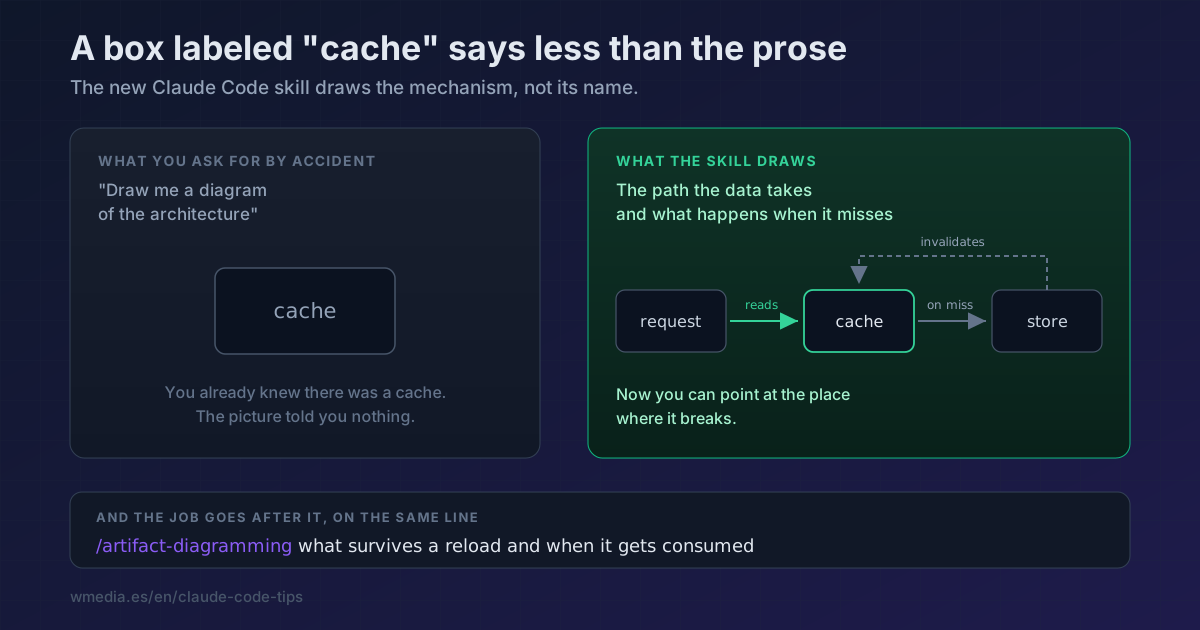
A box labeled
cachesays less than the prose. The path a request takes through it, the two stores it sits between, and the arrow that disappears when the cache is removed say what the words can't.
Everything else follows from that:
| Rule | What it means in practice |
|---|---|
| Draw the mechanism, not its name | Show what the argument hinges on: the boundary being crossed, the hop being added, the data that moves |
| Comparing options? Draw the difference | A separate box per option with nothing connecting them to the system isn't a comparison, it's a restated list |
| Label the arrows | An unlabeled arrow means "related somehow". writes, invalidates, polls every 30s is information |
| Match complexity to the stakes | A one-hop question is three boxes. A migration that reroutes writes through a queue needs the queue, the writer, the reader and the ordering arrow |
| One figure, one claim | <figure> with a <figcaption> stating what the picture shows, plus role="img" and an aria-label carrying the same claim |
And the closing line, my favourite: if a sentence says it faster, write the sentence.
How to ask for it (this is the trick)
/artifact-diagramming on its own draws nothing. It's a prompt command: it drops the guide's forty lines into context and that's that. You load the manual and sit looking at it.
What works is typing the job right after it, on the same line:
> /artifact-diagramming the regeneration flow when the note comes back empty:
  what goes into sessionStorage, what survives a reload, and the moment it
  gets consumed
Your text travels in a <command-args> block alongside the guide, so both land together. And there's no way to guess this works: the skill declares no argumentHint, so the menu never hints that anything fits behind it.
One note on wording the request: say what decision the drawing has to settle, not what thing it should show. "A diagram of the architecture" gets you the org chart. "What survives a reload and when it gets consumed" gets you the mechanism.
No, you don't need the mermaid MCP server
Half the internet is building MCP servers and third-party skills to preview mermaid with Claude. Inside an artifact you don't need any of it: mermaid renders natively, through ```mermaid fences on Markdown pages and <pre class="mermaid"> blocks on HTML ones.
But on HTML pages the skill pushes elsewhere: inline SVG hand-authored with native shapes (rect, circle, line, path) and <text>, no libraries and no runtime. Its own viewBox, currentColor on strokes and text so it survives light and dark themes, and one literal hue reserved for the element that carries the meaning. The official docs push the same way for a different reason: SVG over raster images because data URIs are the expensive part of the token bill.
No <script>, <style> or <foreignObject> inside the SVG, and internal references (<use>, gradients, patterns) pointing at ids in the same fragment.
When not to ask for one
When the answer fits in a sentence. The skill says so itself, and it's the rule people break most: a diagram earns its place when it lets a cold reader see a mechanism they'd otherwise have to assemble from prose. Anything else is expensive decoration.
This pairs with sculpting an artifact until you understand the change before delegating it: the diagram is the moment you find out whether you understood it or not. And if what you want is the whole page to stop looking AI-made, that's the frontend-design skill and /artifact-design.
Requirements
- Claude Code 2.1.221 or later (
claude --version). On 2.1.220 the skill doesn't exist. - Artifacts available: Pro, Max, Team or Enterprise plan, a session signed in with
/loginon claude.ai, and the Anthropic API only. Full details in the artifacts tip.
Official docs: Share session output as artifacts. The diagramming skill isn't documented there yet.