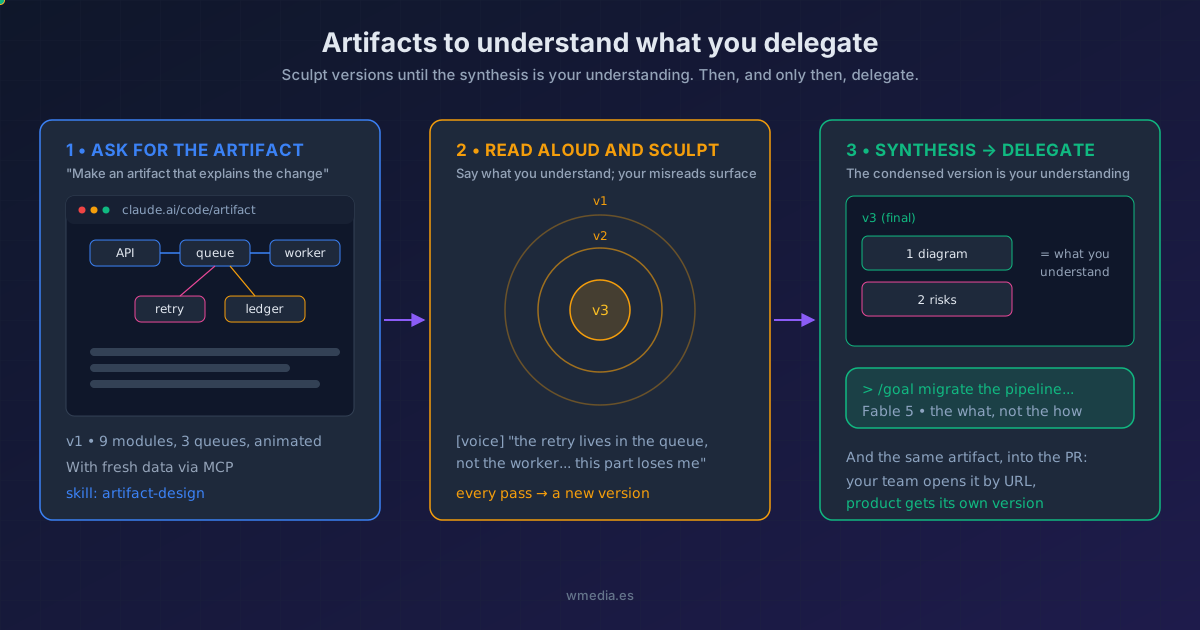
TL;DR Before I delegate anything serious to Fable, I ask for a visual artifact of the surface I'm about to touch. I read it aloud, tell Claude what I understand, and wherever my reading fails, a new version comes out. Carving and sculpting, version after version, what remains is a condensed synthesis that is exactly what I understood. There, and not before, I delegate. It's the visual version of my concentric circles, with the
artifact-designskill as the chisel.
The Fable 5 doctrine is written into the official docs: "Describe the outcome, not the steps." Give it the result, not the path. No reminders to test, no twenty-page specs; spec-driven development is starting to look like a relic (the same principle behind asking for the task list instead of handing one over, taken to its conclusion when Anthropic took that list away from the model). But that doctrine hides a trap: you can only describe the outcome of something you understand. The cost of writing code has collapsed; the cost of understanding it has not. And don't delegate what you don't understand.
The method: concentric circles, made visual
In concentric circles I read the code aloud and every pass halves the area. This is the same loop, but the material isn't code: it's a visual artifact Claude sculpts with me.
1. Scope the surface. In conversation with Fable, I ask questions and let it show me the terrain: which modules the change touches, what depends on what, where the risk lives.
2. Ask for the artifact. "Make an artifact that explains this change." Out comes a live web page with the flow drawn out, animations where they help, even fresh data through MCP connectors when needed.
3. Read it aloud. Instead of a PR or a repository, I read the artifact and tell Claude what I understand. Honestly: the errors in my understanding surface on their own.
4. Sculpt. Every correction produces a new version. Carving away what's noise, sharpening what confuses. The artifact keeps every version; the conversation keeps my progress. And when I pick it up the next day in a new session, /artifacts takes me back to the same link instead of creating another one.
5. The synthesis is your green light. The final condensed version is literally what I understood. With that I can describe the outcome, which is all Fable needs. If the task is long, I release it with /goal and walk away.
Result (an illustrative pass through the loop):
> We're migrating the billing pipeline. Before touching anything,
  make an artifact that explains how a charge flows today.

✓ https://claude.ai/code/artifact/8a21...  (v1: 9 modules, 3 queues)

> [voice] OK, reading the diagram... the retry lives in the queue,
  not the worker. And this "ledger snapshot" thing, no idea.

✓ v2: my retry misread corrected, new section: what the snapshot
  is and when it gets written

> [voice] Now we're talking. Condense it: just the charge path and
  the 2 spots where it can double-charge.

✓ v3 (final): 1 diagram, 2 risks. This is what I understand.
> /goal Migrate the pipeline without duplicate charges...
The chisel: the artifact-design skill
Since v2.1.182, Claude Code loads a built-in skill, artifact-design, every time it builds an artifact (you can also invoke it on demand as /artifact-design). I have it in my own environment, and inside it's an art director with opinions: it calibrates the treatment to the piece (a report is not a landing page), honors your design system before choosing its own (declare it in CLAUDE.md and it applies it), and carries an explicit list of "AI-generated design" clichés it avoids. It's the reason these artifacts read at a glance instead of looking like a dump. When what you're sculpting is the diagram rather than the whole page, since August there's a sibling skill for exactly that: Claude Code diagrams. If you want that same judgment in your product's UIs, the frontend-design skill pushes the same way. And when what you want to sculpt is a screen rather than an explanation, /design publishes a canvas of editable artboards built on this same material.
The byproduct: the same piece convinces your team
Here's the method's parting gift: the artifact you used to understand is already the document that explains the change. Share it in the pull request or with the rest of the team as a link. Product folks, just as sharp but without the technical jargon? Same process, one more prompt: "create a product-audience version of this artifact." Your understanding, sculpted once, serves every audience.
Reference
| Piece | Role in the method |
|---|---|
| Artifacts | The material: the live page you sculpt (now on Pro and Max) |
artifact-design |
The chisel: automatic design judgment, invokable as /artifact-design |
artifact-diagramming |
The fine chisel: the drawing inside the artifact |
| Concentric circles | The parent method: same loop, reading code instead of visuals |
| Fable 5 | The destination: the model you delegate to once you understand |
/goal |
The trigger: a stop condition to release the long task |
Official docs: Share session output as artifacts · Work with Fable 5
Requirements
- Artifacts: Pro, Max, Team, or Enterprise plan, signed in with
/login(won't publish with an API key, Bedrock, or Vertex). - Claude Code v2.1.183+ (artifacts) and v2.1.182+ (the
artifact-designskill).